Serverless

Serverless without the wait

I once bought a five-minute rice cooker that spent four of those minutes warming up with a pathetic hum. It delivered the goods, eventually, but the promise felt… deceptive. For years, AWS Lambda felt like that gadget. It was the perfect kitchen tool for the odd jobs: a bit of glue code here, a light API there. It was the brilliant, quick-fire microwave of our architecture.

Then our little kitchen grew into a full-blown restaurant. Our “hot path”, the user checkout process, became the star dish on our menu. And our diners, quite rightly, expected it to be served hot and fast every time, not after a polite pause while the oven preheated. That polite pause was our cold start, and it was starting to leave a bad taste.

This isn’t a story about how we fell out of love with Lambda. We still adore it. This is the story of how we moved our main course to an industrial-grade, always-on stove. It’s about what we learned by obsessively timing every step of the process and why we still keep that trusty microwave around for the side dishes it cooks so perfectly. Because when your p95 latency needs to be boringly predictable, keeping the kitchen warm isn’t a preference; it’s a law of physics.

What forced us to remodel the kitchen

No single event pushed us over the edge. It was more of a slow-boiling frog situation, a gradual realization that our ambitions were outgrowing our tools. Three culprits conspired against our sub-300ms dream.

First, our traffic got moody. What used to be a predictable tide of requests evolved into sudden, sharp tsunamis during business hours. We needed a sea wall, not a bucket.

Second, our user expectations tightened. We set a rather tyrannical goal of a sub-300ms p95 for our checkout and search paths. Suddenly, the hundreds of milliseconds Lambda spent stretching and yawning before its first cup of coffee became a debt we couldn’t afford.

Finally, our engineers were getting tired. We found ourselves spending more time performing sacred rituals to appease the cold start gods, fiddling with layers, juggling provisioned concurrency, than we did shipping features our users actually cared about. When your mechanics spend more time warming up the engine than driving the car, you know something’s wrong.

The punchline isn’t that Lambda is “bad.” It’s that our requirements changed. When your performance target drops below the cost of a cold start plus dependency initialization, physics sends you a sternly worded letter.

Numbers don’t lie, but anecdotes do

We don’t ask you to trust our feelings. We ask you to trust the stopwatch. Replicate this experiment, adjust it for your own tech stack, and let the data do the talking. The setup below is what we used to get our own facts straight. All results are our measurements as of September 2025.

The test shape

  • Endpoint: Returns a simple 1 KB JSON payload.
  • Comparable Compute: Lambda set to 512 MB vs. an ECS Fargate container task with 0.5 vCPU and 1 GB of memory.
  • Load Profile: A steady, closed-loop 100 requests per second (RPS) for 10 minutes.
  • Metrics Reported: p50, p90, p95, p99 latency, and the dreaded error rate.

Our trusty tools

  • Load Generator: The ever-reliable k6.
  • Metrics: A cocktail of CloudWatch and Prometheus.
  • Dashboards: Grafana, to make the pretty charts that managers love.

Your numbers will be different. That’s the entire point. Run the tests, get your own data, and then make a decision based on evidence, not a blog post (not even this one).

Where our favorite gadget struggled

Under the harsh lights of our benchmark, Lambda’s quirks on our hot path became impossible to ignore.

  • Cold start spikes: Provisioned Concurrency can tame these, but it’s like hiring a full-time chauffeur to avoid a random 10-minute wait for a taxi. It costs you a constant fee, and during a real rush hour, you might still get stuck in traffic.
  • The startup toll: Initializing SDKs and warming up connections added tens to hundreds of milliseconds. This “entry fee” was simply too high to hide under our 300ms p95 goal.
  • The debugging labyrinth: Iterating was slow. Local emulators helped, but parity was a myth that occasionally bit us. Debugging felt like detective work with half the clues missing.

Lambda continues to be a genius for event glue, sporadic jobs, and edge logic. It just stopped being the right tool to serve our restaurant’s most popular dish at rush hour.

Calling in the heavy artillery

We moved our high-traffic endpoints to container-native services. For us, that meant ECS on Fargate fronted by an Application Load Balancer (ALB). The core idea is simple: keep a few processes warm and ready at all times.

Here’s why it immediately helped:

  • Warm processes: No more cold start roulette. Our application was always awake, connection pools were alive, and everything was ready to go instantly.
  • Standardized packaging: We traded ZIP files for standard Docker images. What we built and tested on our laptops was, byte for byte, what we shipped to production.
  • Civilized debugging: We could run the exact same image locally and attach a real debugger. It was like going from candlelight to a floodlight.
  • Smarter scaling: We could maintain a small cadre of warm tasks as a baseline and then scale out aggressively during peaks.

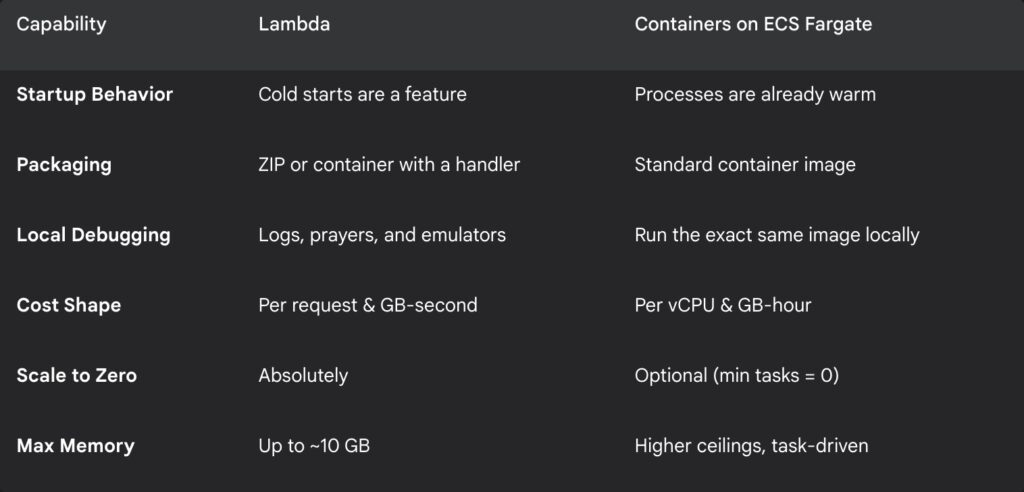
A quick tale of the tape

Here’s a simplified look at how the two approaches stacked up for our specific needs.
Our surprisingly fast migration plan

We did this in days, not weeks. The key was to be pragmatic, not perfect.

1. Pick your battles: We chose our top three most impactful endpoints with the worst p95 latency.

2. Put it in a box: We converted the function handler into a tiny web service. It’s less dramatic than it sounds.

# Dockerfile (Node.js example)
FROM node:22-slim
WORKDIR /usr/src/app

COPY package*.json ./
RUN npm ci --only=production

COPY . .

ENV NODE_ENV=production PORT=3000
EXPOSE 3000
CMD [ "node", "server.js" ]
// server.js
const http = require('http');
const port = process.env.PORT || 3000;

const server = http.createServer((req, res) => {
  if (req.url === '/health') {
    res.writeHead(200, { 'Content-Type': 'text/plain' });
    return res.end('ok');
  }

  // Your actual business logic would live here
  const body = JSON.stringify({ success: true, timestamp: Date.now() });
  res.writeHead(200, { 'Content-Type': 'application/json' });
  res.end(body);
});

server.listen(port, () => {
  console.log(`Server listening on port ${port}`);
});

3. Set up the traffic cop: We created a new target group for our service and pointed a rule on our Application Load Balancer to it.

{
  "family": "payment-api",
  "networkMode": "awsvpc",
  "cpu": "512",
  "memory": "1024",
  "requiresCompatibilities": ["FARGATE"],
  "executionRoleArn": "arn:aws:iam::987654321098:role/ecsTaskExecutionRole",
  "taskRoleArn": "arn:aws:iam::987654321098:role/paymentTaskRole",
  "containerDefinitions": [
    {
      "name": "app-container",
      "image": "[987654321098.dkr.ecr.us-east-1.amazonaws.com/payment-api:2.1.0](https://987654321098.dkr.ecr.us-east-1.amazonaws.com/payment-api:2.1.0)",
      "portMappings": [{ "containerPort": 3000, "protocol": "tcp" }],
      "environment": [{ "name": "NODE_ENV", "value": "production" }]
    }
  ]
}

4. The canary in the coal mine: We used weighted routing to dip our toes in the water. We started by sending just 5% of traffic to the new container service.

# Terraform Route 53 weighted canary
resource "aws_route53_record" "api_primary_lambda" {
  zone_id = var.zone_id
  name    = "api.yourapp.com"
  type    = "A"

  alias {
    name                   = aws_api_gateway_domain_name.main.cloudfront_domain_name
    zone_id                = aws_api_gateway_domain_name.main.cloudfront_zone_id
    evaluate_target_health = true
  }

  set_identifier = "primary-lambda-path"
  weight         = 95
}

resource "aws_route53_record" "api_canary_container" {
  zone_id = var.zone_id
  name    = "api.yourapp.com"
  type    = "A"

  alias {
    name                   = aws_lb.main_alb.dns_name
    zone_id                = aws_lb.main_alb.zone_id
    evaluate_target_health = true
  }

  set_identifier = "canary-container-path"
  weight         = 5
}

5. Stare at the graphs: For one hour, we watched four numbers like hawks: p95 latency, error rates, CPU/memory headroom on the new service, and our estimated cost per million requests.

6. Go all in (or run away): The graphs stayed beautifully, boringly flat. So we shifted to 50%, then 100%. The whole affair was done in an afternoon.

The benchmark kit you can steal

Don’t just read about it. Run a quick test yourself.

// k6 script (save as test.js)
import http from 'k6/http';
import { check, sleep } from 'k6';

export const options = {
  vus: 100,
  duration: '5m',
  thresholds: {
    'http_req_duration': ['p(95)<250'], // Aim for a 250ms p95
    'checks': ['rate>0.999'],
  },
};

export default function () {
  const url = __ENV.TARGET_URL || '[https://api.yourapp.com/checkout/v2/quote](https://api.yourapp.com/checkout/v2/quote)';
  const res = http.get(url);
  check(res, { 'status is 200': r => r.status === 200 });
  sleep(0.2); // Small pause between requests
}

Run it from your terminal like this:

k6 run -e TARGET_URL=https://your-canary-endpoint.com test.js

Our results for context

These aren’t universal truths; they are snapshots of our world. Your mileage will vary.
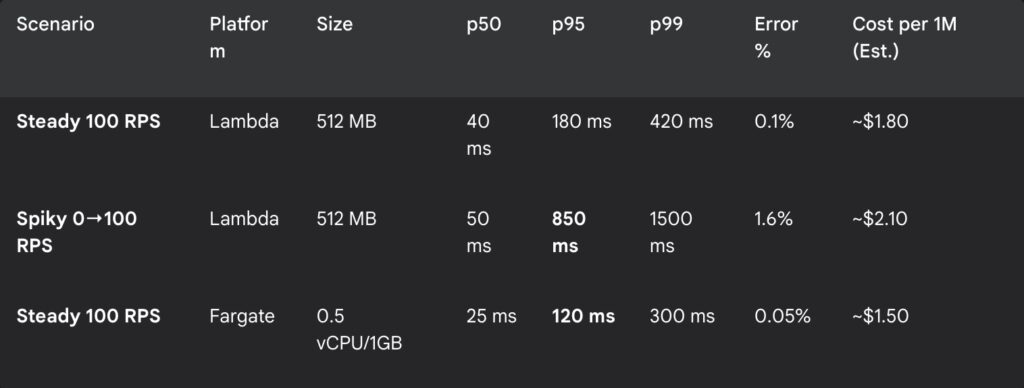
The numbers in bold are what kept us up at night and what finally let us sleep. For our steady traffic, the always-on container was not only faster and more reliable, but it was also shaping up to be cheaper.

Lambda is still in our toolbox

We didn’t throw the microwave out. We just stopped using it to cook the Thanksgiving turkey. Here’s where we still reach for Lambda without a second thought:

  • Sporadic or bursty workloads: Those once-a-day reports or rare event handlers are perfect for scale-to-zero.
  • Event glue: It’s the undisputed champion of transforming S3 puts, reacting to DynamoDB streams, and wiring up EventBridge.
  • Edge logic: For tiny header manipulations or rewrites, Lambda@Edge and CloudFront Functions are magnificent.

Lambda didn’t fail us. We outgrew its default behavior for a very specific, high-stakes workload. We cheated physics by keeping our processes warm, and in return, our p95 stopped stretching like hot taffy.

If your latency targets and traffic shape look anything like ours, please steal our tiny benchmark kit. Run a one-day canary. See what the numbers tell you. The goal isn’t to declare one tool a winner, but to spend less time arguing with physics and more time building things that people love.

What is AWS Nucleus, and why Is it poised to replace EC2?

It all started with a coffee and a bill. My usual morning routine. But this particular Tuesday, the AWS bill had an extra kick that my espresso lacked. The cost for a handful of m5.large instances had jumped nearly 40% over the past year. I almost spat out my coffee.

I did what any self-respecting Cloud Architect does: I blamed myself. Did I forget to terminate a dev environment? Did I leave a data transfer running to another continent? But no. After digging through the labyrinth of Cost Explorer, the truth was simpler and far more sinister: EC2 was quietly getting more expensive. Spot instances had become as predictable as a cat on a hot tin plate, and my “burstable” CPUs seemed to run out of breath if they had to do more than jog for a few minutes.

EC2, our old, reliable friend. The bedrock of the cloud. It felt like watching your trusty old car suddenly start demanding premium fuel and imported spare parts just to get to the grocery store. Something was off.

And then, it happened. A slip-up in a public Reddit forum. A senior AWS engineer accidentally posted a file named ec2-phaseout-q4–2027.pdf. It was deleted in minutes, but the internet, as we know, has the memory of an elephant with a grudge.

(Disclaimer for the nervous: This PDF is my narrative device. A ghost in the machine. A convenient plot twist. But the trends it points to? The rising costs, the architectural creaks? Those are very, very real. Now, where were we?)

The document was a bombshell. It laid out a plan to deprecate over 80% of current EC2 instance families by the end of 2027, paving the way for a “next-gen compute platform.” Was this real? I made some calls. The first partner laughed it off. The second went quiet, a little too quiet. The third, after I promised to buy them beers for a month, whispered: “We’re already planning the transition for our enterprise clients.”

Bingo.

Why our beloved EC2 is becoming a museum piece

My lead engineer summed it up beautifully last week. “Running real-time ML on today’s EC2,” he sighed, “feels like asking a 2010 laptop to edit 4K video. It’ll do it, but it’ll scream in agony the whole time, and you’d better have a fire extinguisher handy.”

He’s not wrong. For general-purpose apps, EC2 is still a trusty workhorse. But for the demanding, high-performance workloads that are becoming the norm? You can practically see the gray hairs and hear the joints creaking.

This isn’t just about cost. It’s about architecture. EC2 was built for a different era, an era before serverless was cool, before WebAssembly (WASM) was a thing, and before your toaster needed to run a Kubernetes cluster. The cracks are starting to show.

Meet AWS Nucleus, the secret successor

No press release. No re:Invent keynote. But if you’re connected to AWS insiders, you’ve probably heard whispers of a project internally codenamed “Nucleus.” We got access to this stealth-mode compute platform, and it’s unlike anything we’ve used before.

What does it feel like? Think of it this way: if Lambda and Fargate had a baby, and that baby was raised by a bare-metal server with a PhD in performance, you’d get Nucleus. It has the speed and direct hardware access of a dedicated machine, but with the auto-scaling magic of serverless.

Here are some of the early capabilities we’ve observed:

  • No more cold starts. Unlike Lambda, which can sometimes feel like it’s waking up from a deep nap.
  • Direct hardware access. Full control over GPU and SSD resources without the usual virtualization overhead.
  • Predictive autoscaling. It analyzes traffic patterns and scales before the spike hits, not during.
  • WASM-native runtime. Support for Node.js, Python, Go, and Rust is baked in from the ground up.

It’s not generally available yet, but internal teams and a select few partners are already building on it.

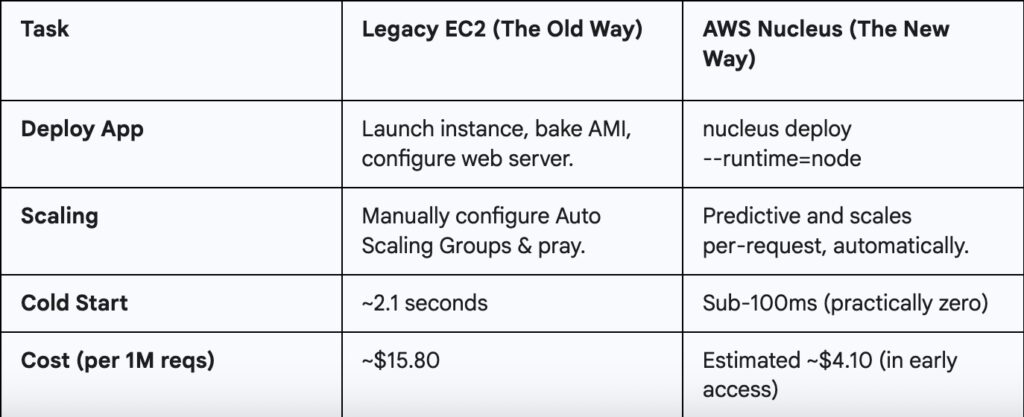
A 30-day head-to-head test

Yes, we triple checked those cost figures. Even if AWS adjusts the pricing after the preview, the efficiency gap is too massive to ignore.

Your survival guide for the coming shift

Let’s be clear, there’s no need to panic and delete all your EC2 instances. But if this memo is even half-right, you don’t want to be caught flat-footed in a few years. Here’s what we’re doing, and what you might want to start experimenting with.

Step 1: Become a cloud whisperer

Start by pinging your AWS Solutions Architect, not directly about “Nucleus,” but something softer:

“Hey, we’re exploring options for more performant, cost-effective compute. Are there any next-gen runtimes or private betas AWS is piloting that we could look into?”

You’ll be surprised what folks share if you ask the right way.

Step 2: test on the shadow platform

Some partners already have early access CLI builds. If you get your hands on one, you’ll notice some familiar patterns.

# Initialize a new service from a template
nucleus init my-api --template=fastapi

# Deploy with a single command
nucleus deploy --env=staging --free-tier

Disclaimer: Not officially available. Use in isolated test environments only. Do not run your production database on this.

Step 3: Run a hybrid setup

If you get preview access, try bridging the old with the new. Here’s a hypothetical Terraform snippet of what that might look like:

# Our legacy EC2 instance for the old monolith
resource "aws_instance" "legacy_worker" {
  ami           = "ami-0b5eea76982371e9" # An old Amazon Linux 2 AMI
  instance_type = "t3.medium"
}

# The new Nucleus service for a microservice
resource "aws_nucleus_service" "new_api" {
  runtime       = "go1.19"
  source_path   = "./app/api"
  
  # This is the magic part: linking to the old world
  vpc_ec2_links = [aws_instance.legacy_worker.id]
}

We ran a few test loads between legacy workers and the new compute, no regressions, and latency even dropped.

Step 4: Estimate the savings yourself

Even with preview pricing, the gap is noticeable. A simple Python script can give you a rough idea.

# Fictional library to estimate costs
import aws_nucleus_estimator

# Your current monthly bill for a specific workload
current_ec2_cost = 4200 

# Estimate based on vCPU hours and memory
# (These numbers are for illustration only)
estimated_nucleus_cost = aws_nucleus_estimator.estimate(
    vcpu_hours=1200, 
    memory_gb_hours=2400
)

print(f"Rough monthly savings: ${current_ec2_cost - estimated_nucleus_cost}")

This is bigger than just EC2

Let’s be honest. This shift isn’t just about cutting costs or shrinking cold start times. It’s about redefining what “compute” even means. EC2 isn’t being deprecated because it’s broken. It’s being phased out because modern workloads have evolved, and the old abstractions are starting to feel like training wheels we forgot to take off.

A broader pattern is emerging across the industry. What AWS is allegedly doing with Nucleus mirrors a larger movement:

  • Google Cloud is reportedly piloting a Cloud Run variant that uses a WASM-based runtime.
  • Microsoft Azure is quietly testing a system to blur the line between containers and functions.
  • Oracle, surprisingly, has been sponsoring development tools optimized for WASM-native environments.

The foundational idea is clear: cloud platforms are moving toward fast-boot, auto-scaling, WASM-capable compute that sits somewhere between Lambda and Kubernetes, but without the overhead of either.

Is EC2 the new legacy?

It’s strange to say, but EC2 is starting to feel like “bare metal” did a decade ago: powerful, essential, but something you try to abstract away.

One of our SREs shared this gem the other day:

“A couple of our junior engineers thought EC2 was some kind of disaster recovery tool for Kubernetes.”

That’s from a Fortune 100 company. When your flagship infrastructure service starts raising eyebrows from fresh grads, you know a generational shift is underway.

The cloud is evolving, again. But this isn’t a gentle, planned succession. It’s a Cambrian explosion in real-time. New, bizarre forms of compute are crawling out of the digital ooze, and the old titans, once thought invincible, are starting to look slow and clumsy. They don’t get a gold watch and a retirement party. They become fossils, their skeletons propping up the new world.

EC2 isn’t dying tomorrow. It’s becoming a geological layer. It’s the bedrock, the sturdy but unglamorous foundation upon which nimbler, more specialized predators will hunt. The future isn’t about killing the virtual machine; it’s about making it an invisible implementation detail. In the same way, most of us stopped thinking about the physical server racks in a data center, we’ll soon stop thinking about the VM. We’ll just care about the work that needs doing.

So no, EC2 isn’t dying. It’s becoming a legend. And in the fast-moving world of technology, legends belong in museums, admired from a safe distance.

The strange world of serverless data processing made simple

Data isn’t just “big” anymore. It’s feral. It stampedes in from every direction, websites, mobile apps, a million sentient toasters, and it rarely arrives neatly packaged. It’s messy, chaotic, and stubbornly resistant to being neatly organized into rows for analysis. For years, taming this digital beast meant building vast, complicated corrals of servers, clusters, and configurations. It was a full-time job to keep the lights on, let alone do anything useful with the data itself.

Then, the cloud giants whispered a sweet promise in our ears: “serverless.” Let us handle the tedious infrastructure, they said. You just focus on the data. It sounds like magic, and sometimes it is. But it’s a specific kind of magic, with its own incantations and rules. Let’s explore the fundamental principles of this magic through Google Cloud’s Dataflow, and then see how its cousins at Amazon, AWS Glue and AWS Kinesis, perform similar tricks.

The anatomy of a data pipeline

No matter which magical cloud service you use, the core ritual is always the same. It’s a simple, three-step dance.

  1. Read: You grab your wild data from a source.
  2. Transform: You perform some arcane logic to clean, shape, enrich, or otherwise domesticate it.
  3. Write: You deposit the now-tamed data into a sink, like a database or data warehouse, where it can finally be useful.

This sequence is called a pipeline. In the serverless world, the pipeline is not a physical thing but a logical construct, a recipe that tells the cloud how to process your data.

Shaping the data clay

Once data enters a pipeline, it needs to be held in something. You can’t just let it slosh around. In Dataflow, data is scooped into a PCollection. The ‘P’ stands for ‘Parallel’, which is a hint that this collection is designed to be scattered across many machines and processed all at once. A key feature of a PCollection is that it’s immutable. When you apply a transformation, you don’t change the original collection; you create a brand-new one. It’s like a paranoid form of data alchemy where you never destroy your original ingredients.

Over in the AWS world, Glue prefers to work with DynamicFrames. Think of them as souped-up DataFrames from the Spark universe, built to handle the messy, semi-structured data that Glue often finds in the wild. Kinesis Data Analytics, being a specialist in fast-moving data, treats data as a continuous stream that you operate on as it flows by. The concept is the same, an in-memory representation of your data, but the name and nuances change depending on the ecosystem.

The art of transformation

A pipeline without transformations is just a very expensive copy-paste command. The real work happens here.

Dataflow uses the Apache Beam SDK, a powerful, open-source framework that lets you define your transformations in Java or Python. These operations are fittingly called Transforms. The beauty of Beam is its portability; you can write a Beam pipeline and, in theory, run it on other platforms (like Apache Flink or Spark) without a complete rewrite. It’s the “write once, run anywhere” dream, applied to data processing.

AWS Glue takes a more direct approach. You can write your transformations using Spark code (Python or Scala) or use Glue Studio, a visual interface that lets you build ETL (Extract, Transform, Load) jobs by dragging and dropping boxes. It’s less about portability and more about deep integration with the AWS ecosystem. Kinesis Data Analytics simplifies things even further for its real-time niche, letting you transform streams primarily through standard SQL queries or, for more complex tasks, by using the Apache Flink framework.

Running wild and scaling free

Here’s the serverless punchline: you define the pipeline, and the cloud runs it. You don’t provision servers, patch operating systems, or worry about cluster management.

When you launch a Dataflow job, Google Cloud automatically spins up a fleet of worker virtual machines to execute your pipeline. Its most celebrated trick is autoscaling. If a flood of data arrives, Dataflow automatically adds more workers. When the flood subsides, it sends them away. For streaming jobs, its Streaming Engine further refines this process, making scaling faster and more efficient.

AWS Glue and Kinesis Data Analytics operate on a similar principle, though with different acronyms. Glue jobs run on a pre-configured amount of “Data Processing Units” (DPUs), which it can autoscale. Kinesis applications run on “Kinesis Processing Units” (KPUs), which also scale based on throughput. The core benefit is identical across all three: you’re freed from the shackles of capacity planning.

Choosing your flow batch or stream

Not all data processing needs are created equal. Sometimes you need to process a massive, finite dataset, and other times you need to react to an endless flow of events.

  • Batch processing: This is like doing all your laundry at the end of the month. It’s perfect for generating daily reports, analyzing historical data, or running large-scale ETL jobs. Dataflow and AWS Glue are both excellent at batch processing.
  • Streaming processing: This is like washing each dish the moment you’re done with it. It’s essential for real-time dashboards, fraud detection, and feeding live data into AI models. Dataflow is a streaming powerhouse. Kinesis Data Analytics is a specialist, designed from the ground up exclusively for this kind of real-time work. While Glue has some streaming capabilities, they are typically geared towards continuous ETL rather than complex real-time analytics.

Picking your champion

So, which tool should you choose for your data-taming adventure? It’s less about which is “best” and more about which is right for your specific quest.

  • Choose Google Cloud Dataflow if you value portability. The Apache Beam model is a powerful abstraction that prevents vendor lock-in and is exceptionally good at handling both complex batch and streaming scenarios with a single programming model.
  • Choose AWS Glue if your world is already painted in AWS colors. Its primary strength is serverless ETL. It integrates seamlessly with the entire AWS data stack, from S3 data lakes to Redshift warehouses, making it the default choice for data preparation within that ecosystem.
  • Choose AWS Kinesis Data Analytics when your only concern is now. If you need to analyze, aggregate, and react to data in milliseconds or seconds, Kinesis is the sharp, specialized tool for the job.

The serverless horizon

Ultimately, these services represent a fundamental shift in how we approach data engineering. They allow us to move our focus away from the mundane mechanics of managing infrastructure and toward the far more interesting challenge of extracting value from data. Whether you’re using Dataflow, Glue, or Kinesis, you’re leveraging an incredible amount of abstracted complexity to build powerful, scalable, and resilient data solutions. The future of data processing isn’t about building bigger servers; it’s about writing smarter logic and letting the cloud handle the rest.

Why simplicity wins when you pick AWS ECS Fargate instead of EKS

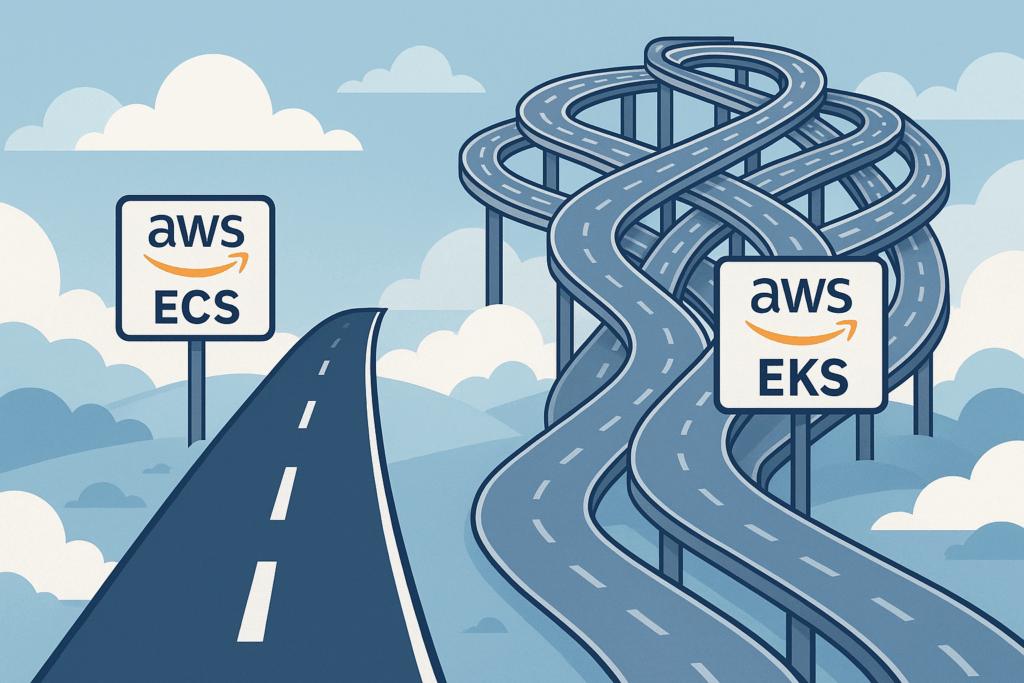
Selecting the right tools often feels like navigating a crossroads. Consider planning a significant project, like building a custom home workshop. You could opt for a complex setup with specialized, industrial-grade machinery (powerful, flexible, demanding maintenance and expertise). Or, you might choose high-quality, standard power tools that handle 90% of your needs reliably and with far less fuss. Development teams deploying containers on AWS face a similar decision. The powerful, industry-standard Kubernetes via Elastic Kubernetes Service (EKS) beckons, but is it always the necessary path? Often, the streamlined native solution, Elastic Container Service (ECS) paired with its serverless Fargate launch type, offers a smarter, more efficient route.

AWS presents these two primary highways for container orchestration. EKS delivers managed Kubernetes, bringing its vast ecosystem and flexibility. It frequently dominates discussions and is hailed in the DevOps world. But then there’s ECS, AWS’s own mature and deeply integrated orchestrator. This article explores the compelling scenarios where choosing the apparent simplicity of ECS, particularly with Fargate, isn’t just easier; it’s strategically better.

Getting to know your AWS container tools

Before charting a course, let’s clarify what each service offers.

ECS (Elastic Container Service): Think of ECS as the well-designed, built-in toolkit that comes standard with your AWS environment. It’s AWS’s native container orchestrator, designed for seamless integration. ECS offers two ways to run your containers:

  • EC2 launch type: You manage the underlying EC2 virtual machine instances yourself. This gives you granular control over the instance type (perhaps you need specific GPUs or network configurations) but brings back the responsibility of patching, scaling, and managing those servers.
  • Fargate launch type: This is the serverless approach. You define your container needs, and Fargate runs them without you ever touching, or even seeing, the underlying server infrastructure.

Fargate: This is where serverless container execution truly shines. It’s like setting your high-end camera to an intelligent ‘auto’ mode. You focus on the shot (your application), and the camera (Fargate) expertly handles the complex interplay of aperture, shutter speed, and ISO (server provisioning, scaling, patching). You simply run containers.

EKS (Elastic Kubernetes Service): EKS is AWS’s managed offering for the Kubernetes platform. It’s akin to installing a professional-grade, multi-component software suite onto your operating system. It provides immense power, conforms to the Kubernetes standard loved by many, and grants access to its sprawling ecosystem of tools and extensions. However, even with AWS managing the control plane’s availability, you still need to understand and configure Kubernetes concepts, manage worker nodes (unless using Fargate with EKS, which adds its own considerations), and handle integrations.

The power of keeping things simple with ECS Fargate

So, what makes this simpler path with ECS Fargate so appealing? Several key advantages stand out.

Reduced operational overhead: This is often the most significant win. Consider the sheer liberation Fargate offers: it completely removes the burden of managing the underlying servers. Forget patching operating systems at 2 AM or figuring out complex scaling policies for your EC2 fleet. It’s the difference between owning a car, with all its maintenance chores, oil changes, tire rotations, and unexpected repairs, and using a seamless rental or subscription service where the vehicle is just there when you need it, ready to drive. You focus purely on the journey (your application), not the engine maintenance (the infrastructure).

Faster learning curve and easier management: ECS generally presents a gentler learning curve than the multifaceted world of Kubernetes. For teams already comfortable within the AWS ecosystem, ECS concepts feel intuitive and familiar. Managing task definitions, services, and clusters in ECS is often more straightforward than navigating Kubernetes deployments, services, pods, and the YAML complexities involved. This translates to faster onboarding and less time spent wrestling with the orchestrator itself. Furthermore, EKS carries an hourly cost for its control plane (though free tiers exist), an expense absent in the standard ECS setup.

Seamless AWS integration: ECS was born within AWS, and it shows. Its integration with other AWS services is typically tighter and simpler to configure than with EKS. Assigning IAM roles directly to ECS tasks for granular permissions, for instance, is remarkably straightforward compared to setting up Kubernetes Service Accounts and configuring IAM Roles for Service Accounts (IRSA) with an OIDC provider in EKS. Connecting to Application Load Balancers, registering targets, and pushing logs and metrics to CloudWatch often requires less configuration boilerplate with ECS/Fargate. It’s like your home’s electrical system being designed for standard plugs, appliances just work without needing special adapters or wiring.

True serverless container experience (Fargate): With Fargate, you pay for the vCPU and memory resources your containerized application requests, consumed only while it’s running. You aren’t paying for idle virtual machines waiting for work. This model is incredibly cost-effective for applications with variable loads, APIs that scale on demand, or batch jobs that run periodically.

Finding your route when ECS Fargate is the best fit

Knowing these advantages, let’s pinpoint the specific road signs indicating ECS/Fargate is the right direction for your team and application.

Teams prioritizing simplicity and velocity: If your primary goal is to ship features quickly and minimize the time spent on infrastructure management, ECS/Fargate is a strong contender. It allows developers to focus more on code and less on orchestration intricacies. It’s like choosing a reliable microwave and stove for everyday cooking; they get the job done efficiently without the complexity of a commercial kitchen setup.

Standard microservices or web applications: Many common workloads, like stateless web applications, APIs, or backend microservices, don’t require the advanced orchestration features or the specific tooling found only in the Kubernetes ecosystem. For these, ECS/Fargate provides robust, scalable, and reliable hosting without unnecessary complexity.

Deep reliance on the AWS ecosystem: If your application heavily leverages other AWS services (like DynamoDB, SQS, Lambda, RDS) and multi-cloud portability isn’t an immediate strategic requirement, ECS/Fargate’s native integration offers tangible benefits in ease of use and configuration.

Serverless-First architectures: For teams embracing a serverless mindset for event-driven processing, data pipelines, or API backends, Fargate fits perfectly. Its pay-per-use model and elimination of server management align directly with serverless principles.

Operational cost sensitivity: When evaluating the total cost of ownership, factor in the human effort. The reduced operational burden of ECS/Fargate can lead to significant savings in staff time and effort, potentially outweighing any differences in direct compute costs or the EKS control plane fee.

Acknowledging the alternative when EKS remains the champion

Of course, EKS exists for good reasons, and it remains the superior choice in certain contexts. Let’s be clear about when you need that powerful, customizable machinery.

Need for Kubernetes Standard/API: If your team requires the full Kubernetes API, needs specific Custom Resource Definitions (CRDs), operators, or advanced scheduling capabilities inherent to Kubernetes, EKS is the way to go.

Leveraging the vast Kubernetes ecosystem: Planning to use popular Kubernetes-native tools like Helm for packaging, Argo CD for GitOps, Istio or Linkerd for a service mesh, or specific monitoring agents designed for Kubernetes? EKS provides the standard platform these tools expect.

Existing Kubernetes expertise or workloads: If your team is already proficient in Kubernetes or you’re migrating existing Kubernetes applications to AWS, sticking with EKS leverages that investment and knowledge, ensuring consistency.

Hybrid or Multi-Cloud strategy: When running workloads across different cloud providers or in hybrid on-premises/cloud environments, Kubernetes (and thus EKS on AWS) provides a consistent orchestration layer, crucial for portability and operational uniformity.

Highly complex orchestration needs: For applications demanding intricate network policies (e.g., using Calico), complex stateful set management, or very specific affinity/anti-affinity rules that might be more mature or flexible in Kubernetes, EKS offers greater depth.

Think of EKS as that specialized, heavy-duty truck. It’s indispensable when you need to haul unique, heavy loads (complex apps), attach specialized equipment (ecosystem tools), modify the engine extensively (custom controllers), or drive consistently across varied terrains (multi-cloud).

Choosing your lane ECS Fargate or EKS

The key insight here isn’t about crowning one service as universally “better.” It’s about recognizing that the AWS container landscape offers different tools meticulously designed for different journeys. ECS with Fargate stands as a powerful, mature, and often much simpler alternative, decisively challenging the notion that Kubernetes via EKS should be the default starting point for every containerized application on AWS.

Before committing, honestly assess your application’s real complexity, your team’s operational capacity, and existing expertise, your reliance on the broader AWS vs. Kubernetes ecosystems, and your strategic goals regarding portability. It’s like packing for a trip: you wouldn’t haul mountaineering equipment for a relaxing beach holiday. Choose the toolset that minimizes friction, maximizes your team’s velocity, and keeps your journey smooth. Choose wisely.

Understanding AWS Lambda Extensions beyond the hype

Lambda extensions are fascinating little tools. They’re like straightforward add-ons, but they bring their own set of challenges. Let’s explore what they are, how they work, and the realities behind using them in production.

Lambda extensions enhance AWS Lambda functions without changing your original application code. They’re essentially plug-and-play modules, which let your functions communicate better with external tools like monitoring, observability, security, and governance services.

Typically, extensions help you:

  • Retrieve configuration data or secrets securely.
  • Send logs and performance data to external monitoring services.
  • Track system-level metrics such as CPU and memory usage.

That sounds quite useful, but let’s look deeper at some hidden complexities.

The hidden risks of Lambda Extensions

Lambda extensions seem simple, but they do add potential risks. Three main areas to watch carefully are security, developer experience, and performance.

Security Concerns

Extensions can be helpful, but they’re essentially third-party software inside your AWS environment. You’re often not entirely sure what’s happening within these extensions since they work somewhat like black boxes. If the publisher’s account is compromised, malicious code could be silently deployed, potentially accessing your sensitive resources even before your security tools detect the problem.

In other words, extensions require vigilant security practices.

Developer experience isn’t always a walk in the park

Lambda extensions can sometimes make life harder for developers. Local testing, for instance, isn’t always straightforward due to external dependencies extensions may have. This discrepancy can result in surprises during deployment, and errors that show up only in production but not locally.

Additionally, updating extensions isn’t always seamless. Extensions use Lambda layers, which aren’t managed through a convenient package manager. You need to track and manually apply updates, complicating your workflow. On top of that, layers count towards Lambda’s total deployment size, capped at 250 MB, adding another layer of complexity.

Performance and cost considerations

Extensions do not come without cost. They consume CPU, memory, and storage resources, which can increase the duration and overall cost of your Lambda functions. Additionally, extensions may slightly slow down your function’s initial execution (cold start), particularly if they require considerable initialization.

When to actually use Lambda Extensions

Lambda extensions have their place, but they’re not universally beneficial. Let’s break down common scenarios:

Fetching configurations and secrets

Extensions initially retrieve configurations quickly. However, once data is cached, their advantage largely disappears. Unless you’re fetching a high volume of secrets frequently, the complexity isn’t likely justified.

Sending logs to external services

Using extensions to push logs to observability platforms is practical and efficient for many use cases. But at a large scale, it may be simpler, and often safer, to log centrally via AWS CloudWatch and forward logs from there.

Monitoring container metrics

Using extensions for monitoring container-level metrics (CPU, memory, disk usage) is highly beneficial. While ideally integrated directly by AWS, for now, extensions fulfill this role exceptionally well.

Chaos engineering experiments

Extensions shine particularly in chaos engineering scenarios. They let you inject controlled disruptions easily. You simply add them during testing phases and remove them afterward without altering your main Lambda codebase. It’s efficient, low-risk, and clean.

The power and practicality of Lambda Extensions

Lambda extensions can significantly boost your Lambda functions’ abilities, enabling advanced integrations effortlessly. However, it’s essential to weigh the added complexity, potential security risks, and extra costs against these benefits. Often, simpler approaches, like built-in AWS services or standard open-source libraries, offer a smoother path with fewer headaches.
Carefully consider your real-world requirements, team skills, and operational constraints. Sometimes the simplest solution truly is the best one.
Ultimately, Lambda extensions are powerful, but only when used wisely.

Crucial AWS skills for developers in Cloud Computing

Cloud computing has transformed how applications are built and deployed, with AWS leading this technological revolution. For developers and architects, mastering essential AWS services is a competitive advantage and a necessity to thrive in today’s job market. This article will guide you through the key AWS skills you need to excel in cloud computing and fully leverage the opportunities this digital transformation offers.

AWS Lambda for serverless computing

AWS Lambda lets you execute your code in the cloud without worrying about server infrastructure. You run your code exactly when you need it, no more, no less. There’s no need to manage servers, maintain operating systems, or manually scale resources. AWS handles the heavy lifting behind the scenes, so you can concentrate on writing efficient code and solving meaningful problems. Lambda easily integrates with other AWS services, allowing you to create event-driven applications quickly and effectively.

Why You Should Learn It

  • Auto-Scaling: Automatically adjusts to demand.
  • Cost-Effective: Pay only for code execution time.
  • Microservices Friendly: Ideal for real-time events and modular architecture.

Essential Skills

  • Writing Lambda functions in Python or Node.js
  • Integrating Lambda with services like API Gateway, S3, and EventBridge
  • Optimizing for minimal latency and reduced costs

Real-world Examples

  • Backend API development
  • Real-time data processing
  • Task automation

Amazon S3 for robust cloud storage

Amazon S3 is an industry-standard storage solution known for its reliability, security, and scalability. Whether you’re managing small amounts of data or massive petabyte-scale datasets, S3 securely and efficiently handles your storage needs. Its seamless integration with other AWS services makes S3 indispensable for developers aiming to build anything from straightforward websites to complex analytics pipelines.

Why You Should Learn It

  • Exceptional Durability: Guarantees high-level data safety.
  • Flexible Storage Classes: Customizable based on performance and cost.
  • Advanced Security: Offers strong encryption and precise access management.

Common Use Cases

  • Hosting static websites
  • Data backups and archives
  • Multimedia content storage
  • Data lakes for analytics and machine learning

DynamoDB for powerful NoSQL databases

DynamoDB delivers ultra-fast database performance without management headaches. As a fully managed NoSQL service, DynamoDB effortlessly scales with your application’s changing needs. It handles heavy workloads with extremely low latency, providing developers with unmatched flexibility for managing structured and unstructured data. Its robust integration with other AWS services makes DynamoDB perfect for developing dynamic, high-performance applications.

Why It Matters

  • Fully Serverless: Zero server management required.
  • Dynamic Scaling: Automatically adjusts for varying traffic.
  • Superior Performance: Optimized for fast, consistent query results.

Critical Skills

  • Understanding NoSQL database concepts
  • Designing efficient data models
  • Leveraging indexes and DynamoDB Accelerator (DAX) for enhanced query performance

Typical Applications

  • Gaming leaderboards
  • Real-time analytics
  • User session management

Effortless containers with AWS ECS and Fargate

Containers have revolutionized how we package and deploy applications, and AWS simplifies this process remarkably. Amazon Elastic Container Service (ECS) allows straightforward orchestration and scaling of containerized applications. For those who prefer not to manage servers, AWS Fargate further streamlines the process by eliminating server management, freeing developers to focus purely on application development. ECS and Fargate combined allow developers to build, deploy, and scale modern applications rapidly and reliably.

Why It’s Essential

  • Managed Containers: No server maintenance headaches.
  • Automatic Scaling: Handles large-scale container deployments smoothly.
  • Serverless Deployment: Fargate simplifies your infrastructure workload.

Skills to Master

  • Building and deploying container images
  • ECS cluster management
  • Implementing serverless container solutions with Fargate

Common Uses

  • Deploying scalable web applications
  • Microservice-oriented architectures
  • Efficient batch processing

Automating infrastructure with AWS CloudFormation

AWS CloudFormation empowers you to automate and standardize infrastructure deployments through code. This ensures that every environment, be it development, staging, or production, is consistent, predictable, and reliable. Defining your infrastructure as code (IaC) reduces manual errors, saves time, and makes it easier to manage complex setups across multiple AWS accounts or regions.

Why You Need It

  • Clear Infrastructure Definitions: Simplifies complex setups into manageable code.
  • Deployment Consistency: Reduces errors and accelerates deployment.
  • Repeatable Deployments: Easily reproduce infrastructure setups anywhere.

Key Skills

  • Creating robust CloudFormation templates
  • Effectively managing stack lifecycles
  • Seamlessly integrating CloudFormation with other AWS services

Practical Scenarios

  • Quick setup of identical environments
  • Version control and management of infrastructure
  • Disaster recovery and multi-region infrastructure management

Boosting DynamoDB with AWS DynamoDB Accelerator (DAX)

AWS DynamoDB Accelerator (DAX) significantly enhances DynamoDB’s performance by adding a fully managed in-memory caching layer. DAX dramatically improves application responsiveness and query speed, making it an excellent addition to high-performance applications. It seamlessly integrates with DynamoDB, requiring no complex configurations or adjustments, which means developers can rapidly enhance application performance with minimal effort.

Why You Should Learn DAX

  • Superior Performance: Greatly reduces response times for data access.
  • Fully Managed Service: Effortless setup with zero infrastructure hassle.

Ideal Use Cases

  • Real-time gaming scenarios
  • High-throughput web applications
  • Transactional systems needing fast responses

In a few words

Mastering these essential AWS services positions you at the forefront of cloud computing innovation. By deeply understanding these tools, you’ll confidently build scalable, resilient, and secure applications that not only perform exceptionally well but also optimize costs effectively. Staying proficient in these AWS technologies ensures you remain adaptable to the evolving demands of the tech industry, empowering you to create solutions that meet the complex challenges of tomorrow. Keep learning, exploring, and experimenting, your enhanced skillset will make you invaluable in any development or architecture role

Serverless mistakes that can ruin your architecture

Serverless architectures offer a compelling promise. They focus on business logic, not infrastructure. They scale automatically, simplify management, and can significantly reduce operational overhead. But over the years, as serverless technology evolved, certain initially appealing patterns revealed hidden pitfalls. Through my journey of building and refining serverless systems, I’ve uncovered a handful of common patterns you should reconsider or abandon altogether. Let’s explore these in detail to help you steer clear of similar mistakes.

Direct API Gateway integrations aren’t always better

Connecting API Gateway directly to services like DynamoDB or SQS, bypassing Lambda functions, initially sounds smart. It promises lower latency, less complexity, and reduced costs by eliminating the Lambda middleman. Who wouldn’t want quicker responses at lower costs?

However, this pattern quickly turns from friend to foe. Defining integration mappings is cumbersome and error-prone, and you lose the flexibility provided by Lambda. Complex mappings become challenging to test, troubleshoot, and maintain, especially when your requirements evolve. When something goes wrong, debugging can be painstaking because you lack detailed logging typically provided by Lambda.

Moreover, security and authorization quickly become complicated. Simple IAM-based authorization often proves insufficient, forcing you to revert to Lambda authorizers. Ultimately, what seemed like efficiency turns into a roadblock.

If your scenario truly is static, limited, and straightforward, a direct integration might work fine. But rarely does reality remain simple for long.

Monolithic Lambda Functions

Many developers, including me, started by creating monolithic Lambda functions that handle numerous API routes. It seemed practical, one deployment, easy management, and straightforward development experience, similar to using frameworks like FastAPI or Express. But as I learned, simplicity can mask significant drawbacks.

Here’s why monolithic Lambdas cause trouble:

  • Costly Resource Allocation: If a single API route requires more memory or CPU, every route inherits these increased resources. You end up paying more for all functions unnecessarily.
  • Security Risks: Broad permissions are needed, breaking AWS’s best practice of least privilege.
  • Scaling Issues: All paths scale equally, leading to inefficiencies when only specific paths experience heavy traffic.
  • Deployment Risks: An error or misconfiguration affects the entire service rather than just a single endpoint.

Breaking the giant Lambda into smaller, specialized micro-functions per API path provides precise control over scalability, security, cost, and memory usage. Each function’s settings can be tuned precisely, reducing costs and improving reliability. The micro-function approach may increase initial complexity slightly, but the long-term benefits greatly outweigh these costs.

Direct Lambda-to-Lambda invocations

Initially, invoking Lambda functions directly from other Lambdas via AWS SDK felt natural. I did it myself thinking it simplified communication between closely related tasks. However, experience showed me this pattern brings more headaches than benefits.

Here’s why:

  • Tight Coupling: Any change in the invoked Lambda’s name or deployment causes immediate breakage. That’s a fragile system.
  • Idle Waiting: In synchronous invocations, you pay for wasted compute time as one Lambda waits for another.
  • Complexity: Direct invocations bypass beneficial abstraction layers, making refactoring difficult.

Instead, adopt an event-driven approach using EventBridge or API Gateway. These intermediaries create loose coupling, facilitating easier scaling, error handling, and maintenance.

Putting everything inside the Handler

At first, writing all the code directly in the Lambda handler seems simpler, one file, fewer headaches. Unfortunately, simplicity fades quickly with complexity, leading to bloated handlers difficult to test, maintain, and debug.

Instead, structure your code logically:

  • Handler Layer: Initialization, input validation, error catching.
  • Business Logic Layer: Application-specific logic isolated from configuration and I/O concerns.
  • Data Access Layer (DAL): Abstracts interactions with databases or external services.

This architectural clarity dramatically simplifies unit testing, debugging, and refactoring. When changes inevitably come, you’ll thank yourself for not cutting corners.

Using EventBridge rules for scheduled tasks

AWS provides two methods for scheduling tasks through EventBridge, Rules and the newer Scheduler. Initially, Rules seemed convenient, especially because AWS never officially deprecated them. But sticking to rules can now be considered a missed opportunity.

Why prefer Scheduler over Rules?

  • Better Feature Set: Scheduler includes improved capabilities like one-time schedules, fine-grained control, and more intuitive management.
  • Scalability: Easier management at large scale.
  • Cost Optimization: Improved efficiency can lead to noticeable cost savings.

Simply put, adopting the newer EventBridge Scheduler positions your infrastructure to be future-proof.

Ignoring observability from the start

Early in my serverless journey, I underestimated observability. Logging seemed enough until it wasn’t. Observability isn’t just about logging errors; it’s about understanding your system thoroughly, from performance bottlenecks to tracing execution across multiple services.

Modern observability tools like AWS X-Ray, OpenTelemetry, and CloudWatch Logs Insights provide invaluable insight into your application’s behavior, especially in serverless environments where traditional debugging is less straightforward.

Integrating observability from day one may seem like overhead, but it significantly shortens troubleshooting and reduces downtime in production.

Final thoughts

Serverless architectures are transformative, but only when applied thoughtfully. The lessons shared here come from real-world experiences and occasional painful mistakes. By reflecting on these patterns and adapting your practices accordingly, you’ll save yourself future headaches and set your projects on a path toward greater flexibility, reliability, and maintainability. Remember, good architecture evolves through both wisdom and the humility to recognize and correct past mistakes.

AWS Step Functions for absolute beginners

While everyone else is busy wrapping presents and baking cookies, we’re going to unwrap something even more exciting: the world of AWS Step Functions. Now, I know what you might be thinking: “Step Functions? That sounds about as fun as getting socks for Christmas.” But trust me, this is way cooler than it sounds.

Imagine you’re Santa Claus for a second. You’ve got this massive list of kids, a whole bunch of elves, and a sleigh full of presents. How do you make sure everything gets done on time? You need a plan, a workflow. You wouldn’t just tell the elves, “Go do stuff!” and hope for the best, right? No, you’d say, “First, check the list. Then, build the toys. Next, wrap the presents. Finally, load up the sleigh.”

That’s essentially what AWS Step Functions does for your code in the cloud. It’s like a super-organized Santa Claus for your computer programs, ensuring everything happens in the right order, at the right time.

Why use AWS Step Functions? Because even Santa needs a plan

What are Step Functions anyway?

Think of AWS Step Functions as a flowchart on steroids. It’s a service that lets you create visual workflows for your applications. These workflows, called “state machines,” are made up of different steps, or “states,” that tell your application what to do and when to do it. These steps can be anything from simple tasks to complex operations, and they often involve our little helpers called AWS Lambda functions.

A quick chat about AWS Lambda

Before we go further, let’s talk about Lambdas. Imagine you have a tiny robot that’s really good at one specific task, like tying bows on presents. That’s a Lambda function. It’s a small piece of code that does one thing and does it well. You can have lots of these little robots, each doing their own thing, and Step Functions helps you organize them into a productive team. They are like the Christmas elves of the cloud!

Why orchestrate multiple Lambdas?

Now, you might ask, “Why not just have one big, all-knowing Lambda function that does everything?” Well, you could, but it would be like having one giant elf try to build every toy, wrap every present, and load the sleigh all by themselves. It would be chaotic, and hard to manage, and if that elf gets tired (or your code breaks), everything grinds to a halt.

Having specialized elves (or Lambdas) for each task is much better. One is for checking the list, one is for building toys, one is for wrapping, and so on. This way, if one elf needs a break (or a code update), the others can keep working. That’s the beauty of breaking down complex tasks into smaller, manageable steps.

Our scenario Santa’s data dilemma

Let’s imagine Santa has a modern problem. He’s got a big list of kids and their gift requests, but it’s all in a digital file (a JSON file, to be precise) stored in a magical cloud storage called S3 (Simple Storage Service). His goal is to read this list, make sure it’s not corrupted, add some extra Christmas magic to each request (like a “Ho Ho Ho” stamp), and then store the updated list back in S3. Finally, he wants a little notification to make sure everything went smoothly.

Breaking down the task with multiple lambdas

Here’s how we can break down Santa’s task into smaller, Lambda-sized jobs:

  1. Validation Lambda: This little helper checks the list to make sure it’s in the right format and that no naughty kids are trying to sneak extra presents onto the list.
  2. Transformation Lambda: This is where the magic happens. This Lambda adds that special “Ho Ho Ho” to each gift request, making sure every kid gets a personalized touch.
  3. Notification Lambda: This is our town crier. Once everything is done, this Lambda shouts “Success!” (or sends a more sophisticated message) to let Santa know the job is complete.

Step Functions Santa’s master plan

This is where Step Functions comes in. It’s the conductor of our Lambda orchestra. It makes sure each Lambda function runs in the right order, passing the list from one Lambda to the next like a relay race.

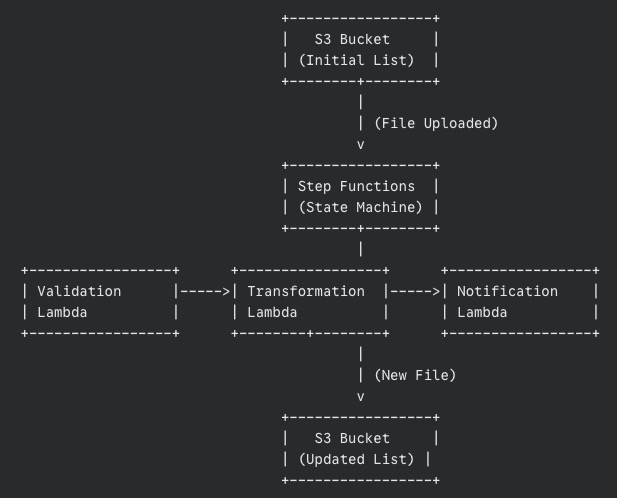
Our High-Level architecture

Let’s draw a simple picture of what’s happening (even Santa loves a good diagram):

The data’s journey

  1. The list (JSON file) lands in an S3 bucket.
  2. This triggers our Step Functions workflow.
  3. The Validation Lambda grabs the list, checks it, and passes the validated list to the Transformation Lambda.
  4. The Transformation Lambda works its magic, adds the “Ho Ho Ho,” and saves the new list to another S3 bucket.
  5. Finally, the Notification Lambda sends out a message confirming success.

The secret sauce passing data between steps

Step Functions automatically passes the output from each step as input to the next. It’s like each elf handing the partially completed present to the next elf in line. This is a crucial part of what makes Step Functions so powerful.

A look at each Lambda function

Let’s peek inside each of our Lambda functions. Don’t worry; we’ll keep it simple.

The list checker validation Lambda

This Lambda, written in Python (a very friendly programming language), does the following:

  1. Downloads the list from S3.
  2. Checks if the list is in the correct format (like making sure it’s actually a list and not a drawing of a reindeer).
  3. If something’s wrong, it raises an error (handled gracefully by Step Functions).
  4. If everything’s good, it returns the validated list.

Adding Christmas magic with the transformation Lambda

This Lambda receives the validated list and:

  1. Adds that special “Ho Ho Ho” to each gift request.
  2. Saves the new, transformed list to a new file in S3.
  3. Returns the location of the newly created file.

Spreading the news with the notification Lambda

This Lambda gets the path to the transformed file and:

  1. Could send a message to Santa’s phone, write “Success!” in the snow, or simply print a message in the cloud logs.
  2. Marks the end of our workflow.

Configuring the state machine

Now, how do we tell Step Functions what to do? We use something called the Amazon States Language (ASL), which is just a fancy way of describing our workflow in a JSON format. Here’s a simplified snippet:

{
  "StartAt": "ValidateData",
  "States": {
    "ValidateData": {
      "Type": "Task",
      "Resource": "arn:aws:lambda:region:123456789012:function:ValidateData",
      "Next": "TransformData"
    },
    "TransformData": {
      "Type": "Task",
      "Resource": "arn:aws:lambda:region:123456789012:function:TransformData",
      "Next": "Notify"
    },
    "Notify": {
      "Type": "Task",
      "Resource": "arn:aws:lambda:region:123456789012:function:Notify",
      "End": true
    }
  }
}

Don’t be scared by the code! It’s just a structured way of saying:

  1. Start with “ValidateData.”
  2. Then go to “TransformData.”
  3. Finally, go to “Notify” and we’re done.

Each “Resource” is the address of our Lambda function in the AWS world.

Error handling for dropped tasks

What happens if an elf drops a present? Step Functions can handle that! We can tell it to retry the step or go to a special “Fix It” state if something goes wrong.

Passing output between steps

Remember how we talked about passing data between steps? Here’s a simplified example of how we tell Step Functions to do that:

"TransformData": {
  "Type": "Task",
  "Resource": "arn:aws:lambda:region:123456789012:function:TransformData",
  "InputPath": "$.validatedData", 
  "OutputPath": "$.transformedData",
  "Next": "Notify"
}

This tells the “TransformData” step to take the “validatedData” from the previous step’s output and put its output in “transformedData.”

Making sure everything works before the big day

Before we unleash our workflow on the world (or Santa’s list), we need to make absolutely sure it works as expected. Testing is like a dress rehearsal for Christmas Eve, ensuring every elf knows their part and Santa’s sleigh is ready to fly.

Two levels of testing

We’ll approach testing in two ways:

  1. Testing each Lambda individually (Local tests):
    • Think of this as quality control for each elf. Before they join the assembly line, we need to make sure each Lambda function does its job correctly in isolation.
    • We can do this right from the AWS Management Console. Simply find your Lambda function, and look for a “Test” tab or button.
    • You’ll be able to create test events, which are like sample inputs for your Lambda. For example, for our Validation Lambda, you could create a test event with a well-formatted JSON and another with a deliberately incorrect JSON to see if the Lambda catches the error.
    • Run the test and check the output. Did the Lambda behave as expected? Did it return the correct data or the proper error message?
    • Alternatively, if you’re comfortable with the command line, you can use the AWS CLI (Command Line Interface) to invoke your Lambdas with test data. This offers more flexibility for advanced testing.
    • It is very important to test each Lambda with different types of inputs to make sure it behaves well under diverse circumstances.
  2. Testing the entire workflow (End-to-End test):
    • This is the grand rehearsal, where we test the whole process from start to finish.
    • First, prepare a sample JSON file that represents a typical Santa’s list. Make it realistic but simple enough for easy testing.
    • Upload this file to your designated S3 bucket. This should automatically trigger your Step Functions workflow.
    • Now, head over to the Step Functions section in the AWS Management Console. Find your state machine and look for the execution history. You should see a new execution that corresponds to your test.
    • Click on the execution. You’ll see a visual diagram of your workflow, with each step highlighted as it’s executed. This is like tracking Santa’s sleigh in real time!
    • Pay close attention to each step. Did it succeed? Did it take roughly the amount of time you expected? If a step fails, the diagram will show you where the problem occurred.
    • Once the workflow is complete, check your output S3 bucket. Is the transformed file there? Is it correctly modified according to your Transformation Lambda’s logic?
    • Finally, verify that your Notification Lambda did its job. Did it log the success message? Did it send a notification if that’s how you configured it?

Why both types of testing matter

You might wonder, “Why do we need both local and end-to-end tests?” Here’s the deal:

  • Local tests help you catch problems early on, at the individual component level. It’s much easier to fix a problem with a single Lambda than to debug a complex workflow with multiple failing parts.
  • End-to-end tests ensure that all the components work together seamlessly. They verify that the data is passed correctly between steps and that the overall workflow produces the desired outcome.

Debugging tips

  • If a step fails during the end-to-end test, click on the failed step in the Step Functions execution diagram. You’ll often see an error message that can help you pinpoint the issue.
  • Check the CloudWatch Logs for your Lambda functions. These logs contain valuable information about what happened during the execution, including any error messages or debug output you’ve added to your code.

Iterate and refine

Testing is not a one-time thing. As you develop your workflow, you’ll likely make changes and improvements. Each time you make a significant change, repeat your tests to ensure everything still works as expected. Remember: a well-tested workflow is a reliable workflow. By thoroughly testing our Step Functions workflow, we’re making sure that Santa’s list (and our application) is in good hands. Now, let’s get testing!

Step Functions or single Lambdas?

Maintainability and visibility

Step Functions makes it super easy to see what’s happening in your workflow. It’s like having a map of Santa’s route on Christmas Eve. This makes it much easier to find and fix problems.

Complexity

For simple tasks, a single Lambda might be enough. But as soon as you have multiple steps that need to happen in a specific order, Step Functions is your best friend.

Beyond Christmas Eve

Key takeaways

Step Functions is a powerful way to chain together Lambda functions in a visual, trackable, and error-tolerant workflow. It’s like having a super-organized Santa Claus for your cloud applications.

Potential improvements

We could add more steps, like extra validation or an automated email to parents. We could use other AWS services like SNS (Simple Notification Service) for more advanced notifications or DynamoDB for storing even more data.

Final words

This was a simple example, but the same ideas apply to much more complex, real-world applications. Step Functions can handle massive workflows with thousands of steps, making it a crucial tool for any aspiring cloud architect.

So, there you have it! You’ve now seen how AWS Step Functions can orchestrate AWS Lambdas to complete a task, just like Santa orchestrates his elves on Christmas Eve. And hopefully, it was a bit more exciting than getting socks for Christmas. 😊

AWS microservices development using Event-Driven architecture

Microservices are all the rage these days, and for good reason. They offer a more flexible and scalable way to build applications compared to the old monolithic approach. However, with many independent services running around, things can get complex very quickly. This is where event-driven architecture shines, providing a robust way to manage and orchestrate microservices for better scalability, resilience, and agility.

1. Introduction

Imagine your application as a bustling city. In the past, we built applications like massive skyscrapers, and monolithic structures that housed everything in one place. But, just like cities evolve, so does software development. Modern development is more like constructing a city filled with smaller, specialized buildings that each have a specific purpose. These buildings communicate and collaborate to get things done efficiently.

This microservices approach is crucial because it allows developers to build more complex and scalable applications while remaining agile and responsive to changes. Event-driven microservices, in particular, add flexibility by enabling communication through events, allowing services to act independently and asynchronously.

2. Fundamentals of microservices architecture

2.1 Core characteristics

Think of microservices as a well-coordinated team. Each member, or service, has a specific role:

  • Small, focused services: Each service is specialized, doing one thing well.
  • Autonomy and loose coupling: Services operate independently and communicate through well-defined interfaces, like team members collaborating on a shared task.
  • Independent data management: Each service manages its own data, ensuring data isolation and consistency.
  • Team ownership: Teams take ownership of the entire lifecycle of a service, from development to deployment and maintenance.
  • Resilient design: Services are designed to handle failures gracefully, preventing cascading failures and maintaining overall system stability.

2.2 Key advantages

This approach provides several benefits:

  • Agile development and deployment: Smaller services are easier to develop, test, and deploy, allowing rapid iterations and responsiveness to market demands.
  • Independent scalability: Each service can scale independently, optimizing resource utilization and reducing costs.
  • Enhanced fault tolerance: If one service fails, the rest of the system can continue operating, ensuring high availability.
  • Technological flexibility: Each service can use the most suitable technology, allowing teams to adopt the latest tools without being restricted by previous technology choices.
  • Alignment with DevOps: Microservices work well with modern practices like DevOps and Continuous Integration/Continuous Delivery (CI/CD), enabling faster and more reliable releases.

3. Communication patterns in microservices

3.1 API Gateway

The API Gateway is like the central hub of our city, directing all communication traffic smoothly. It provides a single entry point for requests, manages authentication, and routes requests to the appropriate services. It also helps with cross-cutting concerns like rate limiting and caching.

3.2 Communication strategies

Microservices can communicate in various ways:

  • Synchronous communication (REST/HTTP): This is like a direct phone call between services, one service makes a request to another and waits for a response. It’s straightforward but can lead to bottlenecks and dependencies.
  • Asynchronous communication (Message Queues): This is akin to sending a letter, one service sends a message to a queue, and the receiver processes it at its own pace. This promotes loose coupling and improves resilience.
  • Events and streaming: Like a public announcement system, one service publishes an event, and interested services subscribe and respond. This allows for real-time, scalable communication and is a key concept in event-driven architecture.

4. Event-Driven Architecture

Event-driven architecture is like a well-choreographed dance, where services react to events and trigger actions, each one moving in perfect synchrony without stepping on the toes of another. Just as dancers respond to cues, these services pick up signals and perform their designated tasks, creating a seamless flow of information and actions. This ensures that every service is aware of what it needs to do without a central authority dictating every move, allowing for flexibility and real-time responsiveness which is crucial in modern, dynamic applications.

4.1 Choreography vs Orchestration

  • Choreography: Imagine a group of dancers responding to each other’s moves without a central conductor. Each dancer is attuned to the others, watching for subtle shifts in movement and adjusting their own steps accordingly. In this approach, services listen for events and react independently, much like dancers who intuitively adapt to the rhythm and flow of the music around them. There is no central authority giving instructions, yet the performance feels harmonious and coordinated. This decentralized system allows each service to be agile, responding quickly to changes without the overhead of a central controller, making it ideal for complex environments where flexibility and adaptability are key.
  • Orchestration: Now picture an orchestra led by a conductor. The conductor signals each musician on when to start, how fast to play, and when to stop. In the same way, a central orchestrator manages the workflow, telling each service what to do and when. This level of centralized control can ensure that everything happens in the correct sequence, avoiding chaos and making sure all services are well synchronized. However, just like an orchestra depends heavily on the conductor, this approach introduces a potential single point of failure. If the orchestrator fails, the entire flow can come to a halt, making resilience planning critical in this setup. To mitigate this, redundancy and failover mechanisms are essential to maintain reliability.

The choice between choreography and orchestration depends on your specific needs. Choreography offers greater flexibility, allowing services to react independently and adapt quickly to changes, but it comes with less centralized control, which can make coordination challenging in more complex workflows. On the other hand, orchestration provides a high level of oversight, with a central authority ensuring all tasks happen in the right sequence. This can simplify the management of dependencies but at the cost of added complexity and potential bottlenecks. Ultimately, the decision hinges on the trade-off between autonomy and control, as well as the nature of the system’s requirements.

4.2 Event streaming

Event streaming can be thought of as a live news feed, providing a continuous stream of data that services can tap into. This enables real-time processing, allowing applications to respond to changes as they happen, such as fraud detection, personalized recommendations, or IoT analytics.

Example with AWS: Using Amazon Kinesis, you can create a streaming pipeline where data is continuously ingested, processed, and analyzed in real time. Imagine an online retail platform that needs to process user activity data, such as clicks, searches, and purchases. Amazon Kinesis acts like a real-time news broadcast where every click or search is an event being transmitted live. Different microservices listen to this data stream simultaneously. One service might update personalized recommendations based on what a user has searched for, another service might monitor suspicious activity in real-time to detect fraud, and yet another might aggregate data for business analytics, such as identifying popular products or customer behavior trends. By using Amazon Kinesis, these services can work concurrently on the same data stream, turning raw data into actionable insights immediately, much like how a news broadcast informs different departments (such as marketing, sales, and security) to take distinct actions based on the same information. This ensures that business demands are met proactively and services can adapt quickly to changing conditions.

5. Failure handling and resilience

No system is immune to failures, and that’s why effective failure-handling mechanisms are vital. Imagine a traffic signal failure in a busy city intersection, without a plan, it could lead to chaos, but with traffic officers stepping in, the flow is managed, minimizing the impact. In event-driven microservices, disruptions can lead to cascading failures if not managed correctly. Implementing robust failure handling strategies ensures that individual services can fail without bringing down the entire system, ultimately making the architecture more resilient and maintaining user trust. Designing for failure from the start helps maintain high availability, supports graceful degradation, and keeps the application responsive even under adverse conditions.

5.1 Fault tolerance strategies

  • Circuit breakers: Similar to an electrical fuse, they prevent cascading failures by stopping requests to a service that is currently failing.
  • Retry patterns: If a request fails, the system retries later, assuming the issue is temporary.
  • Dead letter queues (DLQs): When a message can’t be processed, it is placed in a DLQ for later inspection and troubleshooting.

5.2 Idempotency

Idempotency ensures that an operation can be safely retried without adverse effects. It means that no matter how many times the same operation is performed, the outcome will always be the same, provided that the input remains unchanged. This concept is crucial in distributed systems because failures can lead to retries or repeated messages. Without idempotency, these repetitions could result in unintended consequences like duplicated records, inconsistent data states, or faulty processing.

To achieve idempotency, operations must be designed in such a way that their result remains consistent even when performed multiple times. For example, an operation that deducts from an account balance must first check if it has already processed a particular request to avoid double deductions.

This is essential for handling repeated events and ensuring consistency in distributed systems.

Example: In AWS Lambda, you can use an idempotent function to guarantee that event replays from Amazon SQS won’t alter data incorrectly. By using unique transaction IDs or checking existing state before performing actions, Lambda functions can maintain consistency and prevent unintended side effects.

6. Cloud implementation

The cloud provides an ideal platform for building event-driven microservices, offering scalability, resilience, and flexibility that traditional infrastructures often lack. AWS, in particular, has a rich ecosystem of services designed to support event-driven architectures, making it easier to deploy, manage, and scale microservices. By leveraging these cloud-native tools, developers can focus on business logic while benefiting from built-in reliability and automated scaling.

6.1 Serverless computing

Serverless computing is like renting an apartment instead of owning a house, you don’t have to worry about maintenance or management. AWS Lambda is perfect for microservices because it allows you to focus purely on the business logic without managing infrastructure. It also scales automatically with the volume of requests.

6.2 AWS services for Event-Driven microservices

AWS provides a variety of services to implement event-driven microservices:

  • Amazon SQS: A message queuing service for decoupling components and handling large volumes of requests.
  • Amazon SNS: A pub/sub messaging service for delivering notifications and distributing messages to multiple recipients.
  • Amazon Kinesis: A real-time data streaming service for analyzing and reacting to events in real-time.
  • AWS Lambda: A serverless compute service to run code in response to events, perfect for event-driven designs.
  • Amazon API Gateway: A fully managed service to create and manage APIs that can trigger AWS Lambda functions.

Practical Example: Imagine an e-commerce application where a new order triggers a Lambda function via Amazon SNS. This function processes the order, updates inventory through a microservice, and sends a notification using SNS, creating a fully automated, event-driven workflow.

7. Best practices and considerations

Building successful microservices requires careful design and planning. It involves understanding both the business requirements and technical constraints to create modular, scalable, and maintainable systems. Proper planning helps in defining service boundaries, selecting appropriate communication patterns, and ensuring each microservice is resilient and independently deployable.

7.1 Design and architecture

  • Optimal service size: Keep services small and focused on a single responsibility. This helps maintain simplicity and efficiency.
  • Data storage patterns: Choose the right data storage solution per service, whether it’s relational databases, NoSQL, or in-memory storage, based on consistency, performance, and scalability needs.
  • Versioning strategies: Use proper versioning to handle changes and maintain compatibility between services.

7.2 Operations

  • Monitoring and logging: Comprehensive logging and monitoring are crucial to track performance and identify issues. Think of it as keeping an eye on every moving part of a machine. Use AWS CloudWatch Logs to collect and analyze service logs, giving you insights into how each component is behaving. Meanwhile, AWS X-Ray helps you trace requests as they move through your microservices, much like following the path of a parcel as it moves through various distribution centers. This visibility allows you to detect bottlenecks, identify performance issues, and understand system behavior in real time, enabling faster troubleshooting and optimization.
  • Continuous deployment: Automate your CI/CD pipeline to deploy updates quickly and reliably. Use AWS CodePipeline in combination with Lambda to ensure new features are shipped efficiently. Continuous Deployment is about making sure that every change, once tested and verified, gets into production seamlessly. By integrating services like AWS CodeBuild, CodeDeploy, and leveraging automated testing, you create a streamlined flow from commit to deployment. This approach not only improves efficiency but also reduces human error, ensuring that your system stays up to date and can adapt to new business requirements without manual intervention.
  • Configuration management: Even the best-designed cities face disruptions, which is why failure-handling mechanisms are crucial. Imagine a traffic signal failure in a busy city intersection, without a plan, it could lead to chaos, but with traffic officers stepping in, the flow is managed, and the chaos is minimized. In event-driven microservices, disruptions can lead to cascading failures if not managed correctly. Implementing robust failure handling strategies ensures that individual services can fail without bringing down the entire system, ultimately making the architecture more resilient and maintaining user trust. Designing for failure from the start helps maintain high availability, supports graceful degradation, and keeps the application responsive even under adverse conditions.

8. Final Thoughts

Event-driven microservices represent a powerful way to build scalable, resilient, and highly agile applications. By adopting AWS services, such as Lambda, SNS, and Kinesis, you can simplify the complexities of distributed systems, allowing your team to focus more on the innovations that drive value rather than the intricacies of inter-service communication.

The future of software development lies in embracing distributed architectures and event-driven designs. These approaches empower teams to decouple services, enabling each one to evolve independently while maintaining harmony across the entire system. The ability to respond to events in real time allows for dynamic, adaptable systems that can handle unpredictable workloads and changing user demands. Staying ahead of the curve means not only adopting new technologies but also adapting the mindset of continuous improvement, which ensures that your applications remain robust and competitive in the ever-changing digital landscape.

Embrace the challenge with the tools AWS provides, such as serverless capabilities and event streaming, and watch as your microservices evolve into the backbone of a truly agile, modern, and resilient application ecosystem. By leveraging these tools effectively, you’ll not only simplify operations but also unlock new possibilities for rapid scaling and enhanced fault tolerance, ultimately providing the stability and flexibility needed to thrive in today’s tech world.

A Step-by-Step Guide to Securely Exposing an API Gateway with AWS Services

Amazon API Gateway is a managed service that allows developers to create, publish, maintain, monitor, and secure APIs at scale. Imagine you’re building an application where different types of clients need to interact with backend services, API Gateway steps in to bridge that communication effectively. From serverless functions, like AWS Lambda, to Java microservices running on Amazon EC2, API Gateway helps unify access and security, all while optimizing scalability and cost. It enables you to streamline development by providing a standardized interface to connect different architecture components, thereby reducing complexity and improving maintainability.

In this guide, I’ll walk you through an architecture that securely exposes an API using AWS services, such as API Gateway, CloudFront, Lambda, Network Load Balancers (NLB), and others. We’ll detail each step, referencing a diagram to illustrate how all these components work together harmoniously. I hope to make this information as approachable as possible, like a conversation over coffee, where I explain concepts clearly, even if you’re new to AWS services. By the end of this guide, you should have a solid understanding of how these pieces come together to create a secure, scalable API.

Amazon API Gateway Basics

API Gateway allows you to create APIs that can serve as a front door to your backend services. Whether you have Lambda functions executing your business logic or traditional microservices running on EC2 instances, API Gateway manages traffic, secures APIs, and integrates well with AWS’s ecosystem, ensuring high availability and scalability. It acts as the centralized gateway for all the external requests coming to your application and provides a seamless way to manage those requests without overloading your backend.

API Gateway helps you manage the entire lifecycle of your API. Imagine it as the receptionist of a large office building; it controls who comes in, directs them to the appropriate room, and even handles security checks. Your backend services, whether they are Lambda functions or Java-based microservices, don’t have to worry about authentication, logging, or rate limiting, API Gateway takes care of it all. This allows your development team to focus on the core functionality without worrying about the overhead of managing all these security and operational concerns.

The AWS Architecture to Expose an API

Let’s explore the architecture itself. The diagram accompanying this article details an architecture that effectively exposes an API to the internet, utilizing multiple AWS services to create a robust and secure environment. Each component in the architecture has a specific role, and understanding these roles will help you see how they work together to create a seamless user experience.

1. Entry Point via Amazon Route 53 and CloudFront

The entry point for users starts with Amazon Route 53, which provides domain name resolution. It ensures that your custom domain is easily discoverable by mapping it to your API Gateway endpoint. Once resolved, requests are routed through Amazon CloudFront, a content delivery network (CDN) service. This adds benefits like caching and content delivery optimization, reducing latency for clients globally. The caching provided by CloudFront can significantly reduce the number of calls to your API Gateway, which also helps in cost savings by reducing the usage of downstream resources.

Think of CloudFront as a system of shortcuts. When someone tries to access your API from the other side of the globe, they hit a CloudFront edge location, which reduces travel time and ensures a faster response, saving both your API and the user precious milliseconds. In addition, CloudFront adds a layer of security by keeping certain attacks from reaching your API Gateway, since it can use geo-restriction and SSL/TLS encryption to protect your data.

2. Security with AWS WAF and API Gateway

The next layer is AWS WAF (Web Application Firewall). WAF is the gatekeeper that examines incoming traffic to ensure it’s safe. It prevents attacks, such as SQL injection or cross-site scripting, safeguarding your API from harmful traffic. WAF rules can be configured to block, allow, or count requests based on customizable conditions, such as IP addresses, HTTP headers, or request bodies.

From there, the requests arrive at API Gateway. The API Gateway processes the incoming request, applying rate limiting, authentication, and integrating seamlessly with other AWS services. Here, you’re ensuring that only authorized requests reach your backend. It also allows you to throttle requests, ensuring your backend services do not get overwhelmed during a traffic spike.

AWS IAM (Identity and Access Management) also comes into play, managing who has permissions to access specific components. IAM policies control which entities can invoke Lambda functions or communicate with the Java microservices hosted on EC2 instances. The EC2 instances must use roles defined in IAM to securely access the RDS database, ensuring that only authorized entities can connect. By assigning specific roles, you can tightly control which services or individuals can interact with the backend, minimizing the potential for unauthorized access.

3. Lambda Functions and EC2 Microservices as Backend Services

API Gateway is versatile. In this architecture, you’ll see two main paths from API Gateway:

  • AWS Lambda: If your service logic is serverless, AWS Lambda handles those operations. For example, small functions that perform specific tasks can be triggered directly. Lambda provides scalability without the hassle of managing infrastructure. Lambda is ideal for event-driven applications, where you need to process incoming requests on-demand without needing a dedicated server. Each function runs in an isolated environment, which means even if there’s an issue with one execution, it doesn’t affect others.
  • VPC Link to EC2 Instances: When dealing with microservices hosted in a VPC (Virtual Private Cloud), VPC Link is used to securely connect the API Gateway to those services. In this architecture, the VPC Link connects to a Network Load Balancer (NLB). The NLB then distributes traffic to Java microservices running on EC2 instances within a private subnet. This layer provides isolation, ensuring that the microservices aren’t directly exposed to the internet. The use of VPC Link and NLB ensures that all communication between API Gateway and EC2 instances remains within the secure boundaries of the AWS network, enhancing security.

Think of the NLB as the traffic officer. It receives all the cars (requests) from the VPC Link and directs them to one of the EC2 instances (Java microservices), making sure none of them get overwhelmed. This ensures that your backend can handle requests efficiently, even during peak load times, by spreading the requests across multiple instances.

4. A RDS Database for Data Persistence

The backend services running on EC2 interact with an Amazon RDS (Relational Database Service) instance. The RDS instance sits within another private subnet in the VPC, providing a managed database solution that scales according to the demands of your application. It’s isolated from the public internet, with access controlled strictly by security groups to ensure that only your EC2 microservices can communicate with it. The subnet is private, meaning it has no direct route to the internet, and only the specific port used by the database (typically port 3306 for MySQL, for example) is open to allow inbound traffic from authorized EC2 instances. This minimizes the risk of unauthorized access or potential attacks.

Moreover, the IAM roles assigned to the EC2 instances ensure that each request made to the RDS database is authenticated securely. The controlled access combined with the private subnet adds a defense-in-depth approach, significantly enhancing the security posture of the application. This setup means that even if an attacker were to gain access to other parts of the infrastructure, reaching the RDS database would still be extremely challenging due to the multiple layers of protection.

5. Monitoring with AWS CloudWatch

Lastly, everything needs to be monitored. AWS CloudWatch is used to track metrics and log information across API Gateway, Lambda, and the EC2 instances. CloudWatch helps you understand how the system is behaving, allows you to define alarms for anything out of the ordinary, and ensures that you always have insight into your services’ health. By setting up CloudWatch alarms, you can automatically get notifications if something isn’t performing as expected, allowing you to respond quickly and ensure high availability.

Security groups add a further layer of control, dictating what traffic is allowed in and out of the private subnets. These configurations ensure that only legitimate requests are allowed to reach the EC2 instances or interact with the RDS database. By fine-tuning the security group rules, you can restrict access further, allowing only specific IP ranges or VPC endpoints to communicate with your services.

Final Thoughts and Recommendations

Here are two important considerations to keep in mind as you design your architecture:

  • Clarifying the Connection Between API Gateway and VPC Link: It’s essential to understand that the connection from API Gateway to VPC Link is designed specifically for securely communicating with services residing inside the VPC. This is different from invoking Lambda functions directly, which are handled outside the VPC context. 
  • Balancing Security and Simplicity: The architecture presented here represents a foundational approach to securely exposing an API. It’s valuable to highlight additional security options, such as implementing Network ACLs (NACLs) or creating more granular Security Groups, as a way to enhance the balance between accessibility and security. This approach allows you to keep the initial design straightforward while providing paths for more sophisticated security as requirements evolve.

I hope this guide has demystified the architecture for you. Think of it like a well-oiled machine or even a kitchen during the dinner rush. Every part has a job, API Gateway is the head chef calling out orders, CloudFront is like the waiter running dishes out to customers quickly, and WAF is the security guard keeping everything safe. When each part knows its role and plays it well, the whole restaurant runs smoothly. Understanding these concepts will not only help you build better applications but will also give you the confidence to scale and secure your services, just like a seasoned chef confidently managing a busy kitchen.