
December 2025

Managing the emotional stability of your Linux server

Thursday, 3:47 AM. Your server is named Nigel. You named him Nigel because deep down, despite the silicon and the circuitry, he feels like a man who organizes his spice rack alphabetically by the Latin name of the plant. But right now, Nigel is not organizing spices. Nigel has decided to stage a full-blown existential rebellion.

The screen is black. The network fan is humming with a tone of passive-aggressive silence. A cursor blinks in the upper-left corner with a rhythm that seems designed specifically to induce migraines. You reboot. Nigel reboots. Nothing changes. The machine is technically “on,” in the same way a teenager staring at the ceiling for six hours is technically “awake.”

At this moment, the question separating the seasoned DevOps engineer from the panicked googler is not “Why me?” but rather: Which personality did Nigel wake up with today?

This is not a technical question. It is a psychological one. Linux does not break at random; it merely changes moods. It has emotional states. And once you learn to read them, troubleshooting becomes less like exorcising a demon and more like coaxing a sulking relative out of the bathroom during Thanksgiving dinner.

The grumpy grandfather who started it all

We lived in a numeric purgatory for years. In an era when “multitasking” sounded like dangerous witchcraft and coffee came only in one flavor (scorched), Linux used a system called SysVinit to manage its temperaments. This system boiled the entire machine’s existence down to a handful of numbers, zero through six, called runlevels.

It was a rigid caste system. Each number was a dial you could turn to decide how much Nigel was willing to participate in society.

Runlevel 0 meant Nigel was checking out completely. Death. Runlevel 6 meant Nigel had decided to reincarnate. Runlevel 1 was Nigel as a hermit monk, holed up in a cave with no network, no friends, just a single shell and a vow of digital silence. Runlevel 5 was Nigel on espresso and antidepressants, graphical interface blazing, ready to party and consume RAM for no apparent reason.

This was functional, in the way a Soviet-era tractor is functional. It was also about as intuitive as a dishwasher manual written in cuneiform. You would tell a junior admin to “boot to runlevel 3,” and they would nod while internally screaming. What does three mean? Is it better than two? Is five twice as good as three? The numbers did not describe anything; they just were, like the arbitrary rules of a board game invented by someone who actively hated you.

And then there was runlevel 4. Runlevel 4 is the appendix of the Linux anatomy. It is vaguely present, historically relevant, but currently just taking up space. It was the “user-definable” switch in your childhood home that either did nothing or controlled the neighbor’s garage door. It sits there, unused, gathering digital dust.

Enter the overly organized therapist

Then came systemd. If SysVinit was a grumpy grandfather, systemd is the high-energy hospital administrator who carries a clipboard and yells at people for walking too slowly. Systemd took one look at those numbered mood dials and was appalled. “Numbers? Seriously? Even my router has a name.”

It replaced the cold digits with actual descriptive words: multi-user.target, graphical.target, rescue.target. It was as if Linux had finally gone to therapy and learned to use its words to express its feelings instead of grunting “runlevel 3” when it really meant “I need personal space, but WiFi would be nice.”

Targets are just runlevels with a humanities degree. They perform the exact same job, defining which services start, whether the GUI is invited to the party, whether networking gets a plus-one, but they do so with the kind of clarity that makes you wonder how we survived the numeric era without setting more server rooms on fire.

A Rosetta Stone for Nigel’s mood swings

Here is the translation guide that your cheat sheet wishes it had. Think of this as the DSM-5 for your server.

  • Runlevel 0 becomes poweroff.target
    Nigel is taking a permanent nap. This is the Irish Goodbye of operating states.
  • Runlevel 1 becomes rescue.target
    Nigel is in intensive care. Only family is allowed to visit (root user). The network is unplugged, the drives might be mounted read-only, and the atmosphere is grim. This is where you go when you have broken something fundamental and need to perform digital surgery.
  • Runlevel 3 becomes multi-user.target
    Nigel is wearing sweatpants but answering emails. This is the gold standard for servers. Networking is up, multiple users can log in, cron jobs are running, but there is no graphical interface to distract anyone. It is a state of pure, joyless productivity.
  • Runlevel 5 becomes graphical.target
    Nigel is in full business casual with a screensaver. He has loaded the window manager, the display server, and probably a wallpaper of a cat. He is ready to interact with a mouse. He is also consuming an extra gigabyte of memory just to render window shadows.
  • Runlevel 6 becomes reboot.target
    Nigel is hitting the reset button on his life.

The command line couch

Knowing Nigel’s mood is useless unless you can change it. You need tools to intervene. These are the therapy techniques you keep in your utility belt.

To eyeball Nigel’s default personality (the one he wakes up with every morning), you ask:

systemctl get-default

This might spit back graphical.target. This means Nigel is a morning person who greets the world with a smile and a heavy user interface. If it says multi-user.target, Nigel is the coffee-before-conversation type.

But sometimes, you need to force a mood change. Let’s say you want to switch Nigel from party mode (graphical) to hermit mode (text-only) without making it permanent. You are essentially putting an extrovert in a quiet room for a breather.

systemctl isolate multi-user.target

The word “isolate” here is perfect. It is not “disable” or “kill.” It is “isolate”. It sounds less like computer administration and more like what happens to the protagonist in the third act of a horror movie involving Antarctic research stations. It tells systemd to stop everything that doesn’t belong in the new target. The GUI vanishes. The silence returns.

To switch back, because sometimes you actually need the pretty buttons:

systemctl isolate graphical.target

And to permanently change Nigel’s baseline disposition, akin to telling a chronically late friend that dinner is at 6:30 when it is really at 7:00:

systemctl set-default multi-user.target

Now Nigel will always wake up in Command Line Interface mode, even after a reboot. You can practically hear the sigh of relief from your CPU as it realizes it no longer has to render pixels.

When Nigel has a real breakdown

Let’s walk through some actual disasters, because theory is just a hobby until production goes down and your boss starts hovering behind your chair breathing through his mouth.

Scenario one: The fugue state

Nigel updated his kernel and now boots to a black screen. He is not dead; he is just confused. You reboot, interrupt the boot loader, and add systemd.unit=rescue.target to the boot parameters.

Nigel wakes up in a safe room. It is a root shell. There is no networking. There is no drama. It is just you and the config files. It is intimate, in a disturbing way. You fix the offending setting, type exec /sbin/init, and Nigel reboots into his normal self, slightly embarrassed about the whole episode.

Scenario two: The toddler on espresso

Nigel’s graphical interface has started crashing like a toddler after too much sugar. Every time you log in, the desktop environment panics and dies. Instead of fighting it, you switch to multi-user.target.

Nigel is now a happy, stable server with no interest in pretty icons. Your users can still SSH in. Your automated jobs still run. Nigel just doesn’t have to perform anymore. It is like taking the toddler out of the Chuck E. Cheese and putting him in a library. The screaming stops immediately.

Scenario three: The bloatware incident

Nigel is a production web server that has inexplicably slowed to a crawl. You dig through the logs and discover that an intern (let’s call him “Not-Fernando”) installed a full desktop environment six months ago because they liked the screensaver.

This is akin to buying a Ferrari to deliver pizza because you like the leather seats. The graphical target is eating resources that your database desperately needs. You set the default to multi-user.target and reboot. Nigel comes back lean, mean, and suddenly has five hundred extra megabytes of RAM to play with. It is like watching someone shed a winter coat in the middle of July.

The mindset shift

Beginners see a black screen and ask, “Why is Nigel broken?” Professionals see a black screen and ask, “Which target is Nigel in, and which services are active?”

This is not just semantics. It is the difference between treating a symptom and diagnosing a disease. When you understand that Linux doesn’t break so much as it changes states, you stop being a victim of circumstance and start being a negotiator. You are not praying to the machine gods; you are simply asking Nigel, “Hey buddy, what mood are you in?” and then coaxing him toward a more productive state.

The panic evaporates because you know the vocabulary. You know that rescue.target is a panic room, multi-user.target is a focused work session, and graphical.target is Nigel trying to impress someone at a party.

Linux targets are not arcane theory reserved for greybeards and certification exams. They are the foundational language of state management. They are how you tell Nigel, “It is okay to be a hermit today,” or “Time to socialize,” or “Let’s check you into therapy real quick.”

Once you internalize this, boot issues stop being terrifying mysteries. They become logical puzzles. Interviews stop being interrogations. They become conversations. You stop sounding like a generic admin reading a forum post and start sounding like someone who knows Nigel personally.

Because you do. Nigel is that fussy, brilliant, occasionally melodramatic friend who just needs the right kind of encouragement. And now you have the exact words to provide it.

Docker didn’t die, it just moved to your laptop

Docker used to be the answer you gave when someone asked, “How do we ship this thing?” Now it’s more often the answer to a different question, “How do I run this thing locally without turning my laptop into a science fair project?”

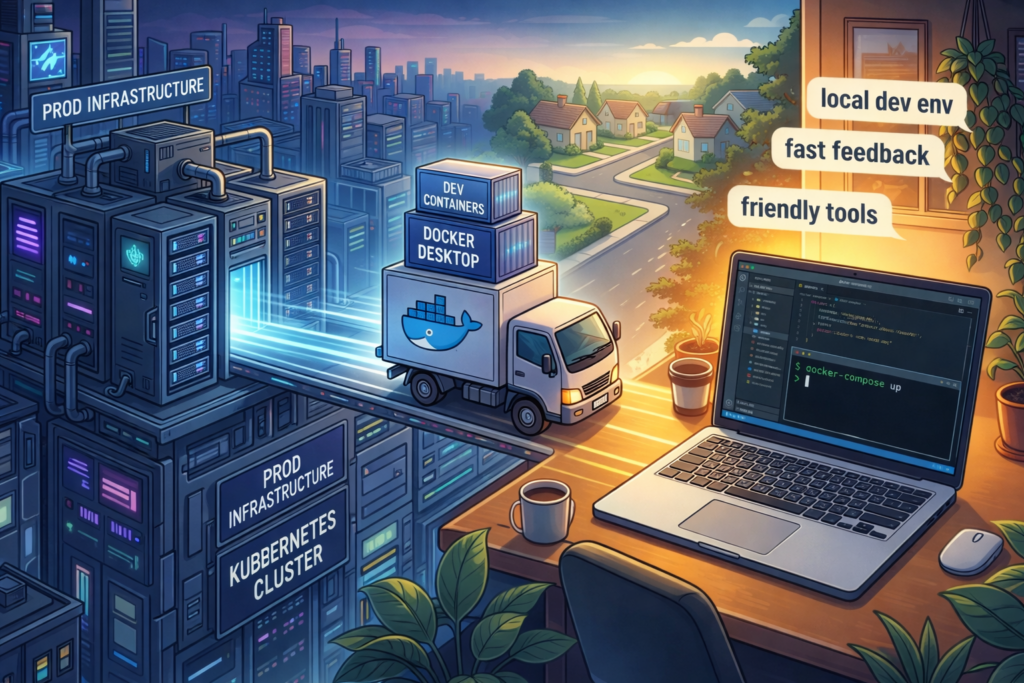
That shift is not a tragedy. It’s not even a breakup. It’s more like Docker moved out of the busy downtown apartment called “production” and into a cozy suburb called “developer experience”, where the lawns are tidy, the tools are friendly, and nobody panics if you restart everything three times before lunch.

This article is about what changed, why it changed, and why Docker is still very much worth knowing, even if your production clusters rarely whisper its name anymore.

What we mean when we say Docker

One reason this topic gets messy is that “Docker” is a single word used to describe several different things, and those things have very different jobs.

  • Docker Desktop is the product that many developers actually interact with day to day, especially on macOS and Windows.
  • Docker Engine and the Docker daemon are the background machinery that runs containers on a host.
  • The Docker CLI and Dockerfile workflow are the human-friendly interface and the packaging format that people have built habits around.

When someone says “Docker is dying,” they usually mean “Docker Engine is no longer the default runtime in production platforms.” When someone says “Docker is everywhere,” they often mean “Docker Desktop and Dockerfile workflows are still the easiest way to get a containerized dev environment running quickly.”

Both statements can be true at the same time, which is annoying, because humans prefer their opinions to come in single-serving packages.

Docker’s rise and the good kind of magic

Docker didn’t become popular because it invented containers. Containers existed before Docker. Docker became popular because it made containers feel approachable.

It offered a developer experience that felt like a small miracle:

  • You could build images with a straightforward command.
  • You could run containers without a small dissertation on Linux namespaces.
  • You could push to registries and share a runnable artifact.
  • You could spin up multi-service environments with Docker Compose.

Docker took something that used to feel like “advanced systems programming” and turned it into “a thing you can demo on a Tuesday.”

If you were around for the era of XAMPP, WAMP, and “download this zip file, then pray,” Docker felt like a modern version of that, except it didn’t break as soon as you looked at it funny.

The plot twist in production

Here is the part where the story becomes less romantic.

Production infrastructure grew up.

Not emotionally, obviously. Infrastructure does not have feelings. It has outages. But it did mature in a very specific way: platforms started to standardize around container runtimes and interfaces that did not require Docker’s full bundled experience.

Docker was the friendly all-in-one kitchen appliance. Production systems wanted an industrial kitchen with separate appliances, separate controls, and fewer surprises.

Three forces accelerated the shift.

Licensing concerns changed the mood

Docker Desktop licensing changes made a lot of companies pause, not because engineers suddenly hated Docker, but because legal teams developed a new hobby.

The typical sequence went like this:

  1. Someone in finance asked, “How many Docker Desktop users do we have?”
  2. Someone in legal asked, “What exactly are we paying for?”
  3. Someone in infrastructure said, “We can probably do this with Podman or nerdctl.”

A tool can survive engineers complaining about it. Engineers complain about everything. The real danger is when procurement turns your favorite tool into a spreadsheet with a red cell.

The result was predictable: even developers who loved Docker started exploring alternatives, if only to reduce risk and friction.

The runtime world standardized without Docker

Modern container platforms increasingly rely on runtimes like containerd and interfaces like the Container Runtime Interface (CRI).

Kubernetes is a key example. Kubernetes removed the direct Docker integration path that many people depended on in earlier years, and the ecosystem moved toward CRI-native runtimes. The point was not to “ban Docker.” The point was to standardize around an interface designed specifically for orchestrators.

This is a subtle but important difference.

  • Docker is a complete experience, build, run, network, UX, opinions included.
  • Orchestrators prefer modular components, and they want to speak to a runtime through a stable interface.

The practical effect is what most teams feel today:

  • In many Kubernetes environments, the runtime is containerd, not Docker Engine.
  • Managed platforms such as ECS Fargate and other orchestrated services often run containers without involving Docker at all.

Docker, the daemon, became optional.

Security teams like control, and they do not like surprises

Security teams do not wake up in the morning and ask, “How can I ruin a developer’s day?” They wake up and ask, “How can I make sure the host does not become a piñata full of root access?”

Docker can be perfectly secure when used well. The problem is that it can also be spectacularly insecure when used casually.

Two recurring issues show up in real organizations:

  • The Docker socket is powerful. Expose it carelessly, and you are effectively offering a fast lane to host-level control.
  • The classic pattern of “just give developers sudo docker” can become a horror story with a polite ticket number.

Tools and workflows that separate concerns tend to make security people calmer.

  • Build tools such as BuildKit and buildah isolate image creation.
  • Rootless approaches, where feasible, reduce blast radius.
  • Runtime components can be locked down and audited more granularly.

This is not about blaming Docker. It’s about organizations preferring a setup where the sharp knives are stored in a drawer, not taped to the ceiling.

What Docker is now

Docker’s new role is less “the thing that runs production” and more “the thing that makes local development less painful.”

And that role is huge.

Docker still shines in areas where convenience matters most:

  • Local development environments
  • Quick reproducible demos
  • Multi-service stacks on a laptop
  • Cross-platform consistency on macOS, Windows, and Linux
  • Teams that need a simple standard for “how do I run this?”

If your job is to onboard new engineers quickly, Docker is still one of the best ways to avoid the dreaded onboarding ritual where a senior engineer says, “It works on my machine,” and the junior engineer quietly wonders if their machine has offended someone.

A small example that still earns its keep

Here is a minimal Docker Compose stack that demonstrates why Docker remains lovable for local development.

services:
  api:
    build: .
    ports:
      - "8080:8080"
    environment:
      DATABASE_URL: postgres://postgres:example@db:5432/app
    depends_on:
      - db

  db:
    image: postgres:16
    environment:
      POSTGRES_PASSWORD: example
      POSTGRES_DB: app
    ports:
      - "5432:5432"

This is not sophisticated. That is the point. It is the “plug it in and it works” power that made Docker famous.

Dockerfile is not the Docker daemon

This is where the confusion often peaks.

A Dockerfile is a packaging recipe. It is widely used. It remains a de facto standard, even when the runtime or build system is not Docker.

Many teams still write Dockerfiles, but build them using tooling that does not rely on the Docker daemon on the CI runner.

Here is a BuildKit example that builds and pushes an image without treating the Docker daemon as a requirement.

buildctl build \
  --frontend dockerfile.v0 \
  --local context=. \
  --local dockerfile=. \
  --output type=image,name=registry.example.com/app:latest,push=true

You can read this as “Dockerfile lives on, but Docker-as-a-daemon is no longer the main character.”

This separation matters because it changes how you design CI.

  • You can build images in environments where running a privileged Docker daemon is undesirable.
  • You can use builders that integrate better with Kubernetes or cloud-native pipelines.
  • You can reduce the amount of host-level power you hand out just to produce an artifact.

What replaced Docker in production pipelines

When teams say they are moving away from Docker in production, they rarely mean “we stopped using containers.” They mean the tooling around building and running containers is shifting.

Common patterns include:

  • containerd as the runtime in Kubernetes and other orchestrated environments
  • BuildKit for efficient builds and caching
  • kaniko for building images inside Kubernetes without a Docker daemon
  • ko for building and publishing Go applications as images without a Dockerfile
  • Buildpacks or Nixpacks for turning source code into runnable images using standardized build logic
  • Dagger and similar tools for defining CI pipelines that treat builds as portable graphs of steps

You do not need to use all of these. You just need to understand the trend.

Production platforms want:

  • Standard interfaces
  • Smaller, auditable components
  • Reduced privilege
  • Reproducible builds

Docker can participate in that world, but it no longer owns the whole stage.

A Kubernetes-friendly image build example

If you want a concrete example of the “no Docker daemon” approach, kaniko is a popular choice in cluster-native pipelines.

apiVersion: batch/v1
kind: Job
metadata:
  name: build-image-kaniko
spec:
  template:
    spec:
      restartPolicy: Never
      containers:
        - name: kaniko
          image: gcr.io/kaniko-project/executor:latest
          args:
            - "--dockerfile=Dockerfile"
            - "--context=dir:///workspace"
            - "--destination=registry.example.com/app:latest"
          volumeMounts:
            - name: workspace
              mountPath: /workspace
      volumes:
        - name: workspace
          emptyDir: {}

This is intentionally simplified. In a real setup, you would bring your own workspace, your own auth mechanism, and your own caching strategy. But even in this small example, the idea is visible: build the image where it makes sense, without turning every CI runner into a tiny Docker host.

The practical takeaway for architects and platform teams

If you are designing platforms, the question is not “Should we ban Docker?” The question is “Where does Docker add value, and where does it create unnecessary coupling?”

A simple mental model helps.

  • Developer laptops benefit from a friendly tool that makes local environments predictable.
  • CI systems benefit from builder choices that reduce privilege and improve caching.
  • Production runtimes benefit from standardized interfaces and minimal moving parts.

Docker tends to dominate the first category, participates in the second, and is increasingly optional in the third.

If your team still uses Docker Engine on production hosts, that is not automatically wrong. It might be perfectly fine. The important thing is that you are doing it intentionally, not because “that’s how we’ve always done it.”

Why this is actually a success story

There is a temptation in tech to treat every shift as a funeral.

But Docker moving toward local development is not a collapse. It is a sign that the ecosystem absorbed Docker’s best ideas and made them normal.

The standardization of OCI images, the popularity of Dockerfile workflows, and the expectations around reproducible environments, all of that is Docker’s legacy living in the walls.

Docker is still the tool you reach for when you want to:

  • start fast
  • teach someone new
  • run a realistic stack on a laptop
  • avoid spending your afternoon installing the same dependencies in three different ways

That is not “less important.” That is foundational.

If anything, Docker’s new role resembles a very specific kind of modern utility.

It is like Visual Studio Code.

Everyone uses it. Everyone argues about it. It is not what you deploy to production, but it is the thing that makes building and testing your work feel sane.

Docker didn’t die.

It just moved to your laptop, brought snacks, and quietly let production run the serious machinery without demanding to be invited to every meeting.

Let IAM handle the secrets you can avoid

There are two kinds of secrets in cloud security.

The first kind is the legitimate kind: a third-party API token, a password for something you do not control, a certificate you cannot simply wish into existence.

The second kind is the kind we invent because we are in a hurry: long-lived access keys, copied into a config file, then copied into a Docker image, then copied into a ticket, then copied into the attacker’s weekend plans.

This article is about refusing to participate in that second category.

Not because secrets are evil. Because static credentials are the “spare house key under the flowerpot” of AWS. Convenient, popular, and a little too generous with access for something that can be photographed.

The goal is not “no secrets exist.” The goal is no secrets live in code, in images, or in long-lived credentials.

If you do that, your security posture stops depending on perfect human behavior, which is great because humans are famously inconsistent. (We cannot all be trusted with a jar of cookies, and we definitely cannot all be trusted with production AWS keys.)

Why this works in real life

AWS already has a mechanism designed to prevent your applications from holding permanent credentials: IAM roles and temporary credentials (STS).

When your Lambda runs with an execution role, AWS hands it short-lived credentials automatically. They rotate on their own. There is nothing to copy, nothing to stash, nothing to rotate in a spreadsheet named FINAL-final-rotation-plan.xlsx.

What remains are the unavoidable secrets, usually tied to systems outside AWS. For those, you store them in AWS Secrets Manager and retrieve them at runtime. Not at build time. Not at deploy time. Not by pasting them into an environment variable and calling it “secure” because you used uppercase letters.

This gives you a practical split:

  • Avoidable secrets are replaced by IAM roles and temporary credentials
  • Unavoidable secrets go into Secrets Manager, encrypted and tightly scoped

The architecture in one picture

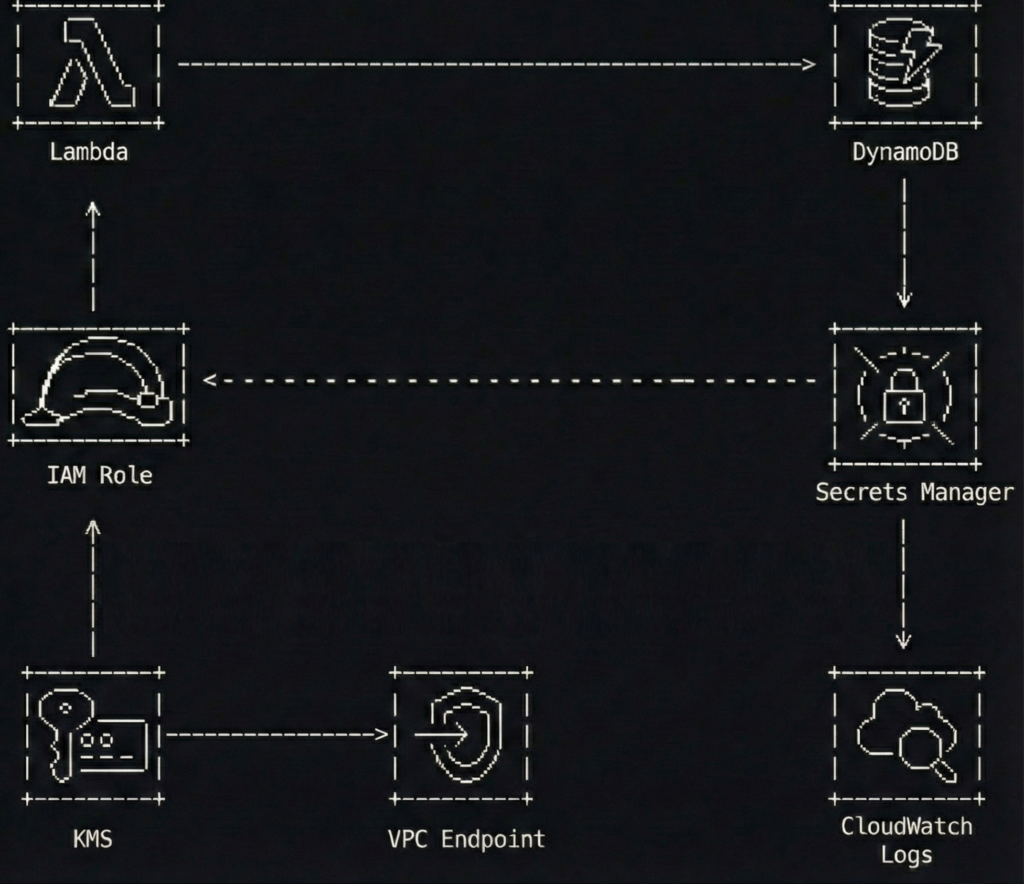
A simple flow to keep in mind:

  1. A Lambda function runs with an IAM execution role
  2. The function fetches one third-party API key from Secrets Manager at runtime
  3. The function calls the third-party API and writes results to DynamoDB
  4. Network access to Secrets Manager stays private through a VPC interface endpoint (when the Lambda runs in a VPC)

The best part is what you do not see.

No access keys. No “temporary” keys that have been temporary since 2021. No secrets baked into ZIPs or container layers.

What this protects you from

This pattern is not a magic spell. It is a seatbelt.

It helps reduce the chance of:

  • Credentials leaking through Git history, build logs, tickets, screenshots, or well-meaning copy-paste
  • Forgotten key rotation schedules that quietly become “never.”
  • Overpowered policies that turn a small bug into a full account cleanup
  • Unnecessary public internet paths for sensitive AWS API calls

Now let’s build it, step by step, with code snippets that are intentionally sanitized.

Step 1 build an IAM execution role with tight policies

The execution role is the front door key your Lambda carries.

If you give it access to everything, it will eventually use that access, if only because your future self will forget why it was there and leave it in place “just in case.”

Keep it boring. Keep it small.

Here is an example IAM policy for a Lambda that only needs to:

  • write to one DynamoDB table
  • read one secret from Secrets Manager
  • decrypt using one KMS key (optional, depending on how you configure encryption)
{
  "Version": "2012-10-17",
  "Statement": [
    {
      "Sid": "WriteToOneTable",
      "Effect": "Allow",
      "Action": [
        "dynamodb:PutItem",
        "dynamodb:UpdateItem"
      ],
      "Resource": "arn:aws:dynamodb:eu-west-1:111122223333:table/app-results-prod"
    },
    {
      "Sid": "ReadOneSecret",
      "Effect": "Allow",
      "Action": [
        "secretsmanager:GetSecretValue"
      ],
      "Resource": "arn:aws:secretsmanager:eu-west-1:111122223333:secret:thirdparty/weather-api-key-*"
    },
    {
      "Sid": "DecryptOnlyThatKey",
      "Effect": "Allow",
      "Action": [
        "kms:Decrypt"
      ],
      "Resource": "arn:aws:kms:eu-west-1:111122223333:key/12345678-90ab-cdef-1234-567890abcdef",
      "Condition": {
        "StringEquals": {
          "kms:ViaService": "secretsmanager.eu-west-1.amazonaws.com"
        }
      }
    }
  ]
}

A few notes that save you from future regret:

  • The secret ARN ends with -* because Secrets Manager appends a random suffix.
  • The KMS condition helps ensure the key is used only through Secrets Manager, not as a general-purpose decryption service.
  • You can skip the explicit kms:Decrypt statement if you use the AWS-managed key and accept the default behavior, but customer-managed keys are common in regulated environments.

Step 2 store the unavoidable secret properly

Secrets Manager is not a place to dump everything. It is a place to store what you truly cannot avoid.

A third-party API key is a perfect example because IAM cannot replace it. AWS cannot assume a role in someone else’s SaaS.

Use a JSON secret so you can extend it later without creating a new secret every time you add a field.

{
  "api_key": "REDACTED-EXAMPLE-TOKEN"
}

If you like the CLI (and I do, because buttons are too easy to misclick), create the secret like this:

aws secretsmanager create-secret \
  --name "thirdparty/weather-api-key" \
  --description "Token for the Weatherly API used by the ingestion Lambda" \
  --secret-string '{"api_key":"REDACTED-EXAMPLE-TOKEN"}' \
  --region eu-west-1

Then configure:

  • encryption with a customer-managed KMS key if required
  • rotation if the provider supports it (rotation is amazing when it is real, and decorative when the vendor does not allow it)

If the vendor does not support rotation, you still benefit from central storage, access control, audit logging, and removing the secret from code.

Step 3 lock down secret access with a resource policy

Identity-based policies on the Lambda role are necessary, but resource policies are a nice extra lock.

Think of it like this: your role policy is the key. The resource policy is the bouncer who checks the wristband.

Here is a resource policy that allows only one role to read the secret.

{
  "Version": "2012-10-17",
  "Statement": [
    {
      "Sid": "AllowOnlyIngestionRole",
      "Effect": "Allow",
      "Principal": {
        "AWS": "arn:aws:iam::111122223333:role/lambda-ingestion-prod"
      },
      "Action": "secretsmanager:GetSecretValue",
      "Resource": "*"
    },
    {
      "Sid": "DenyEverythingElse",
      "Effect": "Deny",
      "Principal": "*",
      "Action": "secretsmanager:GetSecretValue",
      "Resource": "*",
      "Condition": {
        "StringNotEquals": {
          "aws:PrincipalArn": "arn:aws:iam::111122223333:role/lambda-ingestion-prod"
        }
      }
    }
  ]
}

This is intentionally strict. Strict is good. Strict is how you avoid writing apology emails.

Step 4 keep Secrets Manager traffic private with a VPC endpoint

If your Lambda runs inside a VPC, it will not automatically have internet access. That is often the point.

In that case, you do not want the function reaching Secrets Manager through a NAT gateway if you can avoid it. NAT works, but it is like walking your valuables through a crowded shopping mall because the back door is locked.

Use an interface VPC endpoint for Secrets Manager.

Here is a Terraform example (sanitized) that creates the endpoint and limits access using a dedicated security group.

resource "aws_security_group" "secrets_endpoint_sg" {
  name        = "secrets-endpoint-sg"
  description = "Allow HTTPS from Lambda to Secrets Manager endpoint"
  vpc_id      = aws_vpc.main.id

  ingress {
    from_port       = 443
    to_port         = 443
    protocol        = "tcp"
    security_groups = [aws_security_group.lambda_sg.id]
  }

  egress {
    from_port   = 0
    to_port     = 0
    protocol    = "-1"
    cidr_blocks = ["0.0.0.0/0"]
  }
}

resource "aws_vpc_endpoint" "secretsmanager" {
  vpc_id              = aws_vpc.main.id
  service_name        = "com.amazonaws.eu-west-1.secretsmanager"
  vpc_endpoint_type   = "Interface"
  subnet_ids          = [aws_subnet.private_a.id, aws_subnet.private_b.id]
  private_dns_enabled = true
  security_group_ids  = [aws_security_group.secrets_endpoint_sg.id]
}

If your Lambda is not in a VPC, you do not need this step. The function will reach Secrets Manager over AWS’s managed network path by default.

If you want to go further, consider adding a DynamoDB gateway endpoint too, so your function can write to DynamoDB without touching the public internet.

Step 5 retrieve the secret at runtime without turning logs into a confession

This is where many teams accidentally reinvent the problem.

They remove the secret from the code, then log it. Or they put it in an environment variable because “it is not in the repository,” which is a bit like saying “the spare key is not under the flowerpot, it is under the welcome mat.”

The clean approach is:

  • store only the secret name (not the secret value) as configuration
  • retrieve the value at runtime
  • cache it briefly to reduce calls and latency
  • never print it, even when debugging, especially when debugging

Here is a Python example for AWS Lambda with a tiny TTL cache.

import json
import os
import time
import boto3

_secrets_client = boto3.client("secretsmanager")
_cached_value = None
_cached_until = 0

SECRET_ID = os.getenv("THIRDPARTY_SECRET_ID", "thirdparty/weather-api-key")
CACHE_TTL_SECONDS = int(os.getenv("SECRET_CACHE_TTL_SECONDS", "300"))


def _get_api_key() -> str:
    global _cached_value, _cached_until

    now = int(time.time())
    if _cached_value and now < _cached_until:
        return _cached_value

    resp = _secrets_client.get_secret_value(SecretId=SECRET_ID)
    payload = json.loads(resp["SecretString"])

    api_key = payload["api_key"]
    _cached_value = api_key
    _cached_until = now + CACHE_TTL_SECONDS
    return api_key


def lambda_handler(event, context):
    api_key = _get_api_key()

    # Use the key without ever logging it
    results = call_weatherly_api(api_key=api_key, city=event.get("city", "Seville"))

    write_to_dynamodb(results)

    return {
        "status": "ok",
        "items": len(results) if hasattr(results, "__len__") else 1
    }

This snippet is intentionally short. The important part is the pattern:

  • minimal secret access
  • controlled cache
  • zero secret output

If you prefer a library, AWS provides a Secrets Manager caching client for some runtimes, and AWS Lambda Powertools can help with structured logging. Use them if they fit your stack.

Step 6 make security noisy with logs and alarms

Security without visibility is just hope with a nicer font.

At a minimum:

  • enable CloudTrail in the account
  • ensure Secrets Manager events are captured
  • alert on unusual secret access patterns

A simple and practical approach is a CloudWatch metric filter for GetSecretValue events coming from unexpected principals. Another is to build a dashboard showing:

  • Lambda errors
  • Secrets Manager throttles
  • sudden spikes in secret reads

Here is a tiny Terraform example that keeps your Lambda logs from living forever (because storage is forever, but your attention span is not).

resource "aws_cloudwatch_log_group" "lambda_logs" {
  name              = "/aws/lambda/lambda-ingestion-prod"
  retention_in_days = 14
}

Also consider:

  • IAM Access Analyzer to spot risky resource policies
  • AWS Config rules or guardrails if your organization uses them
  • an alarm on unexpected NAT data processing if you intended to keep traffic private

Common mistakes I have made, so you do not have to

I am listing these because I have either done them personally or watched them happen in slow motion.

  1. Using a wildcard secret policy
    secretsmanager:GetSecretValue on * feels convenient until it is a breach multiplier.
  2. Putting secret values into environment variables
    Environment variables are not evil, but they are easy to leak through debugging, dumps, tooling, or careless logging. Store secret names there, not secret contents.
  3. Retrieving secrets at build time
    Build logs live forever in the places you forget to clean. Runtime retrieval keeps secrets out of build systems.
  4. Logging too much while debugging
    The fastest way to leak a secret is to print it “just once.” It will not be just once.
  5. Skipping the endpoint and relying on NAT by accident
    The NAT gateway is not evil either. It is just an expensive and unnecessary hallway if a private door exists.

A two minute checklist you can steal

  • Your Lambda uses an IAM execution role, not access keys
  • The role policy scopes Secrets Manager access to one secret ARN pattern
  • The secret has a resource policy that only allows the expected role
  • Secrets are encrypted with KMS when required
  • The secret value is never stored in code, images, build logs, or environment variables
  • If Lambda runs in a VPC, you use an interface VPC endpoint for Secrets Manager
  • You have CloudTrail enabled and you can answer “who accessed this secret” without guessing

Extra thoughts

If you remove long-lived credentials from your applications, you remove an entire class of problems.

You stop rotating keys that should never have existed in the first place.

You stop pretending that “we will remember to clean it up later” is a security strategy.

And you get a calmer life, which is underrated in engineering.

Let IAM handle the secrets you can avoid.

Then let Secrets Manager handle the secrets you cannot.

And let your code do what it was meant to do: process data, not babysit keys like they are a toddler holding a permanent marker.

How Dropbox saved millions by leaving AWS

Most of us treat cloud storage like a magical, bottomless attic. You throw your digital clutter into a folder: PDFs of tax returns from 2014, blurred photos of a cat that has long since passed away, unfinished drafts of novels, and you forget about them. It feels weightless. It feels ephemeral. But somewhere in a windowless concrete bunker in Virginia or Oregon, a spinning platter of rust is working very hard to keep those cat photos alive. And every time that platter spins, a meter is running.

For the first decade of its existence, Dropbox was essentially a very polished, user-friendly frontend for Amazon’s garage. When you saved a file to Dropbox, their servers handled the metadata (the index card that says where the file is), but the actual payload (the bytes themselves) was quietly ushered into Amazon S3. It was a brilliant arrangement. It allowed a small startup to scale without worrying about hard drives catching fire or power supplies exploding.

But then Dropbox grew up. And when you grow up, living in a hotel starts to get expensive.

By 2015, Dropbox was storing exabytes of data. The problem wasn’t just the storage fee, which is akin to paying rent. The real killer was the “egress” and request fees. Amazon’s business model is brilliantly designed to function like the Hotel California: you can check out any time you like, but leaving with your luggage is going to cost you a fortune. Every time a user opened a file, edited a document, or synced a folder, a tiny cash register dinged in Jeff Bezos’s headquarters.

The bill was no longer just an operating expense. It was an existential threat. The unit economics were starting to look less like a software business and more like a philanthropy dedicated to funding Amazon’s R&D department.

So, they decided to do something that is generally considered suicidal in the modern software era. They decided to leave the cloud.

The audacity of building your own closet

In Silicon Valley, telling investors you plan to build your own data centers is like telling your spouse you plan to perform your own appendectomy using a steak knife and a YouTube tutorial. It is seen as messy, dangerous, and generally regressive. The prevailing wisdom is that hardware is a commodity, a utility like electricity or sewage, and you should let the professionals handle the sludge.

Dropbox ignored this. They launched a project with the internally ironic name “Magic Pocket.” The goal was to build a storage system from scratch that was cheaper than Amazon S3 but just as reliable.

To understand the scale of this bad idea, you have to understand that S3 is a miracle of engineering. It boasts “eleven nines” of durability (99.999999999%). That means if you store 10,000 files, you might lose one every 10 million years. Replicating that level of reliability requires an obsessive, almost pathological attention to detail.

Dropbox wasn’t just buying servers from Dell and plugging them in. They were designing their own chassis. They realized that standard storage servers were too generic. They needed density. They built a custom box nicknamed “Diskotech” (because engineers love puns almost as much as they love caffeine) that could cram up to a petabyte of storage into a rack unit that was barely deeper than a coffee table.

But hardware has a nasty habit of obeying the laws of physics, and physics is often annoying.

Good vibrations and bad hard drives

When you pack hundreds of spinning hard drives into a tight metal box, you encounter a phenomenon that sounds like a joke but is actually a nightmare: vibration.

Hard drives are mechanical divas. They consist of magnetic platters spinning at 7,200 revolutions per minute, with a read/write head hovering nanometers above the surface. If the drive vibrates too much, that head can’t find the track. It misses. It has to wait for the platter to spin around again. This introduces latency. If enough drives in a rack vibrate in harmony, the performance drops off a cliff.

The Dropbox team found that even the fans cooling the servers were causing acoustic vibrations that made the hard drives sulk. They had to become experts in firmware, dampening materials, and the resonant frequencies of sheet metal. It is the kind of problem you simply do not have when you rent space in the cloud. In the cloud, a vibrating server is someone else’s ticket. When you own the metal, it’s your weekend.

Then there was the software. They couldn’t just use off-the-shelf Linux tools. They wrote their own storage software in Rust. At the time, Rust was the new kid on the block, a language that promised memory safety without the garbage collection pauses of Go or Java. Using a relatively new language to manage the world’s most precious data was a gamble, but it paid off. It allowed them to squeeze every ounce of efficiency out of the CPU, keeping the power bill (and the heat) down.

The great migration was a stealth mission

Building the “Magic Pocket” was only half the battle. The other half was moving 500 petabytes of data from Amazon to these new custom-built caverns without losing a single byte and without any user noticing.

They adopted a strategy that I like to call the “belt, suspenders, and duct tape” approach. For a long period, they used a technique called dual writing. Every time you uploaded a file, Dropbox would save a copy to Amazon S3 (the old reliable) and a copy to their new Magic Pocket (the risky experiment).

They then spent months just verifying the data. They would ask the Magic Pocket to retrieve a file, compare it to the S3 version, and check if they matched perfectly. It was a paranoia-fueled audit. Only when they were absolutely certain that the new system wasn’t eating homework did they start disconnecting the Amazon feed.

They treated the migration like a bomb disposal operation. They moved users over silently. One day, you were fetching your resume from an AWS server in Virginia; the next day, you were fetching it from a custom Dropbox server in Texas. The transfer speeds were often better, but nobody sent out a press release. The ultimate sign of success in infrastructure engineering is that nobody knows you did anything at all.

The savings were vulgar

The financial impact was immediate and staggering. Over the two years following the migration, Dropbox saved nearly $75 million in operating costs. Their gross margins, the holy grail of SaaS financials, jumped from a worrisome 33% to a healthy 67%.

By owning the hardware, they cut out the middleman’s profit margin. They also gained the ability to use “Shingled Magnetic Recording” (SMR) drives. These are cheaper, high-density drives that are notoriously slow at writing data because the data tracks overlap like roof shingles (hence the name). Standard databases hate them. But because Dropbox wrote their own software specifically for their own use case (write once, read many), they could use these cheap, slow drives without the performance penalty.

This is the hidden superpower of leaving the cloud: optimization. AWS has to build servers that work reasonably well for everyone, from Netflix to the CIA to a teenager running a Minecraft server. That means they are optimized for the average. Dropbox optimized for the specific. They built a suit that fit them perfectly, rather than buying a “one size fits all” poncho from the rack.

Why you should probably not do this

If you are reading this and thinking, “I should build my own data center,” please stop. Go for a walk. Drink some water.

Dropbox’s success is the exception that proves the rule. They had a very specific workload (huge files, rarely modified) and a scale (exabytes) that justified the massive R&D expense. They had the budget to hire world-class engineers who dream in Rust and understand the acoustic properties of cooling fans.

For 99% of companies, the cloud is still the right answer. The premium you pay to AWS or Google is not just for storage; it is an insurance policy against complexity. You are paying so that you never have to think about a failed power supply unit at 3:00 AM on a Sunday. You are paying so that you don’t have to negotiate contracts for fiber optic cables or worry about the price of real estate in Nevada.

However, Dropbox didn’t leave the cloud entirely. And this is the punchline.

Today, Dropbox is a hybrid. They store the files, the cold, heavy, static blocks of data, in their own Magic Pocket. But the metadata? The search functions? The flashy AI features that summarize your documents? That all still runs in the cloud.

They treat the public cloud like a utility kitchen. When they need to cook up something complex that requires thousands of CPUs for an hour, they rent them from Amazon or Google. When they just need to store the leftovers, they put them in their own fridge.

Adulthood is knowing when to rent

The story of Dropbox leaving the cloud is not really about leaving. It is about maturity.

In the early days of a startup, you prioritize speed. You pay the “cloud tax” because it allows you to move fast and break things. But there comes a point where the tax becomes a burden.

Dropbox realized that renting is great for flexibility, but ownership is the only way to build equity. They turned a variable cost (a bill that grows every time a user uploads a photo) into a fixed cost (a warehouse full of depreciating assets). It is less sexy. It requires more plumbing.

But there is a quiet dignity in owning your own mess. Dropbox looked at the cloud, with its infinite promise and infinite invoices, and decided that sometimes, the most radical innovation is simply buying a screwdriver, rolling up your sleeves, and building the shelf yourself. Just be prepared for the vibration.