
Serverless

Cloud Run finally adopted an insomniac

My AI agent hung up on me after exactly five minutes. It did not wait for four minutes, nor did it stretch to six. The line went dead at five minutes flat, displaying the sterile punctuality of a scheduled dental cleaning and the interpersonal warmth of a parking meter. I reconnected. Five minutes later, another hang-up. I reconnected yet again, driven by that specific primate delusion that makes humans violently mash an elevator button that is already glowing. Five minutes.

This is the clinical record of how that aggressively rude disconnection finally explained to me why Google issued a fourth child to the Cloud Run family, and why this particular infant absolutely refuses to go to bed.

A family that already reached maximum occupancy

Cloud Run is the designated quarantine zone where most of my experiments go to live, especially the ones involving artificial intelligence workloads. Therefore, when Google announced Cloud Run instances in preview, my initial reaction was not one of boundless joy. It was the haunted expression of an exhausted parent being told that yet another sibling is on the way. Cloud Run already possessed three execution models, and they seemed to cover every conceivable household chore:

  • Services, the aggressively sociable one. This sibling greets every single visitor, answers every request, and drops into a deep coma the exact millisecond the last guest leaves the living room. The marketing brochure politely refers to this narcolepsy as “scaling to zero.”
  • Jobs, the brooding teenager who shows up, runs a five-hour load of heavy laundry, and departs without saying goodbye or making eye contact.
  • Worker Pools, the subterranean dweller. It lives in the basement, quietly pulls tasks from a queue, and possesses no public URL. Nobody has its phone number. Nobody asks how its day went.

Why did we need a fourth? What bizarre task could this new arrival possibly execute that the other three could not handle between them?

(A brief warning about vocabulary before we proceed. Cloud Run already utilized the word “instance” for the container copies a Service spins up when it scales. Now there is a separate product officially named Cloud Run instances. This linguistic choice means the sentence “my instance ran out of instances” is now grammatically valid. Sooner or later someone will say this in a corporate meeting with a completely straight face. For our purposes, “Instance” with a capital I refers to the new product. When in doubt during your daily life, ask the speaker which instance they mean. Then ask them again just to be safe.)

The experiment that worked and explained absolutely nothing

My plan was to find the justification for this new product empirically. I would build an AI agent that runs long-lived sessions and keeps temporary data locally, deploy it as a regular Cloud Run Service, and watch it fail spectacularly. The failure would reveal the true purpose of Instances.

I mounted a Cloud Storage bucket as a volume and gave the agent a tool to read and write its session state there. I added an ephemeral disk for the scratch data it produced mid-task. Then I sat back and waited for the disaster.

Disaster did not come. The agent handled long sessions without complaint. It scaled to zero when ignored, costing me nothing, and when I called it later it picked up the exact same session as if it had just stepped out for a coffee. Scientifically speaking, this was the worst possible outcome. A total success without any comprehension of the underlying mechanics is just a failure with an excellent public relations team.

Of course, the setup was deeply flawed. Cloud Storage mounted through FUSE (Filesystem in Userspace) is less like a modern hard drive and more like trying to maintain a deep, philosophical conversation by sending telegrams via carrier pigeons with bad attitudes. The latency is palpable, and real POSIX file locking is completely off the menu. The ephemeral disk, meanwhile, was wiped completely clean every time the service scaled to zero. It was like hiring an overzealous sanitation team that incinerates your filing cabinets the moment you step out for a bathroom break.

But here is the catch. None of those problems justified the new Instances product, because an Instance would suffer from the exact same storage limitations. My confusion had metastasized into a peer-reviewed finding.

The waiter who violently confiscates your plate

The breakthrough arrived when I stopped thinking of agents as people who mail letters and started thinking of them as people who make phone calls.

Request and response is letter writing. A question goes out, an answer comes back, and the mailbox goes quiet. That is the natural habitat of a Cloud Run Service. But many long-running agents do not write letters. They open a WebSocket and keep it perpetually open, pushing a steady trickle of updates back to the user. That is a phone call meant to stay active for hours.

When I rebuilt my agent using this methodology, I met the five-minute hang-up from the first paragraph. The culprit was the request timeout. On a Cloud Run Service, a WebSocket connection is treated as a standard request, and every request has a deadline. You can stretch this maximum timeout to 60 minutes. To a long-running AI agent, sixty minutes is equivalent to a waiter staring unblinkingly into your eyes while ripping the plate from your hands and charging you for the privilege of not swallowing your food.

This is precisely the gap Cloud Run instances fill. Unlike Cloud Run services that scale based on incoming traffic, an Instance is a dedicated compute container managed manually through lifecycle transitions (create, stop, start, update, delete). It gets an HTTPS address that survives updates and restarts. It holds connections open. It does not suffer from narcolepsy when traffic stops. It is the insomniac cousin who always picks up the phone at three in the morning.

Creating one requires a single beta command. Just remember to keep IAM invoker authentication enabled. Bypassing IAM is fine for a quick demo, but for an AI agent with access to your calendar and inbox, you probably do not want it casually chatting with the entire internet.

What the insomniac actually does for a living

Long-running AI agents got me through the door, but they are not the only tenants suited for this environment.

Personal agents and workflow engines. If I run an automation tool like n8n or a personal agent for myself, I do not need it to scale to a thousand users. I need it awake, holding its state, and reachable at a stable URL that refuses to hang up after an hour. This is the flagship use case.

A quick bastion host. Giving developers access to a private database usually requires provisioning a Virtual Machine and babysitting SSH keys, which is the IT equivalent of building a dedicated two-story garage just to store a single garden rake. Now, developers can use Instances as bastion hosts to reach internal resources. Just check the current documentation, because SSH access for this preview product changes rapidly.

Sandboxes and code playgrounds. Sometimes you just need an addressable box to execute code you do not entirely trust, a playground you fully intend to delete next week. Pair an Instance with Cloud Run sandboxes, and you get that environment without standing up a massive Kubernetes cluster.

The argument for Instances is not raw capability. A dedicated Virtual Machine can do all of this. The argument is convenience and price. Running an Instance with 1 vCPU and 1 GiB of memory continuously for a month costs around $5.70. Unlike a vending machine sandwich of the exact same price, this compute container will not give you severe heartburn, though its absolute lack of local persistent storage might cause a mild nervous breakdown. The insomniac does its own laundry, saving you from patching operating systems or provisioning HTTPS endpoints.

The fine print, read aloud in a clinical setting

Every adoption comes with paperwork. Here is the part of the file the agency hoped you would not read.

It is a goldfish. An Instance is a singleton with zero autoscaling. It is cheap and low maintenance, but if you overfeed it, it floats belly-up. When your app gets a sudden spike in traffic, Cloud Run will not spin up a helpful sibling. Requests will queue politely until they quietly die of old age. Internet users love to tap on the server glass until the poor fish suffers a fatal HTTP-induced collapse. Keep IAM authentication turned on so strangers cannot overfeed a goldfish they cannot reach.

It has nowhere safe to keep its things. An Instance feels like a VM, but it has no local persistent disk. Anything written to the temporary folder lives in the container’s memory, so your scratch files compete directly with your application for RAM. It is like storing your weekly groceries in your jacket pockets.

It suffers from weekly amnesia. Instances can stay active for up to seven days before a mandatory restart policy kicks in. When that happens, everything in memory and on the ephemeral disk is instantly vaporized. Think of a corporate office worker who suffers a blunt-force head trauma every Sunday at midnight. They show up on Monday morning smiling, with their tie on backward, having absolutely no recollection of their own name, waiting for an external database to explain who they are. Anything that must survive this reboot belongs in a bucket.

It is still in preview. Running production workloads on a preview product is not strictly forbidden. It is just the infrastructure version of moving your living room furniture into a house while the construction crew is actively sawing the legs off the staircase.

A Field Guide to the Cloud Run Household

By the end of my investigation, the entire Cloud Run family finally made clinical sense. Since tables tend to break when viewed on mobile phones, think of this as a highly practical survival guide for your next architectural decision:

  • The Service: Reach for this when you need a web app or API that scales massively with traffic and takes a nap when idle.
  • The Job: Reach for this when you have a batch task that runs for hours and then permanently clocks out.
  • The Worker Pool: Reach for this when you need background workers pulling from a queue, hiding safely from the public internet.
  • The Instance: Reach for this when you need one always-on container with a stable URL that holds connections for days without hanging up.

The first three members of the family were built around the very reasonable idea that you should not pay for a machine that is not actively working. The new sibling is built around a different, equally reasonable idea: some things are only useful if they are completely awake when you call them.

So yes, Cloud Run adopted an insomniac. It costs about as much as a sad sandwich, it answers the phone at any hour, it violently forgets its own identity once a week, and it will panic if more than a handful of people speak to it simultaneously. I have worked with human beings exactly like that. Some of them were excellent colleagues.

Just remember, when you tell your team you are “moving the agent to an instance,” clarify exactly which instance you mean. Then clarify it again, just to be safe.


The sandbox finally gets its own apartment

There is a particular kind of optimism that appears in architecture diagrams. It is usually represented by a neat rectangle labelled “sandbox”, placed between “user code” and “production systems”, as if malicious input could be discouraged by tidy geometry.

For years, we have treated this rectangle with a level of trust usually reserved for elevators, bridges, and the one person in the meeting who says, “This should be simple.” Inside the box went user scripts, notebook cells, plugin code, CI jobs, vulnerability scanners, browser IDE sessions and, more recently, AI agents with the confidence of a junior developer and the impulse control of a caffeinated raccoon.

The problem was never running code. Computers are embarrassingly eager to do that. The problem was trusting the code not to bite the furniture.

AWS Lambda MicroVMs are interesting because they arrive at the exact moment when everyone is trying to run more untrusted code, more often, with fewer humans staring nervously at terminal output. They are not just another Lambda feature wearing a party hat. They are AWS trying to give each user, job, or agentic session its own small, isolated room, complete with VM-level walls, preserved state, and a serverless landlord who handles the plumbing.

That is worth paying attention to.

The old sandbox had suspicious drywall

Containers made modern platform engineering possible. They package applications beautifully, start quickly and behave well enough that we have built entire civilizations on top of them, some of which even survive Monday mornings.

But containers share the host kernel. That is not a moral failure. It is simply the bargain. You get speed and density, but the isolation boundary is not the same as a virtual machine boundary. For normal workloads, this is often a perfectly reasonable trade. For hostile or unknown code, it becomes a slightly more awkward dinner party.

Running untrusted code in containers usually requires extra hardening. Seccomp profiles, AppArmor or SELinux policies, rootless runtimes, careful filesystem restrictions, capability dropping, network controls, resource limits, image hygiene, and a collection of internal documents with titles like “please do not run customer code as root again”.

This does not mean containers are bad. It means they have spent years being asked to babysit workloads they would probably rather not meet in a dark data center.

Virtual machines have always had a stronger answer. Each workload gets a separate kernel and a more substantial isolation boundary. Security teams like that sort of thing. They sleep better when the boundary is not made entirely of namespace optimism.

The problem is that traditional VMs are heavier. They take longer to boot, require more lifecycle management and make interactive platforms feel like they are starting a small moon every time someone clicks “run”. If you are building a browser IDE, a notebook platform, or an AI coding assistant, waiting minutes for an execution environment is not a product experience. It is a hostage situation with a spinner.

So teams built their own sandboxes. Some used hardened containers. Some orchestrated pools of VMs. Some built elaborate custom schedulers. Many discovered that safely running other people’s code is less a feature and more a lifestyle choice involving pager alerts.

Firecracker was already doing the quiet work

The interesting part is that AWS already had a lightweight virtualization story hiding in plain sight. Firecracker has powered Lambda and Fargate-style isolation patterns for years. It was designed to provide lightweight MicroVMs with fast startup and strong boundaries, without dragging the full emotional luggage of traditional VM management into every request.

Lambda MicroVMs take that idea and expose it as a managed primitive for a very specific class of applications. These are not ordinary Lambda functions that got promoted. They are separate resources with a distinct lifecycle and a different purpose.

Regular Lambda functions are still excellent for event-driven work. A request arrives, a function runs, a result returns, and the function disappears back into the mist like a responsible woodland creature. That model works beautifully for stateless tasks.

Lambda MicroVMs are for the messier cases. A user opens an interactive coding environment. An AI agent needs to inspect files, run code, call tools, and maintain context. A data analytics session installs packages, loads working files, and waits while the human operator goes to lunch, a meeting, or an unexpected argument with Kubernetes.

These sessions need state. They need isolation. They need to start quickly. They need to pause without losing their belongings.

That combination used to be annoying. Now it has a first-class shape.

Lambda functions answer the doorbell, MicroVMs let the guest stay

The lifecycle is the real story.

You create a MicroVM image from a Dockerfile and a code artifact. AWS initializes the environment and captures a Firecracker snapshot of disk and memory. Later, when you launch a MicroVM from that image, it starts from the pre-initialized snapshot instead of beginning from scratch.

This is the difference between cooking dinner from raw ingredients and reheating yesterday’s lasagna. One is noble. The other is faster and, under the correct emotional conditions, superior.

Snapshots matter because many interactive environments spend a surprising amount of time getting ready to do the thing the user actually asked for. Installing packages, loading runtimes, preparing tools, arranging directories, initializing services, warming models, importing dependencies, and opening files. All of this can become part of the prepared environment.

For AI agents, this is especially useful. The environment can already contain the tools, SDKs, interpreters, and supporting processes the agent needs. When a session starts or resumes, it does not have to assemble itself from a cold and resentful universe.

There is a catch, because distributed systems are legally required to have at least one. Snapshotting state means engineers must think carefully about what is safe to preserve and clone. Unique identifiers, network connections, ephemeral credentials, time-sensitive tokens, and initialization-time randomness may all need special handling.

A snapshot is not just a performance trick. It is a memory of a machine. And memories, as anyone who has debugged a stale cache knows, can lie with great confidence.

Eight hours change the serverless conversation

The 8-hour runtime limit is one of the details that make this more than a faster function wrapper.

Traditional serverless thinking has usually pushed us toward short, stateless execution. Do a job, return a result, vanish. This is clean, scalable, and architecturally pleasing, which means real users immediately invent workflows that do not fit it.

Interactive sessions are not short. Vulnerability scans can run for a while. Data analysis can wander. AI agents can start with “inspect this repository” and somehow end up creating four temporary files, two package installs, and a philosophical dispute with a linter.

Lambda MicroVMs support longer-running sessions while preserving memory, disk, and process state. During idle periods, the environment can be suspended and later resumed. That matters because many workloads are not constantly busy. Humans pause. Agents wait. Browsers sleep. Developers get pulled into meetings where someone says “alignment” until the will to compute leaves the room.

Idle suspension changes the economics and the experience. The user can return to a session that still has its working state, but the platform does not have to pay as if the machine were actively sweating the entire time.

This is still serverless, but not the old cartoon version where everything is tiny, stateless, and over before the coffee cools. It is serverless with a memory.

That sentence would have terrified architects ten years ago. Now it may be exactly what agent platforms need.

AI agents need walls, not vibes

Agentic AI has made sandboxing fashionable in the same way kitchen fires make extinguishers fashionable.

An AI agent can generate code, run commands, inspect files, call APIs, and modify state. Sometimes it does this brilliantly. Sometimes it does this like a raccoon found a shell prompt and decided to modernize procurement.

The security model for agents must assume mistakes. It must assume prompt injection. It must assume unexpected tool use. It must assume that the agent is not evil, just helpful in the way a toddler with admin privileges might be helpful.

This is where per-user or per-session MicroVM isolation becomes important. If each agent run gets its own dedicated execution environment, the blast radius becomes easier to reason about. One confused agent should not be able to interfere with another user’s session. One malicious script should not get a friendly wave from a shared kernel and an invitation to explore the neighborhood.

But this is not magic safety dust. VM-level isolation is a stronger primitive, not a complete architecture.

You still need tight IAM roles. You still need network egress controls. You still need to decide whether the MicroVM can reach the internet, internal APIs, metadata services, package repositories or that one ancient endpoint nobody admits owns the business process. You still need secrets management, audit trails, logging, quotas, timeouts and cleanup.

The agent may now have its own padded serverless studio. You still need to check what tools you left in the drawers.

The security story is better, but not finished

The most dangerous sentence in cloud security is “the service handles that”.

Sometimes the service does handle that. Sometimes it handles one very important layer, and everything around it remains your problem, wearing a fake moustache.

Lambda MicroVMs improve the isolation layer. A dedicated MicroVM with no shared kernel between users is a meaningful architectural improvement for untrusted execution. It gives platform teams a stronger foundation than a basic container sandbox. It also reduces the amount of custom virtualization machinery teams need to build themselves.

But the surrounding design still decides whether the result is secure or just expensive theater.

Before production, architects should ask some unfashionable questions.

What can the MicroVM reach on the network?

What credentials exist inside the environment?

Can the workload call internal APIs?

Can it download arbitrary packages?

How is user code authenticated before execution?

How are sessions terminated?

What happens to files after suspension?

What gets written to logs?

How are snapshots built, versioned, and retired?

How are malicious or runaway workloads detected?

What prevents one customer from turning your lovely sandbox platform into a cryptocurrency-themed space heater?

These questions are not reasons to avoid the service. These are the reasons to use it properly. The stronger the primitive, the more tempting it is to stop thinking. Resist this. Architecture diagrams are very good at looking innocent.

The bill is also part of the architecture

Serverless has trained us to associate managed services with financial elegance. Sometimes this is true. Sometimes the invoice arrives carrying a clipboard and asking to speak with the adult who designed the retry policy.

Lambda MicroVMs have a cost model that deserves actual modeling. You pay for baseline resources while a MicroVM is running, and for additional active usage when the workload exceeds that baseline. That is reasonable, but it means usage patterns matter.

A short-lived scan that starts, does work, and terminates has one shape. An interactive coding session that runs, idles, suspends, resumes, and idles again has another. A swarm of AI agents that each receive their own environment has a third shape, one that may require finance to breathe into a paper bag if nobody adds quotas.

The point is not that this will be expensive. The point is that “serverless” does not automatically mean “cheap”. It means the operational model changes. Billing still obeys physics, usage, and the quiet vengeance of concurrency.

If you are building a platform on top of Lambda MicroVMs, model the boring details. Average session duration. Idle time. Resume frequency. Memory size. CPU requirements. Disk usage. Regional availability. Expected concurrency. Abuse scenarios. Free-tier fantasies, if your product team has recently been exposed to those.

Cloud bills are where optimistic architecture diagrams go to receive adult supervision.

Platform engineering gets a new building block

For platform teams, the most promising part of Lambda MicroVMs is not that they make one workload easier. It is that they could simplify a recurring pattern.

Many organizations need a safe way to run untrusted or semi-trusted code. Internal developer platforms need execution sandboxes. AI products need agent workspaces. Security platforms need isolated scanning environments. Data platforms need notebook-like sessions. Education platforms need per-student runtimes. CI systems need disposable workers.

Historically, building this well meant assembling a small private cloud inside your cloud. VM pools, schedulers, cleanup jobs, image builders, network isolation, capacity management, logging pipelines, and emergency scripts named things like final_cleanup_v7_really_final.sh.

Lambda MicroVMs do not remove all platform work. They move the boundary.

You still need golden images. You still need lifecycle policies. You still need guardrails. You still need quotas and tenant mapping. You still need observability. You still need deployment pipelines. You still need to decide how MicroVMs integrate with Lambda functions, S3, CloudWatch, IAM, and whatever control plane runs your product.

But you may not need to own as much of the virtualization substrate yourself. That is not glamorous. It is better. Glamour is what vendors put in keynote slides before someone asks about day two operations.

A sensible pattern might use regular Lambda functions for the event-driven control plane, APIs, and orchestration logic. Lambda MicroVMs handle the isolated execution path, where user code or AI-generated code actually runs. S3 stores build artifacts. CloudWatch captures logs. IAM defines what each environment can do. Network controls define what each environment can reach.

That division feels clean. Not simple, because nothing involving untrusted code is simple. But clean enough to be useful.

The uncomfortable production checklist

Before adopting Lambda MicroVMs, it is worth being deliberately boring. Boring is underrated in architecture. Boring systems sleep through the night.

Ask which workloads actually need VM-level isolation. Some do. Some are perfectly fine as regular Lambda functions, ECS tasks, or containers in Kubernetes. Using a stronger primitive everywhere can become expensive and operationally awkward.

Ask how long sessions really run. Not how long the demo runs. Not how long the product manager hopes they run. How long do users actually keep them alive while opening seven browser tabs and going to lunch?

Ask what state must survive suspension. Then ask what state must never survive suspension. Secrets, temporary credentials, one-time tokens, and sensitive intermediate files need careful treatment.

Ask how images are built and patched. A MicroVM image is still software. It needs supply chain controls, vulnerability scanning, versioning, and retirement. Yesterday’s golden image can become tomorrow’s antique security incident.

Ask what happens when a workload wants more. More CPU. More memory. More disk. GPU acceleration. x86 compatibility. A different region. A longer session. Some requests will fit the service. Some will not. That is not a failure. That is architecture doing its job before production does it for you with alarms.

Ask how abuse is stopped. Per-user quotas, concurrency limits, session expiration, network restrictions, and cost controls should be designed early. Waiting until after the first runaway agent is a traditional learning method, but not a relaxing one.

A better sandbox is not a finished safety plan

Lambda MicroVMs arrive at a useful moment. The industry is asking applications to execute more code that the application developer did not write. Some of that code comes from users. Some comes from AI systems. Some comes from a collaboration between both, which is how you get an incident report with a surprisingly emotional timeline.

The old choices were uncomfortable. Containers were fast but needed serious hardening for hostile workloads. Traditional VMs were safer but heavy. Regular serverless functions were elegant but not designed for long, stateful, interactive sessions.

Lambda MicroVMs offer a new middle ground. VM-level isolation. Fast launch and resume from snapshots. Stateful sessions. Idle suspension. Serverless lifecycle management. A dedicated environment per user, job, or agentic session.

That combination will not remove the need for security architecture. It will not absolve anyone from IAM, networking, secrets, observability, patching, or cost controls. It will not make AI agents safe by virtue of being placed inside a branded rectangle.

But it gives the sandbox real walls.

And that matters. Because the sandbox did not become safer because someone wrote “AI” on the diagram. It became safer because the walls got real.

AWS architecture choices I would not repeat

I was holding a lukewarm Americano in my left hand and a lukewarm sense of dread in my right when the Slack notifications started arriving. It was one of those golden hour afternoons where the light hits your monitor at exactly the wrong angle, turning your screen into a mirror that reflects your own panic back at you. CloudWatch was screaming. Not the dignified beep of a minor alert, but the full banshee wail of latency charts gone vertical.

My coffee had developed that particular skin on top that lukewarm coffee gets when you have forgotten it exists. I stared at the graph. Our system, which I had personally architected with the confidence of a man who had read half a documentation page, was melting in real time. The app was not even big. We had fewer concurrent users than a mid-sized bowling league, yet there we were. Throttling errors stacked up like dirty dishes in a shared apartment kitchen. Cold starts multiplied like rabbits on a vitamin regimen. Costs were rising faster than my blood pressure, which at that moment could have powered a small turbine.

That afternoon changed how I design systems. After four years of writing Python and just enough AWS experience to be dangerous, I learned the cardinal rule. Most architectures that look elegant at small scale are just disasters wearing tuxedos. Here is how I built a Rube Goldberg machine of regret, and how I eventually stopped lighting my own infrastructure on fire.

The Godzilla Lambda and the art of overeating

At first, it felt elegant. One Lambda function to handle everything. Image resizing, email sending, report generation, user authentication, and probably the kitchen sink if I had thought to attach plumbing. One deployment. One mental model. One massive mistake.

I called it my Swiss Army knife approach. Except this particular knife weighed eighty pounds and required three weeks’ notice to open. The function had more conditional branches than a family tree in a soap opera. If the event type was ‘resize_image’, it did one thing. If it was ‘send_email’, it did another. It was essentially a diner where the chef was also the waiter, the dishwasher, and the person who had to physically restrain customers who complained about the meatloaf.

The cold starts were spectacular. My function would wake up slower than a teenager on a Monday morning after an all-night gaming session. It dragged itself into consciousness, looked around, and slowly remembered it had responsibilities. Deployments became existential gambles. Change a comma in the email formatting logic, and you risk taking down the image processing pipeline that paying customers actually cared about. Logs turned into a crime scene where every suspect had the same fingerprint.

The automation scripts I had written to manage this beast were just duct tape on top of more duct tape. They had to account for the fact that the entry point was a fragile monolith masquerading as serverless elegance.

Now I build small, single-purpose functions. Each one does exactly one thing, like a very boring but highly reliable employee. My resize handler resizes. My email handler emails. They do not mingle. They do not gossip. They do not share IAM policies at the same coffee station.

Here is the only snippet of code you need to see today, mostly because it is so short it could fit in a tweet from someone with a short attention span.

def handler(event, context):
    return process_invoice(event.get("invoice_id"))

That is it. No if statements doing interpretive dance. No switch cases having an identity crisis. If a Lambda needs more than one IAM policy, it is already too big. It is like needing two different keys to open your refrigerator. If that is the case, you have designed a refrigerator incorrectly.

Using HTTP to check the mailbox

API Gateway is powerful. It is also expensive, verbose, and absolutely overkill for workflows where no human is holding a browser. I learned this the day I decided to route every single background job through API Gateway because I valued consistency over solvency. My AWS bill arrived looking like a phone number. A long one.

I was using HTTP requests for internal automation. Let that sink in. I was essentially hiring a limousine to drive across the street to check my mailbox. Every time a background job needed to trigger another background job, it went through API Gateway. That meant authentication layers, request validation, and pricing tiers designed for enterprise traffic handling, my little cron job that cleaned up temporary files.

Debugging was a nightmare wrapped in an OAuth flow. I spent three hours one Tuesday trying to figure out why an internal service could not authenticate, only to realize I had designed a system where my left hand needed to show my right hand three forms of government ID just to borrow a stapler.

The fix was to remember that computers can talk to each other without pretending to be web browsers. I switched to event-driven architecture using SNS and SQS. Now my producers throw messages into a queue like dropping letters into a mailbox, and they do not care who picks them up. The consumers grab what they need when they are ready.

sns_client = boto3.client("sns")
sns_client.publish(
    TopicArn=REPORT_GENERATION_TOPIC,
    Message=json.dumps({"customer_id": "CUST-8842", "report_type": "quarterly"})
)

The producers have no idea who consumes the message. They do not need to know. It is like leaving a note on the fridge instead of calling your roommate on their cell phone every time you need to tell them the milk is sour. If humans are not calling the endpoint, it probably should not be HTTP. Save your API Gateway budget for something that actually faces the internet, like that side project you will never finish.

The Server with amnesia

This one still stings. I used to run cron jobs on EC2 instances. Backups, cleanup scripts, data pipelines, all scheduled on a server that I treated like a reliable employee instead of the forgetful intern it actually was.

It worked perfectly until the instance restarted. Which instances do. They reboot for maintenance, for updates, for mysterious AWS reasons that arrive in emails written in that particular corporate tone that suggests everything is fine while your world burns. Every time the server came back up, it had the memory of a goldfish with a head injury. Scheduled jobs vanished into the ether. Backups did not happen. Cleanup scripts sat idle while storage costs climbed.

I spent three mornings a week SSHing into instances like a nervous parent checking if a sleeping teenager is still breathing. I would type crontab -l with the same trepidation one might use when opening a credit card statement after a vacation. Is everything there? Did it forget? Is the database backup running, or am I going to explain to the CEO why our disaster recovery plan is actually just a disaster?

If your automation depends on a server staying alive, it is not automation. It is hope dressed up in a shell script.

I replaced it with EventBridge and Lambda. EventBridge does not forget. EventBridge does not take vacations. EventBridge does not require you to log in at 3 AM in your pajamas to check if it is still breathing. It triggers the function, the function does the work, and if something breaks, it either retries or sends a message to a dead letter queue where you can ignore it at your leisure during business hours.

Trusting the Database to save itself

I trusted RDS autoscaling because the documentation made it sound intelligent. Like having a butler who watches your dinner party and quietly brings more chairs when guests arrive. The reality was more like having a butler who stands in the corner watching the house catch fire, then asks if you would like a chair.

The database would hit a traffic spike. Connections would pile up like shoppers at a Black Friday doorbuster sale. The application layer would be perfectly healthy, humming along, wondering why the database was on fire. By the time RDS autoscaling decided to add capacity, the damage was done. The connection pool had already exhausted itself. Automation scripts designed to recover the situation could not even connect to run their recovery logic. It was like calling the fire department only to find out they start driving when they smell smoke, not when the alarm rings.

Now I automate predictive scaling. It is not fancy. It is just intentional. I have scripts that check expected connection loads against current capacity. If we are going to hit five hundred connections, the script starts warming up a larger instance class before we need it. It is like preheating an oven instead of shoving a turkey into a cold metal box and hoping for the best.

AWS gives you primitives. Architecture is deciding when not to trust the defaults, because the defaults are designed to keep AWS running, not to keep you sane.

Reading tea leaves in a hurricane

I once thought centralized logging meant dumping everything into CloudWatch and calling it observability. This is the equivalent of shoveling all your mail into a closet and claiming you have a filing system. Technically true, practically useless.

My automation depended on parsing these logs. I wrote regex patterns that looked like ancient Sumerian curses. They would match error messages sometimes, ignore them other times, and occasionally trigger alerts on completely irrelevant noise because someone had logged the word error in a debugging statement about their lunch order.

During incidents, I would stare at these logs trying to find patterns. It was like trying to identify a specific scream in a horror movie marathon. Everything was urgent. Nothing was actionable. My scripts could not tell the difference between a critical database failure and a debug message about cache expiration. They were essentially reading entrails.

Structured logs saved my sanity. Now everything gets dumped as JSON with actual fields. Event types, durations, identifiers, all labeled and searchable. My automation can trigger follow-up jobs when specific events complete. It can detect anomalies by looking at actual numeric fields instead of trying to parse human-readable text like some kind of desperate fortune teller.

logger.info(
    "task_completed",
    extra={
        "job_type": "inventory_sync",
        "warehouse_id": "WH-15",
        "duration_ms": 1420,
        "items_processed": 847
    }
)

Logs are not for humans anymore. They are for systems. Humans should read dashboards. Systems should read logs. Confuse the two, and you end up with alerts that cry wolf at 3 AM because someone spelled success wrong.

The quiet killer wearing a price tag

This is the one that really hurts. Everything worked. Latency was acceptable. Automation was smooth. The system scaled. Then the bill arrived, and I nearly spilled my coffee onto the keyboard. If cost is not part of your architecture, scale will punish you like a gym teacher who has decided you need motivation.

I had built something that scaled technically but not financially. It was like designing an airplane that flies beautifully but requires fuel that costs more than the GDP of a small nation. Every request through API Gateway, every idle EC2 waiting for a cron job that might not come, every poorly optimized Lambda running for fifteen seconds because I had not bothered to trim the dependencies, it all added up.

Now I automate cost checks. Before expensive jobs run, they estimate their impact. If the daily budget threshold approaches, the system starts making choices. It defers non-critical tasks. It sends warnings. It acts like a responsible adult at a bar when the tab starts getting too high.

def should_process_batch(estimated_cost, daily_spend):
    remaining_budget = DAILY_LIMIT - daily_spend
    return estimated_cost < (remaining_budget * 0.8)

Simple guardrails save real money. There is a saying I keep taped to my monitor now. If it scales technically but not financially, it does not scale. It is just a very efficient way to go bankrupt.

The art of rehearsed failure

Every bad decision I made had the same DNA. I optimized for speed of development. I ignored the longevity of automation. I trusted defaults because reading the full documentation seemed like work for people who had more time than I did. I treated AWS like a magic wand instead of a very powerful, very expensive tool that requires respect.

Good architecture is not about services. It is about failure modes you have already rehearsed in your head. It is about assuming you will forget what you built in six months, because you will. It is about assuming growth will happen, failure will happen, and at some point, you will be trying to debug this thing while your phone buzzes with angry messages from people who just want the system to work.

Build like you are designing a kitchen for a very forgetful, very busy chef who might be slightly drunk. Label everything. Make the dangerous stuff hard to do by accident. Keep the receipts. And for the love of all that is holy, do not put cron jobs on EC2.

Let IAM handle the secrets you can avoid

There are two kinds of secrets in cloud security.

The first kind is the legitimate kind: a third-party API token, a password for something you do not control, a certificate you cannot simply wish into existence.

The second kind is the kind we invent because we are in a hurry: long-lived access keys, copied into a config file, then copied into a Docker image, then copied into a ticket, then copied into the attacker’s weekend plans.

This article is about refusing to participate in that second category.

Not because secrets are evil. Because static credentials are the “spare house key under the flowerpot” of AWS. Convenient, popular, and a little too generous with access for something that can be photographed.

The goal is not “no secrets exist.” The goal is no secrets live in code, in images, or in long-lived credentials.

If you do that, your security posture stops depending on perfect human behavior, which is great because humans are famously inconsistent. (We cannot all be trusted with a jar of cookies, and we definitely cannot all be trusted with production AWS keys.)

Why this works in real life

AWS already has a mechanism designed to prevent your applications from holding permanent credentials: IAM roles and temporary credentials (STS).

When your Lambda runs with an execution role, AWS hands it short-lived credentials automatically. They rotate on their own. There is nothing to copy, nothing to stash, nothing to rotate in a spreadsheet named FINAL-final-rotation-plan.xlsx.

What remains are the unavoidable secrets, usually tied to systems outside AWS. For those, you store them in AWS Secrets Manager and retrieve them at runtime. Not at build time. Not at deploy time. Not by pasting them into an environment variable and calling it “secure” because you used uppercase letters.

This gives you a practical split:

  • Avoidable secrets are replaced by IAM roles and temporary credentials
  • Unavoidable secrets go into Secrets Manager, encrypted and tightly scoped

The architecture in one picture

A simple flow to keep in mind:

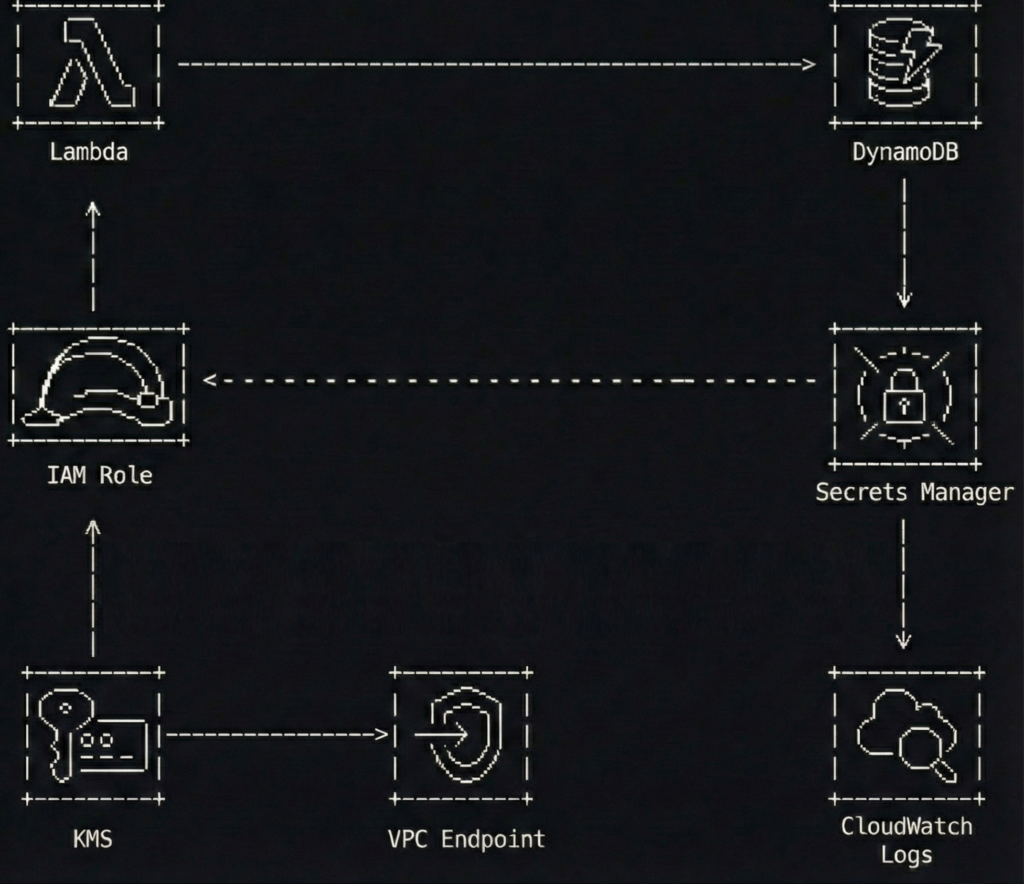
  1. A Lambda function runs with an IAM execution role
  2. The function fetches one third-party API key from Secrets Manager at runtime
  3. The function calls the third-party API and writes results to DynamoDB
  4. Network access to Secrets Manager stays private through a VPC interface endpoint (when the Lambda runs in a VPC)

The best part is what you do not see.

No access keys. No “temporary” keys that have been temporary since 2021. No secrets baked into ZIPs or container layers.

What this protects you from

This pattern is not a magic spell. It is a seatbelt.

It helps reduce the chance of:

  • Credentials leaking through Git history, build logs, tickets, screenshots, or well-meaning copy-paste
  • Forgotten key rotation schedules that quietly become “never.”
  • Overpowered policies that turn a small bug into a full account cleanup
  • Unnecessary public internet paths for sensitive AWS API calls

Now let’s build it, step by step, with code snippets that are intentionally sanitized.

Step 1 build an IAM execution role with tight policies

The execution role is the front door key your Lambda carries.

If you give it access to everything, it will eventually use that access, if only because your future self will forget why it was there and leave it in place “just in case.”

Keep it boring. Keep it small.

Here is an example IAM policy for a Lambda that only needs to:

  • write to one DynamoDB table
  • read one secret from Secrets Manager
  • decrypt using one KMS key (optional, depending on how you configure encryption)
{
  "Version": "2012-10-17",
  "Statement": [
    {
      "Sid": "WriteToOneTable",
      "Effect": "Allow",
      "Action": [
        "dynamodb:PutItem",
        "dynamodb:UpdateItem"
      ],
      "Resource": "arn:aws:dynamodb:eu-west-1:111122223333:table/app-results-prod"
    },
    {
      "Sid": "ReadOneSecret",
      "Effect": "Allow",
      "Action": [
        "secretsmanager:GetSecretValue"
      ],
      "Resource": "arn:aws:secretsmanager:eu-west-1:111122223333:secret:thirdparty/weather-api-key-*"
    },
    {
      "Sid": "DecryptOnlyThatKey",
      "Effect": "Allow",
      "Action": [
        "kms:Decrypt"
      ],
      "Resource": "arn:aws:kms:eu-west-1:111122223333:key/12345678-90ab-cdef-1234-567890abcdef",
      "Condition": {
        "StringEquals": {
          "kms:ViaService": "secretsmanager.eu-west-1.amazonaws.com"
        }
      }
    }
  ]
}

A few notes that save you from future regret:

  • The secret ARN ends with -* because Secrets Manager appends a random suffix.
  • The KMS condition helps ensure the key is used only through Secrets Manager, not as a general-purpose decryption service.
  • You can skip the explicit kms:Decrypt statement if you use the AWS-managed key and accept the default behavior, but customer-managed keys are common in regulated environments.

Step 2 store the unavoidable secret properly

Secrets Manager is not a place to dump everything. It is a place to store what you truly cannot avoid.

A third-party API key is a perfect example because IAM cannot replace it. AWS cannot assume a role in someone else’s SaaS.

Use a JSON secret so you can extend it later without creating a new secret every time you add a field.

{
  "api_key": "REDACTED-EXAMPLE-TOKEN"
}

If you like the CLI (and I do, because buttons are too easy to misclick), create the secret like this:

aws secretsmanager create-secret \
  --name "thirdparty/weather-api-key" \
  --description "Token for the Weatherly API used by the ingestion Lambda" \
  --secret-string '{"api_key":"REDACTED-EXAMPLE-TOKEN"}' \
  --region eu-west-1

Then configure:

  • encryption with a customer-managed KMS key if required
  • rotation if the provider supports it (rotation is amazing when it is real, and decorative when the vendor does not allow it)

If the vendor does not support rotation, you still benefit from central storage, access control, audit logging, and removing the secret from code.

Step 3 lock down secret access with a resource policy

Identity-based policies on the Lambda role are necessary, but resource policies are a nice extra lock.

Think of it like this: your role policy is the key. The resource policy is the bouncer who checks the wristband.

Here is a resource policy that allows only one role to read the secret.

{
  "Version": "2012-10-17",
  "Statement": [
    {
      "Sid": "AllowOnlyIngestionRole",
      "Effect": "Allow",
      "Principal": {
        "AWS": "arn:aws:iam::111122223333:role/lambda-ingestion-prod"
      },
      "Action": "secretsmanager:GetSecretValue",
      "Resource": "*"
    },
    {
      "Sid": "DenyEverythingElse",
      "Effect": "Deny",
      "Principal": "*",
      "Action": "secretsmanager:GetSecretValue",
      "Resource": "*",
      "Condition": {
        "StringNotEquals": {
          "aws:PrincipalArn": "arn:aws:iam::111122223333:role/lambda-ingestion-prod"
        }
      }
    }
  ]
}

This is intentionally strict. Strict is good. Strict is how you avoid writing apology emails.

Step 4 keep Secrets Manager traffic private with a VPC endpoint

If your Lambda runs inside a VPC, it will not automatically have internet access. That is often the point.

In that case, you do not want the function reaching Secrets Manager through a NAT gateway if you can avoid it. NAT works, but it is like walking your valuables through a crowded shopping mall because the back door is locked.

Use an interface VPC endpoint for Secrets Manager.

Here is a Terraform example (sanitized) that creates the endpoint and limits access using a dedicated security group.

resource "aws_security_group" "secrets_endpoint_sg" {
  name        = "secrets-endpoint-sg"
  description = "Allow HTTPS from Lambda to Secrets Manager endpoint"
  vpc_id      = aws_vpc.main.id

  ingress {
    from_port       = 443
    to_port         = 443
    protocol        = "tcp"
    security_groups = [aws_security_group.lambda_sg.id]
  }

  egress {
    from_port   = 0
    to_port     = 0
    protocol    = "-1"
    cidr_blocks = ["0.0.0.0/0"]
  }
}

resource "aws_vpc_endpoint" "secretsmanager" {
  vpc_id              = aws_vpc.main.id
  service_name        = "com.amazonaws.eu-west-1.secretsmanager"
  vpc_endpoint_type   = "Interface"
  subnet_ids          = [aws_subnet.private_a.id, aws_subnet.private_b.id]
  private_dns_enabled = true
  security_group_ids  = [aws_security_group.secrets_endpoint_sg.id]
}

If your Lambda is not in a VPC, you do not need this step. The function will reach Secrets Manager over AWS’s managed network path by default.

If you want to go further, consider adding a DynamoDB gateway endpoint too, so your function can write to DynamoDB without touching the public internet.

Step 5 retrieve the secret at runtime without turning logs into a confession

This is where many teams accidentally reinvent the problem.

They remove the secret from the code, then log it. Or they put it in an environment variable because “it is not in the repository,” which is a bit like saying “the spare key is not under the flowerpot, it is under the welcome mat.”

The clean approach is:

  • store only the secret name (not the secret value) as configuration
  • retrieve the value at runtime
  • cache it briefly to reduce calls and latency
  • never print it, even when debugging, especially when debugging

Here is a Python example for AWS Lambda with a tiny TTL cache.

import json
import os
import time
import boto3

_secrets_client = boto3.client("secretsmanager")
_cached_value = None
_cached_until = 0

SECRET_ID = os.getenv("THIRDPARTY_SECRET_ID", "thirdparty/weather-api-key")
CACHE_TTL_SECONDS = int(os.getenv("SECRET_CACHE_TTL_SECONDS", "300"))


def _get_api_key() -> str:
    global _cached_value, _cached_until

    now = int(time.time())
    if _cached_value and now < _cached_until:
        return _cached_value

    resp = _secrets_client.get_secret_value(SecretId=SECRET_ID)
    payload = json.loads(resp["SecretString"])

    api_key = payload["api_key"]
    _cached_value = api_key
    _cached_until = now + CACHE_TTL_SECONDS
    return api_key


def lambda_handler(event, context):
    api_key = _get_api_key()

    # Use the key without ever logging it
    results = call_weatherly_api(api_key=api_key, city=event.get("city", "Seville"))

    write_to_dynamodb(results)

    return {
        "status": "ok",
        "items": len(results) if hasattr(results, "__len__") else 1
    }

This snippet is intentionally short. The important part is the pattern:

  • minimal secret access
  • controlled cache
  • zero secret output

If you prefer a library, AWS provides a Secrets Manager caching client for some runtimes, and AWS Lambda Powertools can help with structured logging. Use them if they fit your stack.

Step 6 make security noisy with logs and alarms

Security without visibility is just hope with a nicer font.

At a minimum:

  • enable CloudTrail in the account
  • ensure Secrets Manager events are captured
  • alert on unusual secret access patterns

A simple and practical approach is a CloudWatch metric filter for GetSecretValue events coming from unexpected principals. Another is to build a dashboard showing:

  • Lambda errors
  • Secrets Manager throttles
  • sudden spikes in secret reads

Here is a tiny Terraform example that keeps your Lambda logs from living forever (because storage is forever, but your attention span is not).

resource "aws_cloudwatch_log_group" "lambda_logs" {
  name              = "/aws/lambda/lambda-ingestion-prod"
  retention_in_days = 14
}

Also consider:

  • IAM Access Analyzer to spot risky resource policies
  • AWS Config rules or guardrails if your organization uses them
  • an alarm on unexpected NAT data processing if you intended to keep traffic private

Common mistakes I have made, so you do not have to

I am listing these because I have either done them personally or watched them happen in slow motion.

  1. Using a wildcard secret policy
    secretsmanager:GetSecretValue on * feels convenient until it is a breach multiplier.
  2. Putting secret values into environment variables
    Environment variables are not evil, but they are easy to leak through debugging, dumps, tooling, or careless logging. Store secret names there, not secret contents.
  3. Retrieving secrets at build time
    Build logs live forever in the places you forget to clean. Runtime retrieval keeps secrets out of build systems.
  4. Logging too much while debugging
    The fastest way to leak a secret is to print it “just once.” It will not be just once.
  5. Skipping the endpoint and relying on NAT by accident
    The NAT gateway is not evil either. It is just an expensive and unnecessary hallway if a private door exists.

A two minute checklist you can steal

  • Your Lambda uses an IAM execution role, not access keys
  • The role policy scopes Secrets Manager access to one secret ARN pattern
  • The secret has a resource policy that only allows the expected role
  • Secrets are encrypted with KMS when required
  • The secret value is never stored in code, images, build logs, or environment variables
  • If Lambda runs in a VPC, you use an interface VPC endpoint for Secrets Manager
  • You have CloudTrail enabled and you can answer “who accessed this secret” without guessing

Extra thoughts

If you remove long-lived credentials from your applications, you remove an entire class of problems.

You stop rotating keys that should never have existed in the first place.

You stop pretending that “we will remember to clean it up later” is a security strategy.

And you get a calmer life, which is underrated in engineering.

Let IAM handle the secrets you can avoid.

Then let Secrets Manager handle the secrets you cannot.

And let your code do what it was meant to do: process data, not babysit keys like they are a toddler holding a permanent marker.

AWS Lambda SQS provisioned mode is cheaper than therapy

There is a specific flavor of nausea reserved for serverless engineering teams. It usually strikes at 2 a.m., shortly after a major product launch, when someone posts a triumphant screenshot of user traffic in Slack. While the marketing team is virtually high-fiving, CloudWatch quietly begins to draw a perfect, vertical line that looks less like a growth chart and more like a cliff edge.

Your SQS queues swell. Lambda invocations crawl. Suddenly, the phrase “fully managed service” sounds less comforting and more like a cruel punchline delivered by a distant cloud provider.

For years, the relationship between Amazon SQS and AWS Lambda has been the backbone of event-driven architecture. You wire up an event source mapping, let Lambda poll the queue, and trust the system to scale as messages arrive. Most days, this works beautifully. On the wrong day, under the wrong kind of spike, it works “eventually.”

But in the world of high-frequency trading or flash sales, “eventually” is just a polite synonym for “too late.”

With the release of AWS Lambda SQS Provisioned Mode on November 14, Amazon is finally admitting that sometimes magic is too slow. It grants you explicit control over the invisible workers that poll SQS for your function. It ensures they are already awake, caffeinated, and standing in line before the mob shows up. It allows you to trade a bit of extra planning (and money) for the guarantee that your system won’t hit the snooze button while your backlog turns into a towering monument to failure.

The uncomfortable truth about standard SQS polling

To understand why we need Provisioned Mode, we have to look at the somewhat lazy nature of the standard behavior.

Out of the box, Lambda uses an event source mapping to poll SQS on your behalf. You give it a queue and some basic configuration, and Lambda spins up pollers to check for work. You never see these pollers. They are the ghosts in the machine.

The problem with ghosts is that they are not particularly urgent. When a massive spike hits your queue, Lambda realizes it needs more pollers and more concurrent function invocations. However, it does not do this instantly. It ramps up. It adds capacity in increments, like a cautious driver merging onto a freeway.

For a steady workload, you will never notice this ramp-up. But during a viral marketing campaign or a market crash, those minutes of warming up feel like an eternity. You are essentially watching a barista who refuses to start grinding coffee beans until the line of customers has already curled around the block.

Standard SQS polling gives you tools like batch size, but it denies you direct influence over the urgency of the consumption. You cannot tell the system, “I need ten workers ready right now.” You can only stand in line and hope the algorithm notices you are drowning.

This is acceptable for background jobs like resizing images or sending emails. It is decidedly less acceptable for payment processing or fraud detection. In those cases, watching twenty thousand messages pile up while your system “automatically scales” is not an architectural feature. It is a resume-generating event.

Paying for a standing army instead of volunteers

Provisioned Mode flips the script on this reactive behavior. Instead of letting Lambda decide how many pollers to use based purely on demand, you tell it the minimum and maximum number of event pollers you want reserved for that queue.

An event poller is a dedicated worker that reads from SQS and hands batches of messages to your function. In standard mode, these pollers are summoned from a shared pool when needed. In Provisioned Mode, you are paying to keep them on retainer.

Think of it as the difference between calling a ride-share service and hiring a private driver to sit in your driveway with the engine running. One is efficient for the general public; the other is necessary if you need to leave the house in exactly three seconds.

The benefits are stark when translated into human terms.

First, you get speed. AWS advertises significantly faster scaling for SQS event source mappings in Provisioned Mode. We are talking about adding up to one thousand new concurrent invocations per minute.

Second, you get capacity. Provisioned Mode can support massive concurrency per SQS mapping, far higher than the default capabilities.

Third, and perhaps most importantly, you get predictability. A single poller is not just a warm body. It is a unit of throughput (handling up to 1 MB per second or 10 concurrent invokes). By setting a minimum number of pollers, you are mathematically guaranteeing a baseline of throughput. You are no longer hoping the waiters show up; you have paid their salaries in advance.

Configuring this without losing your mind

The good news is that Provisioned Mode is not a new service with its own terrifying learning curve. It is just a configuration toggle on the event source mapping you are already using. You can set it up in the AWS Console, the CLI, or your Infrastructure as Code tool of choice.

The interface asks for two numbers, and this is where the engineering art form comes in.

First, it asks for Minimum Pollers. This is the number of workers you always want ready.

Second, it asks for Maximum Pollers. This is the ceiling, the limit you set to ensure you do not accidentally DDoS your own database.

Choosing these numbers feels a bit like gambling, but there is a logic to it. For the minimum, pick a number that comfortably handles your typical traffic plus a standard spike. Start small. Setting this to 100 when you usually need 2 is the serverless equivalent of buying a school bus to commute to work alone.

For the maximum, look at your downstream systems. There is no point in setting a maximum that allows 5,000 concurrent Lambda functions if your relational database curls into a fetal position at 500 connections.

Once you enable it, you need to watch your metrics. Keep an eye on “Queue Depth” and “Age of Oldest Message.” If the backlog clears too slowly, buy more pollers. If your database administrator starts sending you angry emails in all caps, reduce the maximum. The goal is not perfection on day one; it is to replace guesswork with a feedback loop.

The financial hangover

Nothing in life is free, and this applies doubly to AWS features that solve headaches.

When you enable Provisioned Mode, AWS begins charging you for “Event Poller Units.” You pay for the minimum pollers you configure, regardless of whether there are messages in the queue. You are paying for readiness.

This is a mental shift for serverless purists. The whole promise of serverless was “pay for what you use.” Provisioned Mode is “pay for what you might need.”

You are essentially renting a standing army. Most of the time, they will just stand there, playing cards and eating your budget. But when the enemy (traffic) attacks, they are already in position. Standard SQS polling is cheaper because it relies on volunteers. Volunteers are free, but they take a while to put on their boots.

From a FinOps perspective, or simply from the perspective of explaining the bill to your boss, the question is not “Is this expensive?” The question is “What is the cost of latency?”

For a background report generator, a five-minute delay costs nothing. For a high-frequency trading platform, a five-second delay costs everything. You should not enable Provisioned Mode on every queue in your account. That would be financial malpractice. You reserve it for the critical paths, the workflows where the price of slowness is measured in lost customers rather than just infrastructure dollars.

Why you should care about the fourth dial

Architecturally, Provisioned Mode gives us a new layer of control. Previously, we had three main dials in event-driven systems: how fast we write to the queue, how fast the consumers process messages, and how much concurrency Lambda is allowed.

Provisioned Mode adds a fourth dial: the aggression of the retrieval.

It allows you to reason about your system deterministically. If you know that one poller provides X amount of throughput, you can stack them to meet a specific Service Level Agreement. It turns a “best effort” system into a “calculated guarantee” system.

Serverless was sold to us as freedom from capacity planning. We were told we could just write code and let the cloud handle the undignified details of scaling. For many workloads, that promise holds true.

But as your workloads become more critical, you discover the uncomfortable corners where “just let it scale” is not enough. Latency budgets shrink. Compliance rules tighten. Customers grow less patient.

AWS Lambda SQS Provisioned Mode is a small, targeted answer to that discomfort. It allows you to say, “I want at least this much readiness,” and have the platform respect that wish, even when your traffic behaves like a toddler on a sugar high.

So, pick your most critical queue. The one that keeps you awake at night. Enable Provisioned Mode, set a modest minimum, and watch the metrics. Your future self, staring at a flat latency graph during the next Black Friday, will be grateful you decided to stop trusting in magic and started paying for physics.

Escaping the AWS NAT Gateway toll booth

My coffee went cold. I was staring at my AWS bill, and one line item was staring back at me with a judgmental smirk: NAT Gateway: 33,01 €.

This wasn’t for compute. This wasn’t for storing terabytes of crucial data. This was for the simple, mundane privilege of letting my Lambda functions send emails and tell Stripe to charge a credit card.

Let’s talk about NAT Gateway pricing. It’s a special kind of pain.

  • $0.045 per hour (That’s roughly $33 a month, just for existing).
  • $0.045 per GB processed (You get charged for your own data).
  • …and that’s per Availability Zone. For High Availability, you multiply by two or three.

I was suddenly paying more for a digital toll booth operator than I was for the actual application logic running my startup. That’s when I started asking questions. Did I really need this? What was I actually paying for? And more importantly, was there another way?

This is the story of how I hunted down that 33€ line item. By the end, you’ll know exactly if you need a NAT Gateway, or if you’re just burning money to keep the AWS machine fed.

The great NAT lie

Every AWS tutorial, every Stack Overflow answer, every “serverless best practice” blog post chants the same mantra: “If your Lambda needs to access the internet, and it’s in a VPC, you need a NAT Gateway.”

It’s presented as a law of physics. Like gravity, or the fact that DNS will always be the problem. And I, like a good, obedient engineer, followed the instructions. I clicked the button. I added the NAT. And then the bill came.

It turns out that obedience is expensive.

The gilded cage we call a VPC

Before we storm the castle, we have to understand why we built the castle in the first place. Why are our Lambdas in this mess? The answer is the Virtual Private Cloud (VPC).

By default, a Lambda function is a free spirit. It’s born with a magical, AWS-managed connection to the outside world. It can call any API it wants. It’s a social butterfly.

But then, security happens.

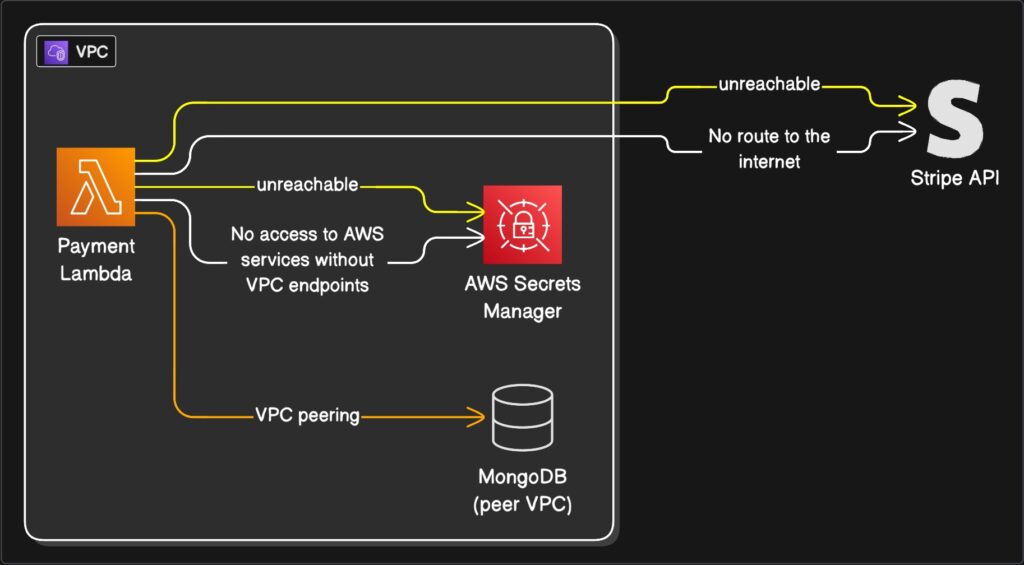
We have a managed database, like MongoDB Atlas. We absolutely, positively do not want this database exposed to the public internet. That’s like shouting your bank details across a crowded shopping mall. So, we rightly configure it to only accept private connections.

To let our Lambda talk to this database, we have to build a “gated community” for it. That’s our VPC. We move the Lambda inside this community and set up a “VPC Peering” connection, which is like a private, guarded footpath between our VPC and the MongoDB VPC.

Our Lambda can now securely whisper secrets to the database. The traffic never touches the public internet. We are secure. We are compliant. We are… trapped.

House arrest

We solved one problem but created a massive new one. In building this fortress to protect our database, we built it with no doors to the outside world.

Our Lambda is now on house arrest.

Sure, it can talk to the database in the adjoining room. But it can no longer call the Stripe API to process a payment. It can’t call an email service. It can’t even phone its own cousins in the AWS family, like AWS Secrets Manager or S3 (not without extra work, anyway). Any attempt to reach the internet just… times out. It’s the sound of silence.

This is the dilemma. To be secure, our Lambda must be in a VPC. But once in a VPC, it’s useless for half its job.

Enter the expensive chaperone

This is where the AWS Gospel presents its solution: the NAT Gateway.

The NAT (Network Address Translation) Gateway is, in our analogy, an extremely expensive, bonded chaperone.

You place this chaperone in a “public” part of your gated community (a public subnet). When your Lambda on house arrest needs to send a letter to the outside world (like an API call to Stripe), it gives the letter to the chaperone.

The chaperone (the NAT) takes the letter, walks it to the main gate, puts its own public return address on it, and sends it. When the reply comes back, the chaperone receives it, verifies it’s for the Lambda, and delivers it.

This works. It’s secure. The Lambda’s private address is never exposed.

But this chaperone charges you. It charges you by the hour just to be on call. It charges you for every letter it carries (data processed). And as we established, you need three of them if you want to be properly redundant.

This is a racket.

The “Split Personality” solution

I refused to pay the toll. There had to be another way. The solution came from realizing I was trying to make one Lambda do two completely opposite jobs.

What if, instead of one “do-it-all” Lambda, I created two specialists?

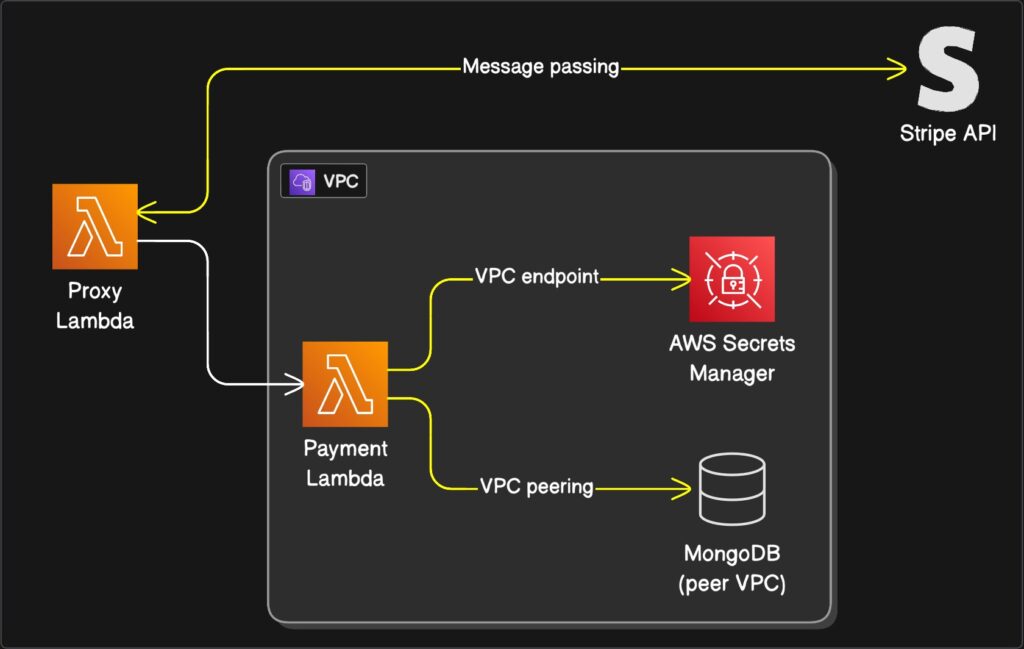
  1. The hermit: This Lambda lives inside the VPC. Its one and only job is to talk to the database. It is antisocial, secure, and has no idea the internet exists.
  2. The messenger: This Lambda lives outside the VPC. It’s a “free-range” Lambda. Because it’s not attached to any VPC, AWS magically gives it that default internet access. It cannot talk to the database (which is good!), but it can talk to Stripe all day long.

The plan is simple: when The hermit (VPC Lambda) needs something from the internet, it invokes The messenger (Proxy Lambda). It hands it a note: “Please tell Stripe to charge $25.00.” The messenger runs the errand, gets the receipt, and passes it back to The hermit, who then safely logs the result in the database.

It’s a “split personality” architecture.

But is it safe?

I can hear you asking: “Wait. A Lambda with internet access? Isn’t that like leaving your front door wide open for attackers?”

No. And this is the most beautiful part.

A Lambda function, whether in a VPC or not, never gets a public IP address. It can make outbound calls, but nothing from the public internet can initiate a call to it.

It’s like having a phone that can only make calls, not receive them. It’s unreachable. The “Messenger” Lambda is perfectly safe to live outside the VPC, ready to do our bidding.

The secret tunnel system

So, I built it. The hermit. The messenger. I was a genius. I hit “test.”

…timeout.

Of course. I forgot. The hermit is still on house arrest. “Invoking” another Lambda is, itself, an AWS API call. It’s a request that has to leave the VPC to reach the AWS Lambda service. My Lambda couldn’t even call its own lawyer.

This is where the real solution lies. Not in a gateway, but in a series of tunnels.

They’re called VPC Endpoints.

A VPC Endpoint is not a big, expensive, public chaperone. It’s a private, secret tunnel that you build directly from your VPC to a specific AWS service, all within the AWS network.

So, I built two tunnels:

  1. A tunnel to AWS Secrets Manager: Now my hermit Lambda can get its API keys directly, without ever leaving the house.
  2. A tunnel to AWS Lambda: Now my hermit Lambda can use its private phone to “invoke” The messenger.

These endpoints have a small hourly cost, but it’s a fraction of a NAT Gateway, and the data processing fee is either tiny or free, depending on the endpoint type. We’ve replaced a $100/mo toll road with a $5/mo private footpath.

(A grumpy side note: annoyingly, some AWS services like Cognito don’t support VPC Endpoints. For those, you still have to use the Messenger proxy pattern. But for most, the tunnels work.)

Our glorious new contraption

Let’s look at our payment handler again. This little function needed to:

  1. Get API keys from AWS Secrets Manager.
  2. Call Stripe’s API.
  3. Write the transaction to MongoDB.

Here is how our new, glorious, Rube Goldberg machine works:

  • Step 1: The Payment Lambda (The hermit) gets a request.
  • Step 2: It needs keys. It pops over to AWS Secrets Manager through its private tunnel (the VPC Endpoint). No internet needed.
  • Step 3: It needs to charge a card. It calls the invoke command, which goes through its other private tunnel to the AWS Lambda service, triggering The messenger.
  • Step 4: The messenger (Proxy Lambda), living in the free-range world, makes the outbound call to Stripe. Stripe, delighted, processes the payment and sends a reply.
  • Step 5: The messenger passes the success (or failure) response back to The hermit.
  • Step 6: The hermit, now holding the result, calmly turns and writes the transaction record to MongoDB via its private VPC Peering connection.

Everything works. Nothing is exposed. And the NAT Gateway bill is 0€.

For those who speak in code

Here is a simplified look at what our two specialist Lambdas are doing.

Payment Lambda (The hermit – INSIDE VPC)

// This Lambda is attached to your VPC
// It needs VPC Endpoints for 'lambda' and 'secretsmanager'

import { InvokeCommand, LambdaClient } from "@aws-sdk/client-lambda";
// ... (imports for Secrets Manager and Mongo)

const lambda = new LambdaClient({});

export const handler = async (event) => {
  try {
    const amountToCharge = 2500; // 25.00

    // 1. Get secrets via VPC Endpoint
    // const apiKeys = await getSecretsFromManager();
    
    // 2. Prepare to invoke the proxy
    const command = new InvokeCommand({
      FunctionName: process.env.PAYMENT_PROXY_FUNCTION_NAME,
      InvocationType: "RequestResponse",
      Payload: JSON.stringify({
        chargeDetails: { amount: amountToCharge, currency: "usd" },
      }),
    });

    // 3. Invoke the proxy Lambda via VPC Endpoint
    const response = await lambda.send(command);
    const proxyResponse = JSON.parse(
      Buffer.from(response.Payload).toString()
    );

    if (proxyResponse.status === "success") {
      // 4. Write to MongoDB via VPC Peering
      // await writePaymentRecordToMongo(proxyResponse.transactionId);
      
      return {
        statusCode: 200,
        body: `Payment succeeded! TxID: ${proxyResponse.transactionId}`,
      };
    } else {
      // Handle payment failure
      return { statusCode: 400, body: "Payment failed." };
    }
  } catch (error) {
    console.error(error);
    return { statusCode: 500, body: "Server error" };
  }
};

Proxy Lambda (The messenger – OUTSIDE VPC)

// This Lambda is NOT attached to a VPC
// It has default internet access

// ... (import for your Stripe client)
// const stripe = new Stripe(process.env.STRIPE_SECRET_KEY);

export const handler = async (event) => {
  // 1. Extract the data from the invoking Hermit
  const { chargeDetails } = event.payload;

  try {
    // 2. Call the external Stripe API
    // const stripeResponse = await stripe.charges.create({
    //   amount: chargeDetails.amount,
    //   currency: chargeDetails.currency,
    //   source: "tok_visa", // Example token
    // });
   
    // Mocking the Stripe call for this example
    const stripeResponse = {
        id: `txn_${Math.random().toString(36).substring(2, 15)}`,
        status: 'succeeded'
    };


    if (stripeResponse.status === 'succeeded') {
      // 3. Return the successful result
      return {
        status: "success",
        transactionId: stripeResponse.id,
      };
    } else {
      return { status: "failed", error: "Stripe decline" };
    }
  } catch (err) {
    // 4. Return any errors
    return {
      status: "failed",
      error: `Error contacting Stripe: ${err.message}`,
    };
  }
};

Was it worth it?

And there it is. A production-grade, secure, and resilient system. Our hermit Lambda is safe in its VPC, talking to the database, our Messenger Lambda is happily running errands on the internet, and our secret tunnels are connecting everything privately.

That said, figuring all this out and integrating it into a production system takes a significant amount of time. This… this contraption of proxies and endpoints is, frankly, a headache.

If you don’t want the headache, sometimes it’s easier to just pay that damn 30€ for a NAT Gateway and move on with your life.

The purpose of this article wasn’t just to save a few bucks. It was to pull back the curtain. To show that the “one true way” isn’t the only way, and to prove that with a little bit of architectural curiosity, you can, in fact, escape the AWS NAT Gateway toll booth.

Burst traffic realities for AWS API Gateway Architects

Let’s be honest. Cloud architecture promises infinite scalability, but sometimes it feels like we’re herding cats wearing rocket boots. I learned this the hard way when my shiny serverless app, built with all the modern best practices, started hiccuping like a soda-drunk kangaroo during a Black Friday sale. The culprit? AWS API Gateway throttling under bursty traffic. And no, it wasn’t my coffee intake causing the chaos.

The token bucket, a simple idea with a sneaky side

AWS API Gateway uses a token bucket algorithm to manage traffic. Picture a literal bucket. Tokens drip into it at a steady rate, your rate limit. Each incoming request steals a token to pass through. If the bucket is empty? Requests get throttled. Simple, right? Like a bouncer checking IDs at a club.

But here’s the twist: This bouncer has a strict hourly wage. If 100 requests arrive in one second, they’ll drain the bucket faster than a toddler empties a juice box. Then, even if traffic calms down, the bucket refills slowly. Your API is stuck in timeout purgatory while tokens trickle back. AWS documents this, but it’s easy to miss until your users start tweeting about your “haunted API.”

Bursty traffic is life’s unpredictable roommate

Bursty traffic isn’t a bug; it’s a feature of modern apps. Think flash sales, mobile app push notifications, or that viral TikTok dance challenge your marketing team insisted would go viral (bless their optimism). Traffic doesn’t flow like a zen garden stream. It arrives in tsunami waves.

I once watched a client’s analytics dashboard spike at 3 AM. Turns out, their smart fridge app pinged every device simultaneously after a firmware update. The bucket emptied. Alarms screamed. My weekend imploded. Bursty traffic doesn’t care about your sleep schedule.

When bursts meet buckets, the throttling tango

Here’s where things get spicy. API Gateway’s token bucket has a burst capacity. For stage-level throttling, it’s tied to your rate limit. Set a rate of 100 requests/second? Your bucket holds 100 tokens. Send 150 requests in one burst? The first 100 sail through. The next 50 get throttled, even if the average traffic is below 100/second.

It’s like a theater with 100 seats. If 150 people rush the door at once, 50 get turned away, even if half the theater is empty later. AWS isn’t being petty. It’s protecting downstream services (like your database) from sudden stampedes. But when your app is the one getting trampled? Less poetic. More infuriating.

Does this haunt all throttling types?

Good news: This quirk primarily targets stage-level and account-level throttling. Usage Plans? They play by different rules. Their buckets refill steadily, making them more burst-friendly. But stage-level throttling? It’s the diva of the trio. Configure it carelessly, and it will sabotage your bursts like a jealous ex.

If you’ve layered all three throttling types (account, stage, usage plan), stage-level settings often dominate the drama. Check your stage settings first. Always.

Taming the beast, practical fixes that work

After several caffeine-fueled debugging sessions, I’ve learned a few tricks to keep buckets full and bursts happy. None requires sacrificing a rubber chicken to the cloud gods.

1. Resize your bucket
Stage-level throttling lets you set a burst limit alongside your rate limit. Double it. Triple it. AWS allows bursts up to 5,000 requests for some tiers. Calculate your peak bursts (use CloudWatch metrics!), then set burst capacity 20% higher. Safety margins are boring until they save your launch day.

2. Queue the chaos
Offload bursts to SQS or Kinesis. Front your API with a lightweight service that accepts requests instantly, dumps them into a queue, and processes them at a civilized pace. Users get a “we got this” response. Your bucket stays calm. Everyone wins. Except the throttling gremlins.

3. Smarter clients are your friends
Teach client apps to retry intelligently. Exponential backoff with jitter isn’t just jargon, it’s the art of politely asking “Can I try again later?” instead of spamming “HELLO?!” every millisecond. AWS SDKs bake this in. Use it.

4. Distribute the pain
Got multiple stages or APIs? Spread bursts across them. A load balancer or Route 53 weighted routing can turn one screaming bucket into several murmuring ones. It’s like splitting a rowdy party into smaller rooms.

5. Monitor like a paranoid squirrel
CloudWatch alarms for 429 Too Many Requests are non-negotiable. Track ThrottledRequests and Count metrics per stage. Set alerts at 70% of your burst limit. Because knowing your bucket is half-empty is far better than discovering it via customer complaints.

The quiet triumph of preparedness

Cloud architecture is less about avoiding fires and more about not using gasoline as hand sanitizer. Bursty traffic will happen. Token buckets will empty. But with thoughtful configuration, you can transform throttling from a silent assassin into a predictable gatekeeper.

AWS gives you the tools. It’s up to us to wield them without setting the data center curtains ablaze. Start small. Test bursts in staging. And maybe keep that emergency coffee stash stocked. Just in case.

Your APIs deserve grace under pressure. Now go forth and throttle wisely. Or better yet, throttle less.

The slow unceremonious death of EC2 Autoscaling

Let’s pour one out for an old friend.

AWS recently announced a small, seemingly boring new feature for EC2 Auto Scaling: the ability to cancel a pending instance refresh. If you squinted, you might have missed it. It sounds like a minor quality-of-life update, something to make a sysadmin’s Tuesday slightly less terrible.

But this isn’t a feature. It’s a gold watch. It’s the pat on the back and the “thanks for your service” speech at the awkward retirement party.

The EC2 Auto Scaling Group (ASG), the bedrock of cloud elasticity, the one tool we all reflexively reached for, is being quietly put out to pasture.

No, AWS hasn’t officially killed it. You can still spin one up, just like you can still technically send a fax. AWS will happily support it. But its days as the default, go-to solution for modern workloads are decisively over. The battle for the future of scaling has ended, and the ASG wasn’t the winner. The new default is serverless containers, hyper-optimized Spot fleets, and platforms so abstract they’re practically invisible.

If you’re still building your infrastructure around the ASG, you’re building a brand-new house with plumbing from 1985. It’s time to talk about why our old friend is retiring and meet the eager new hires who are already measuring the drapes in its office.

So why is the ASG getting the boot?

We loved the ASG. It was a revolutionary idea. But like that one brilliant relative everyone dreads sitting next to at dinner, it was also exhausting. Its retirement was long overdue, and the reasons are the same frustrations we’ve all been quietly grumbling about into our coffee for years.

It promised automation but gave us chores

The ASG’s sales pitch was simple: “I’ll handle the scaling!” But that promise came with a three-page, fine-print addendum of chores.

It was the operational overhead that killed us. We were promised a self-driving car and ended up with a stick-shift that required constant, neurotic supervision. We became part-time Launch Template librarians, meticulously versioning every tiny change. We became health-check philosophers, endlessly debating the finer points of ELB vs. EC2 health checks.

And then… the Lifecycle Hooks.

A “Lifecycle Hook” is a polite, clinical term for a Rube Goldberg machine of desperation. It’s a panic button that triggers a Lambda, which calls a Systems Manager script, which sends a carrier pigeon to… maybe… drain a connection pool before the instance is ruthlessly terminated. Trying to debug one at 3 AM was a rite of passage, a surefire way to lose precious engineering time and a little bit of your soul.

It moves at a glacial pace

The second nail in the coffin was its speed. Or rather, the complete lack of it.

The ASG scales at the speed of a full VM boot. In our world of spiky, unpredictable traffic, that’s an eternity. It’s like pre-heating a giant, industrial pizza oven for 45 minutes just to toast a single slice of bread. By the time your new instance is booted, configured, service-discovered, and finally “InService,” the spike in traffic has already come and gone, leaving you with a bigger bill and a cohort of very annoyed users.

It’s an expensive insurance policy

The ASG model is fundamentally wasteful. You run a “warm” fleet, paying for idle capacity just in case you need it. It’s like paying rent on a 5-bedroom house for your family of three, just in case 30 cousins decide to visit unannounced.

This “scale-up” model was slow, and the “scale-down” was even worse, riddled with fears of terminating the wrong instance and triggering a cascading failure. We ended up over-provisioning to avoid the pain of scaling, which completely defeats the purpose of “auto-scaling.”

The eager interns taking over the desk

So, the ASG has cleared out its desk. Who’s moving in? It turns out there’s a whole line of replacements, each one leaner, faster, and blissfully unconcerned with managing a “fleet.”

1. The appliance Fargate and Cloud Run

First up is the “serverless container”. This is the hyper-efficient new hire who just says, “Give me the Dockerfile. I’ll handle the rest.”

With AWS Fargate or Google’s Cloud Run, you don’t have a fleet. You don’t manage VMs. You don’t patch operating systems. You don’t even think about an instance. You just define a task, give it some CPU and memory, and tell it how many copies you want. It scales from zero to a thousand in seconds.

This is the appliance model. When you buy a toaster, you don’t worry about wiring the heating elements or managing its power supply. You just put in bread and get toast. Fargate is the toaster. The ASG was the “build-your-own-toaster” kit that came with a 200-page manual on electrical engineering.

Just look at the cognitive load. This is what it takes to get a basic ASG running via the CLI:

# The "Old Way": Just one of the many steps...
aws autoscaling create-auto-scaling-group \
    --auto-scaling-group-name my-legacy-asg \
    --launch-template "LaunchTemplateName=my-launch-template,Version='1'" \
    --min-size 1 \
    --max-size 5 \
    --desired-capacity 2 \
    --vpc-zone-identifier "subnet-0571c54b67EXAMPLE,subnet-0c1f4e4776EXAMPLE" \
    --health-check-type ELB \
    --health-check-grace-period 300 \
    --tag "Key=Name,Value=My-ASG-Instance,PropagateAtLaunch=true"

You still need to define the launch template, the subnets, the load balancer, the health checks…

Now, here’s the core of a Fargate task definition. It’s just a simple JSON file:

// The "New Way": A snippet from a Fargate Task Definition
{
  "family": "my-modern-app",
  "containerDefinitions": [
    {
      "name": "my-container",
      "image": "nginx:latest",
      "cpu": 256,
      "memory": 512,
      "portMappings": [
        {
          "containerPort": 80,
          "hostPort": 80
        }
      ]
    }
  ],
  "requiresCompatibilities": ["FARGATE"],
  "cpu": "256",
  "memory": "512"
}

You define what you need, and the platform handles everything else.

2. The extreme couponer Spot fleets

For workloads that are less “instant spike” and more “giant batch job,” we have the “optimized fleet”. This is the high-stakes, high-reward world of Spot Instances.

Spot used to be terrifying. AWS could pull the plug with two minutes’ notice, and your entire workload would evaporate. But now, with Spot Fleets and diversification, it’s the smartest tool in the box. You can tell AWS, “I need 1,000 vCPUs, and I don’t care what instance types you give me, just find the cheapest ones.”

The platform then builds a diversified fleet for you across multiple instance types and Availability Zones, making it incredibly resilient to any single Spot pool termination. It’s perfect for data processing, CI/CD runners, and any batch job that can be interrupted and resumed. The ASG was always too rigid for this kind of dynamic, cost-driven scaling.

3. The paranoid security guard MicroVMs

Then there’s the truly weird stuff: Firecracker. This is the technology that powers AWS Lambda and Fargate. It’s a “MicroVM” that gives you the iron-clad security isolation of a full virtual machine but with the lightning-fast startup speed of a container.

We’re talking boot times of under 125 milliseconds. This is for when you need to run thousands of tiny, separate, untrusted workloads simultaneously without them ever being able to see each other. It’s the ultimate “multi-tenant” dream, giving every user their own tiny, disposable, fire-walled VM in the blink of an eye.

4. The invisible platform Edge runtimes

Finally, we have the platforms that are so abstract they’re “scaled to invisibility”. This is the world of Edge. Think Lambda@Edge or CloudFront Functions.

With these, you’re not even scaling in a region anymore. Your logic, your code, is automatically replicated and executed at hundreds of Points of Presence around the globe, as close to the end-user as possible. The entire concept of a “fleet” or “instance” just… disappears. The logic scales with the request.

Life after the funeral. How to adapt

Okay, the eulogy is over. The ASG is in its rocking chair on the porch. What does this mean for us, the builders? It’s time to sort through the old belongings and modernize the house.

Go full Marie Kondo on your architecture

First, you need to re-evaluate. Open up your AWS console and take a hard look at every single ASG you’re running. Be honest. Ask the tough questions:

  • Does this workload really need to be stateful?
  • Do I really need VM-level control, or am I just clinging to it for comfort?
  • Is this a stateless web app that I’ve just been too lazy to containerize?

If it doesn’t spark joy (or isn’t a snowflake legacy app that’s impossible to change), thank it for its service and plan its migration.

Stop shopping for engines, start shopping for cars

The most important shift is this: Pick the runtime, not the infrastructure.

For too long, our first question was, “What EC2 instance type do I need?” That’s the wrong question. That’s like trying to build a new car by starting at the hardware store to buy pistons.

The right question is, “What’s the best runtime for my workload?”

  • Is it a simple, event-driven piece of logic? That’s a Function (Lambda).
  • Is it a stateless web app in a container? That’s a Serverless Container (Fargate).
  • Is it a massive, interruptible batch job? That’s an Optimized Fleet (Spot).
  • Is it a cranky, stateful monolith that needs a pet VM? Only then do you fall back to an Instance (EC2, maybe even with an ASG).

Automate logic, not instance counts

Your job is no longer to be a VM mechanic. Your team’s skills need to shift. Stop manually tuning desired_capacity and start designing event-driven systems.

Focus on scaling logic, not servers. Your scaling trigger shouldn’t be “CPU is at 80%.” It should be “The SQS queue depth is greater than 100” or “API latency just breached 200ms”. Let the platform, be it Lambda, Fargate, or a KEDA-powered Kubernetes cluster, figure out how to add more processing power.

Was it really better in the old days?

Of course, this move to abstraction isn’t without trade-offs. We’re gaining a lot, but we’re also losing something.

The gain is obvious: We get our nights and weekends back. We get drastically reduced operational overhead, faster scaling, and for most stateless workloads, a much lower bill.

The loss is control. You can’t SSH into a Fargate container. You can’t run a custom kernel module on Lambda. For those few, truly special, high-customization legacy workloads, this is a dealbreaker. They will be the ASG’s loyal companions in the retirement home.

But for everything else? The ASG is a relic. It was a brilliant, necessary solution for the problems of 2010. But the problems of 2025 and beyond are different. The cloud has evolved to scale logic, functions, and containers, not just nodes.

The king isn’t just dead. The very concept of a throne has been replaced by a highly efficient, distributed, and slightly impersonal serverless committee. And frankly, it’s about time.

When invisible limits beat warm Lambdas

My team had a problem. Or rather, we had a cause. A noble crusade that consumed our sprints, dominated our Slack channels, and haunted our architectural diagrams. We were on a relentless witch hunt for the dreaded Lambda cold start.

We treated those extra milliseconds of spin-up time like a personal insult from Jeff Bezos himself. We became amateur meteorologists, tracking “cold start storms” across regions. We had dashboards so finely tuned they could detect the faint, quantum flutter of an EC2 instance thinking about starting up. We proudly spent over $3,000 a month on provisioned concurrency¹, a financial sacrifice to the gods of AWS to keep our functions perpetually toasty.

We had done it. Cold starts were a solved problem. We celebrated with pizza and self-congratulatory Slack messages. The system was invincible.

Or so we thought.

The 2:37 am wake-up call

It was a Tuesday, of course. The kind of quiet, unassuming Tuesday that precedes all major IT disasters. At 2:37 AM, my phone began its unholy PagerDuty screech. The alert was as simple as it was terrifying: “API timeouts.”

I stumbled to my laptop, heart pounding, expecting to see a battlefield. Instead, I saw a paradox.

The dashboards were an ocean of serene green.

  • Cold starts? 0%. Our $3,000 was working perfectly. Our Lambdas were warm, cozy, and ready for action.
  • Lambda health? 100%. Every function was executing flawlessly, not an error in sight.
  • Database queries? 100% failure rate.

It was like arriving at a restaurant to find the chefs in the kitchen, knives sharpened and stoves hot, but not a single plate of food making it to the dining room. Our Lambdas were warm, our dashboards were green, and our system was dying. It turns out that for $3,000 a month, you can keep your functions perfectly warm while they helplessly watch your database burn to the ground.

We had been playing Jenga with AWS’s invisible limits, and someone had just pulled the wrong block.

Villain one, The great network card famine

Every Lambda function that needs to talk to services within your VPC, like a database, requires a virtual network card, an Elastic Network Interface (ENI). It’s the function’s physical connection to the world. And here’s the fun part that AWS tucks away in its documentation: your account has a default, region-wide limit on these. Usually around 250.

We discovered this footnote from 2018 when the Marketing team, in a brilliant feat of uncoordinated enthusiasm, launched a flash promo.

Our traffic surged. Lambda, doing its job beautifully, began to scale. 100 concurrent executions. 200. Then 300.

The 251st request didn’t fail. Oh no, that would have been too easy. Instead, it just… waited. For fourteen seconds. It was waiting in a silent, invisible line for AWS to slowly hand-carve a new network card from the finest, artisanal silicon.

Our “optimized” system had become a lottery.

  • The winners: Got an existing ENI and a zippy 200ms response.
  • The losers: Waited 14,000ms for a network card to materialize out of thin air, causing their request to time out.

The worst part? This doesn’t show up as a Lambda error. It just looks like your code is suddenly, inexplicably slow. We were hunting for a bug in our application, but the culprit was a bureaucrat in the AWS networking department.

Do this right now. Seriously. Open a terminal and check your limit. Don’t worry, we’ll wait.

# This command reveals the 'Maximum network interfaces per Region' quota.
# You might be surprised at what you find.
aws service-quotas get-service-quota \
  --service-code vpc \
  --quota-code L-F678F1CE

Villain two, The RDS proxy’s velvet rope policy

Having identified the ENI famine, we thought we were geniuses. But fixing that only revealed the next layer of our self-inflicted disaster. Our Lambdas could now get network cards, but they were all arriving at the database party at once, only to be stopped at the door.

We were using RDS Proxy, the service AWS sells as the bouncer for your database, managing connections so your Aurora instance doesn’t get overwhelmed. What we failed to appreciate is that this bouncer has its own… peculiar rules. The proxy itself has CPU limits. When hundreds of Lambdas tried to get a connection simultaneously, the proxy’s CPU spiked to 100%.

It didn’t crash. It just became incredibly, maddeningly slow. It was like a nightclub bouncer enforcing a strict one-in, one-out policy, not because the club was full, but because he could only move his arms so fast. The queue of connections grew longer and longer, each one timing out, while the database inside sat mostly idle, wondering where everybody went.

The humbling road to recovery

The fixes weren’t complex, but they were humbling. They forced us to admit that our beautiful, perfectly-tuned relational database architecture was, for some tasks, the wrong tool for the job.

  1. The great VPC escape
    For any Lambda that only needed to talk to public AWS services like S3 or SQS, we ripped it out of the VPC. This is Lambda 101, but we had put everything in the VPC for “security.” Moving them out meant they no longer needed an ENI to function. We implemented VPC Endpoints², allowing these functions to access AWS services over a private link without the ENI overhead.
  2. RDS proxy triage
    For the databases we couldn’t escape, we treated the proxy like the delicate, overworked bouncer it was. We massively over-provisioned the proxy instances, giving them far more CPU than they should ever need. We also implemented client-side jitter, a small, random delay before retrying a connection, to stop our Lambdas from acting like a synchronized mob storming the gates.
  3. The nuclear option DynamoDB
    For one critical, high-throughput service, we did the unthinkable. We migrated it from Aurora to DynamoDB. The hardest part wasn’t the code; it was the ego. It was admitting that the problem didn’t require a Swiss Army knife when all we needed was a hammer. The team’s reaction after the migration was telling: “Wait… you mean we don’t need to worry about connection pooling at all?” Every developer, after their first taste of NoSQL freedom.

The real lesson we learned

Obsessing over cold starts is like meticulously polishing the chrome on your car’s engine while the highway you’re on is crumbling into a sinkhole. It’s a visible, satisfying metric to chase, but it often distracts from the invisible, systemic limits that will actually kill you.

Yes, optimize your cold starts. Shave off those milliseconds. But only after you’ve pressure-tested your system for the real bottlenecks. The unsexy ones. The ones buried in AWS service quota pages and 5-year-old forum posts.

Stop micro-optimizing the 50ms you can see and start planning for the 14-second delays you can’t. We learned that the hard way, at 2:37 AM on a Tuesday.

¹ The official term for ‘setting a pile of money on fire to keep your functions toasty’.

² A fancy AWS term for ‘a private, secret tunnel to an AWS service so your Lambda doesn’t have to go out into the scary public internet’. It’s like an employee-only hallway in a giant mall.

Avoiding serverless chaos with 3 essential Lambda patterns

Your first Lambda function was a thing of beauty. Simple, elegant, it did one job and did it well. Then came the second. And the tenth. Before you knew it, you weren’t running an application; you were presiding over a digital ant colony, with functions scurrying in every direction without a shred of supervision.

AWS Lambda, the magical service that lets us run code without thinking about servers, can quickly devolve into a chaotic mess of serverless spaghetti. Each function lives happily in its own isolated bubble, and when demand spikes, AWS kindly hands out more and more bubbles. The result? An anarchic party of concurrent executions.

But don’t despair. Before you consider a career change to alpaca farming, let’s introduce three seasoned wranglers who will bring order to your serverless circus. These are the architectural patterns that separate the rookies from the maestros in the art of building resilient, scalable systems.

Meet the micromanager boss

First up is a Lambda with a clipboard and very little patience. This is the Command Pattern function. Its job isn’t to do the heavy lifting—that’s what the interns are for. Its sole purpose is to act as the gatekeeper, the central brain that receives an order, scrutinizes it (request validation), consults its dusty rulebook (business logic), and then barks commands at its underlings to do the actual work.

It’s the perfect choice for workflows where bringing in AWS Step Functions would be like using a sledgehammer to crack a nut. It centralizes decision-making and maintains a crystal-clear separation between those who think and those who do.

When to hire this boss

  • For small to medium workflows that need a clear, single point of control.
  • When you need a bouncer at the door to enforce rules before letting anyone in.
  • If you appreciate a clean hierarchy: one boss, many workers.

A real-world scenario

An OrderProcessor Lambda receives a new order via API Gateway. It doesn’t trust anyone. It first validates the payload, saves a record to DynamoDB so it can’t get lost, and only then does it invoke other Lambdas: one to handle the payment, another to send a confirmation email, and a third to notify the shipping department. The boss orchestrates; the workers execute. Clean and effective.

Visually, it looks like a central hub directing traffic:

Here’s how that boss might delegate a task to the notifications worker:

// The Command Lambda (e.g., process-order-command)
import { LambdaClient, InvokeCommand } from "@aws-sdk/client-lambda";

const lambdaClient = new LambdaClient({ region: "us-east-1" });

export const handler = async (event) => {
    const orderDetails = JSON.parse(event.body);

    // 1. Validate and save the order (your business logic here)
    console.log(`Processing order ${orderDetails.orderId}...`);
    // ... logic to save to DynamoDB ...

    // 2. Delegate to the notification worker
    const invokeParams = {
        FunctionName: 'arn:aws:lambda:us-east-1:123456789012:function:send-confirmation-email',
        InvocationType: 'Event', // Fire-and-forget
        Payload: JSON.stringify({
            orderId: orderDetails.orderId,
            customerEmail: orderDetails.customerEmail,
        }),
    };

    await lambdaClient.send(new InvokeCommand(invokeParams));

    return {
        statusCode: 202, // Accepted
        body: JSON.stringify({ message: "Order received and is being processed." }),
    };
};

The dark side of micromanagement

Be warned. This boss can become a bottleneck. If all decisions flow through one function, it can get overwhelmed. It also risks becoming a “God Object,” a monstrous function that knows too much and does too much, making it a nightmare to maintain and a single, terrifying point of failure.

Enter the patient courier

So, what happens when the micromanager gets ten thousand requests in one second? It chokes, your system grinds to a halt, and you get a frantic call from your boss. The Command Pattern’s weakness is its synchronous nature. We need a buffer. We need an intermediary.

This is where the Messaging Pattern comes in, embodying the art of asynchronous patience. Here, instead of talking directly, services drop messages into a queue or stream (like SQS, SNS, or Kinesis). A consumer Lambda then picks them up whenever it’s ready. This builds healthy boundaries between your services, absorbs sudden traffic bursts like a sponge, and ensures that if something goes wrong, the message can be retried.

When to Call the Courier

  • For bursty or unpredictable workloads that would otherwise overwhelm your system.
  • To isolate slow or unreliable third-party services from your main request path.
  • When you need to offload heavy tasks to be processed in the background.
  • If you need a guarantee that a task will be executed at least once, with a safety net (a Dead-Letter Queue) for messages that repeatedly fail.

A Real-World Scenario

A user clicks “Checkout.” Instead of processing everything right away, the API Lambda simply drops an OrderPlaced event into an SQS queue and immediately returns a success message to the user. On the other side, a ProcessOrderQueue Lambda consumes events from the queue at its own pace. It reserves inventory, charges the credit card, and sends notifications. If the payment service is down, SQS holds the message, and the Lambda tries again later. No lost orders, no frustrated users.

The flow decouples the producer from the consumer:

The producer just needs to drop the message and walk away:

// The Producer Lambda (e.g., checkout-api)
import { SQSClient, SendMessageCommand } from "@aws-sdk/client-sqs";

const sqsClient = new SQSClient({ region: "us-east-1" });

export const handler = async (event) => {
    const orderDetails = JSON.parse(event.body);

    const command = new SendMessageCommand({
        QueueUrl: "[https://sqs.us-east-1.amazonaws.com/123456789012/OrderProcessingQueue](https://sqs.us-east-1.amazonaws.com/123456789012/OrderProcessingQueue)",
        MessageBody: JSON.stringify(orderDetails),
        MessageGroupId: orderDetails.orderId // For FIFO queues
    });

    await sqsClient.send(command);

    return {
        statusCode: 200,
        body: JSON.stringify({ message: "Your order is confirmed!" }),
    };
};

The price of patience

This resilience isn’t free. The biggest trade-off is added latency; you’re introducing an extra step. It also makes end-to-end tracing more complex. Debugging a journey that spans across a queue can feel like trying to track a package with no tracking number.

Unleash the Ttown crier

Sometimes, one piece of news needs to be told to everyone, all at once, without waiting for them to ask. You don’t want a single boss delegating one by one, nor a courier delivering individual letters. You need a proclamation.

The Fan-Out Pattern is your digital town crier. A single event is published to a central hub (typically an SNS topic or EventBridge), which then broadcasts it to any services that have subscribed. Each subscriber is a Lambda function that kicks into action in parallel, completely unaware of the others.

When to shout from the rooftops

  • When a single event needs to trigger multiple, independent downstream processes.
  • For building real-time, event-driven architectures where services react to changes.
  • In high-scale systems where parallel processing is a must.

A real-world scenario

An OrderPlaced event is published to an SNS topic. Instantly, this triggers multiple Lambdas in parallel: one to update inventory, another to send a confirmation email, and a third for the analytics pipeline. The beauty is that the publisher doesn’t know or care who is listening. You can add a fifth or sixth subscriber later without ever touching the original publishing code.

One event triggers many parallel actions:

The publisher’s job is delightfully simple:

// The Publisher Lambda (e.g., reservation-service)
import { SNSClient, PublishCommand } from "@aws-sdk/client-sns";

const snsClient = new SNSClient({ region: "us-east-1" });

export const handler = async (event) => {
    // ... logic to create a reservation ...
    const reservationDetails = {
        reservationId: "res-xyz-123",
        customerEmail: "jane.doe@example.com",
    };

    const command = new PublishCommand({
        TopicArn: "arn:aws:sns:us-east-1:123456789012:NewReservationsTopic",
        Message: JSON.stringify(reservationDetails),
        MessageAttributes: {
            'eventType': {
                DataType: 'String',
                StringValue: 'RESERVATION_CONFIRMED'
            }
        }
    });

    await snsClient.send(command);

    return { status: "SUCCESS", reservationId: reservationDetails.reservationId };
};

The dangers of a loud voice

With great power comes a great potential for a massive, distributed failure. A single poison-pill event could trigger dozens of Lambdas, each failing and retrying, leading to an invocation storm and a bill that will make your eyes water. Careful monitoring and robust error handling in each subscriber are non-negotiable.

Choosing your champions

There you have it: the Micromanager, the Courier, and the Town Crier. Three patterns that form the bedrock of almost any serverless architecture worth its salt.

  • Use the Command Pattern when you need a firm hand on the tiller.
  • Adopt the Messaging Pattern to give your services breathing room and resilience.
  • Leverage the Fan-Out Pattern when one event needs to efficiently kickstart a flurry of activity.

The real magic begins when you combine them. But for now, start seeing your Lambdas not as a chaotic mob of individual functions, but as a team of specialists. With a little architectural guidance, they can build systems that are complex, resilient, and, best of all, cause you far fewer operational headaches.