

The email always arrives in the same tone, the calm and faintly apologetic voice of a notary reading a will. Your Kubernetes version, it says, will soon reach the end of standard support. Nobody has died yet. But the cluster has started looking at you the way an elderly Labrador looks at the car when it suspects the destination is the vet.
Kubernetes ships three minor releases a year, and managed providers support each one for roughly fourteen months. That gives your cluster about the shelf life of a yogurt with ambitions. On EKS, ignoring the expiry date does not break anything, it just gets expensive. Clusters roll into extended support by default, and the control plane goes from $0.10 to $0.60 per hour, six times the price for the privilege of postponing a decision you will have to make anyway. Procrastination, it turns out, has an hourly rate.
Large companies handle this ritual with platform teams the size of a small village. You have three people, a backlog with its own gravitational field, and a production environment that nobody fully remembers configuring. Upgrading means touching the control plane, the nodes, the controllers, and the workloads, all while the patient is awake and serving traffic.
So let us be clear about the goal. This is not about heroism. In operations, heroism is a polite word for someone losing sleep. The goal is to make upgrades so boring, so predictable and so reversible that nobody mentions them at lunch the following week. Think of it as elective surgery, scheduled, rehearsed, and performed by people who have read the patient’s chart.
Kubernetes rarely kills anyone directly
When an upgrade goes wrong, Kubernetes itself is almost never the murderer. It is more like the host of a dinner party where something in the soup disagreed with the guests. The real culprits are the things you bolted onto it over the years.
The classic case is the ingress controller that flatlines the moment the upgrade finishes. It was quietly relying on networking.k8s.io/v1beta1, an API version Kubernetes deprecated years earlier and finally removed in 1.22. Nobody noticed because nothing broke, until everything did. PodSecurityPolicy pulled the same trick in 1.25, leaving like a houseguest who sneaks out before breakfast and takes your security model with them.
Then there is Helm, which keeps the rendered manifests of every release the way some people keep old love letters. If those manifests reference an API that no longer exists, your next helm upgrade fails, even when the new chart is perfectly modern. The helm-mapkubeapis plugin exists precisely to clean up this kind of sentimental clutter.
Add a service mesh with its own compatibility matrix (Istio publishes the Kubernetes versions each release supports, and it means it), stateful workloads that panic when a node vanishes, and version skew between the control plane and the nodes, and the pattern becomes obvious. Most upgrade incidents are dependency failures wearing a Kubernetes trench coat.
Taking the patient’s medical history
No surgeon operates on a stranger. Before you touch anything, write down what is really inside the cluster, which is rarely what the architecture diagram claims.
The list does not need to be elegant. It needs your current and target versions, the OS images on every node pool, and every add-on, CRD, and operator, including the one someone installed during an incident in 2022 and never mentioned again. Note the critical workloads and the humans who own them, because at 3 a.m. “the payments team” is not a phone number. Record the external dependencies too, from databases to DNS to the identity provider whose webhook will suddenly matter a great deal if it stops answering.
Keep this inventory in Git, next to the code. It becomes the baseline for the next upgrade and the one after that. The second upgrade should be cheaper than the first. If it is not, the inventory was a diary entry rather than a medical chart.
Hunting for the APIs nobody admits to using
Production should never be the first place you test a theory. Before the upgrade, scan for deprecated and removed APIs in your manifests, your Kustomize overlays, your Helm releases, and the resources your CI pipeline generates, which nobody has read since the day they were written. A few commands go a long way.
# Deprecated APIs in manifests and Helm releases
pluto detect-files -d ./manifests
pluto detect-helm -owide

# What is running in the cluster right now
kubent

# Which clients are still calling deprecated APIs
kubectl get --raw /metrics | grep apiserver_requested_deprecated_apis
The last one is the most honest of the group. It asks the API server who is still calling deprecated endpoints, which catches things that live outside Git, like a forgotten CronJob or a vendor operator with outdated opinions.
The cloud providers will help too, each with its own temperament. EKS upgrade insights flags readiness problems before you press the button. GKE surfaces deprecation insights and tells you which versions your release channel offers. AKS is strict about the version skew it allows between the control plane and node pools, and its rules are worth reading before you plan the sequence rather than halfway through it.
A backup you have never restored is a bedtime story
Backups belong before the surgery, not after it. A backup you have never restored is a story you tell yourself so you can fall asleep, and like most bedtime stories, it contains no useful information about what happens when the lights go out.
Think in three layers. The first is your GitOps repositories and infrastructure as code, which describe what the cluster should look like. The second is the cluster’s own configuration (RBAC, network policies, operator settings, and the custom resources that never quite made it into Git). The third is the application data, persistent volumes included, which is the only layer your customers care about.
Tools like Velero cover the second and third layers well, but owning a tool is not the test. The test is restoring into a scratch cluster and timing it. Do it every quarter and before any upgrade that touches stateful workloads. “We have snapshots” is a feeling. “We can restore the orders database in 40 minutes” is a plan.
The operation, in five uneventful acts
Upgrading everything at once is a reliable way to end up on a 3 a.m. call with a dozen people, a shared screen, and no idea which change started the fire. Doing it in phases keeps the blast radius small and the call list short.
Pre-op paperwork
Check your quotas and your IP address capacity. Surge upgrades and new node pools need room, and a subnet with no free addresses will stall an upgrade more efficiently than any bug. Freeze nonessential deployments. Then write down, before you start, what success looks like and which specific signal will make you stop. Abort criteria decided in advance are engineering. Abort criteria decided during the incident are a negotiation.
Practicing on the cadaver
Medical students learn on cadavers because cadavers do not file complaints. Your staging cluster plays the same role. Upgrade it first, run the integration tests, and let it soak for a defined period. Every manual tweak you needed is a bug in your process, so write it down and automate it before production. If staging is so different from production that a clean run proves nothing, congratulations, you have found next quarter’s real project.
Brain surgery, performed by someone else
The control plane upgrade is the one part of the operation where the cloud provider holds the scalpel, and you hold the patient’s hand. You move one minor version at a time, and on the major managed services you rarely get a say in the matter, since they will not let you skip ahead. It is one of the few occasions when a vendor protects you from your own optimism.
Leave the node pools on the old version while the control plane changes. The upstream skew policy allows kubelets to run up to three minor versions behind the API server, so a patient can live for a while with a new brain and old limbs. The opposite arrangement, nodes newer than the control plane, is not supported at all.
The organ transplant
Node upgrades are where availability really gets tested, because you are dismantling the machines your code is running on. For simple stateless workloads, a surge upgrade is fine: add a new node, drain an old one, repeat. For anything critical, create a fresh node pool on the target version and move workloads across deliberately. GKE offers blue-green node pool upgrades out of the box, and AKS recommends going control plane first, then system node pools, then user node pools.
Do the transplant in stages. Move your least important background jobs to the new pool first and watch them like a nervous parent at a school play. Are error rates stable? Is scheduling behaving? Are the pods starting at all? Only then move critical workloads, in batches.
None of this works without PodDisruptionBudgets, readiness probes, and graceful shutdown. PDBs, however, have a dark side. A budget that allows zero disruptions does not protect your service, it takes the upgrade hostage, and each provider handles hostages differently. GKE respects PDBs for up to an hour during a surge upgrade and then evicts the remaining pods by force. EKS managed node groups wait 15 minutes and then fail the upgrade with a PodEvictionFailure error unless you pass the force flag. Neither ending is what you had in mind when you wrote that PDB.
Physical therapy for the add-ons
Once the core is done, move on to CoreDNS, the CNI, the ingress controller, cert-manager and the service mesh, one at a time, each checked against its own compatibility notes. Ship application changes separately from infrastructure changes. If two things change at once and something breaks, you will spend the afternoon running a paternity test instead of fixing the problem.
The seven-day return policy
For years, rolling back a managed control plane was mostly wishful thinking. Upstream Kubernetes does not support it natively, so teams paid for reversibility with duplicate clusters or elaborate snapshots of cluster state.
That changed this summer. In July 2026, AWS launched EKS Version Rollback, which lets you return the control plane to the previous minor version within seven days of an upgrade. It goes back one minor version at a time, and before starting it runs rollback readiness insights that check API compatibility, version skew, add-ons, and cluster health. GKE has offered control plane minor version rollback since 1.33, while AKS limits rollback to node pools.
Two caveats keep this from being a get-out-of-jail-free card. The first is the clock. If your plan is to watch production for ten days before declaring victory, the safety net disappears on day seven, so fit your observation window inside it. The second is scope. Only the control plane goes back. Your database migrations, the CRDs an operator already converted, and the data written in the meantime all stay exactly where they are. A rollback undoes the surgery, not the meals the patient has eaten since.
Let the robots drain, let the humans sign
Small teams survive by automating the boring parts, such as version compatibility checks, health polling, node draining and post-upgrade smoke tests. Machines are excellent at doing the same tedious thing the same way every time, which is more than anyone can say for an engineer on their fourth coffee.
What should not be automated is judgment. A human approves the production control plane upgrade. A human approves deleting the old node pools, which is the exact moment your fallback stops existing. A human decides any rollback that involves stateful data. Automate the labor, but keep a person on the consent form.
A runbook you can read while panicking
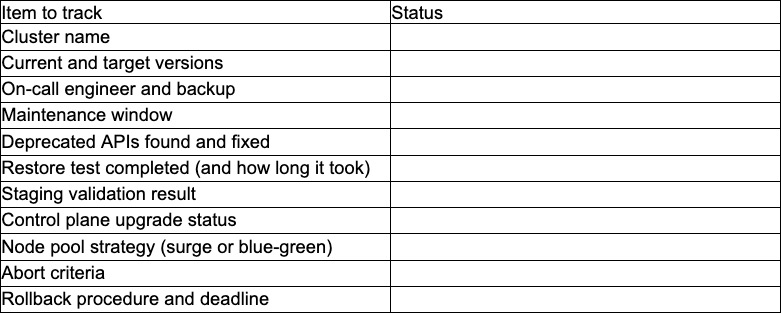
Upgrade documentation should be short enough to read with your heart rate at 140. If it reads like a novel, nobody will open it during the incident. Here is a one-page template you are welcome to steal.
The best upgrade is the one nobody remembers
Upgrading Kubernetes does not have to be traumatic. Move one minor version at a time, take your dependencies more seriously than Kubernetes itself, rehearse on staging, and treat any backup you have not restored with the suspicion it deserves.
Do that a few times and something strange happens. The notary’s email arrives, someone opens a ticket, the runbook gets filled in, and a week later nobody can quite remember when the upgrade happened. In operations, that kind of amnesia is the highest compliment there is.