CloudEngineering

GCP services DevOps engineers rely on

I have spent the better part of three years wrestling with Google Cloud Platform, and I am still not entirely convinced it wasn’t designed by a group of very clever people who occasionally enjoy a quiet laugh at the rest of us. The thing about GCP, you see, is that it works beautifully right up until the moment it doesn’t. Then it fails with such spectacular and Byzantine complexity that you find yourself questioning not just your career choices but the fundamental nature of causality itself.

My first encounter with Cloud Build was typical of this experience. I had been tasked with setting up a CI/CD pipeline for a microservices architecture, which is the modern equivalent of being told to build a Swiss watch while someone steadily drops marbles on your head. Jenkins had been our previous solution, a venerable old thing that huffed and puffed like a steam locomotive and required more maintenance than a Victorian greenhouse. Cloud Build promised to handle everything serverlessly, which is a word that sounds like it ought to mean something, but in practice simply indicates you won’t know where your code is running and you certainly won’t be able to SSH into it when things go wrong.

The miracle, when it arrived, was decidedly understated. I pushed some poorly written Go code to a repository and watched as Cloud Build sprang into life like a sleeper agent receiving instructions. It ran my tests, built a container, scanned it for vulnerabilities, and pushed it to storage. The whole process took four minutes and cost less than a cup of tea. I sat there in my home office, the triumph slowly dawning, feeling rather like a man who has accidentally trained his cat to make coffee. I had done almost nothing, yet everything had happened. This is the essential GCP magic, and it is deeply unnerving.

The vulnerability scanner is particularly wonderful in that quietly horrifying way. It examines your containers and produces a list of everything that could possibly go wrong, like a pilot’s pre-flight checklist written by a paranoid witchfinder general. On one memorable occasion, it flagged a critical vulnerability in a library I wasn’t even aware we were using. It turned out to be nested seven dependencies deep, like a Russian doll of potential misery. Fixing it required updating something else, which broke something else, which eventually led me to discover that our entire authentication layer was held together by a library last maintained in 2018 by someone who had subsequently moved to a commune in Oregon. The scanner was right, of course. It always is. It is the most anxious and accurate employee you will ever meet.

Google Kubernetes Engine or how I learned to stop worrying and love the cluster

If Cloud Build is the efficient butler, GKE is the robot overlord you find yourself oddly grateful to. My initial experience with Kubernetes was self-managed, which taught me many things, primarily that I do not have the temperament to manage Kubernetes. I spent weeks tuning etcd, debugging network overlays, and developing what I can only describe as a personal relationship with a persistent volume that refused to mount. It was less a technical exercise and more a form of digitally enhanced psychotherapy.

GKE’s Autopilot mode sidesteps all this by simply making the nodes disappear. You do not manage nodes. You do not upgrade nodes. You do not even, strictly speaking, know where the nodes are. They exist in the same conceptual space as socks that vanish from laundry cycles. You request resources, and they materialise, like summoning a very specific and obliging genie. The first time I enabled Autopilot, I felt I was cheating somehow, as if I had been given the answers to an exam I had not revised for.

The real genius is Workload Identity, a feature that allows pods to access Google services without storing secrets. Before this, secret management was a dark art involving base64 encoding and whispered incantations. We kept our API keys in Kubernetes secrets, which is rather like keeping your house keys under the doormat and hoping burglars are too polite to look there. Workload Identity removes all this by using magic, or possibly certificates, which are essentially the same thing in cloud computing. I demonstrated it to our security team, and their reaction was instructive. They smiled, which security people never do, and then they asked me to prove it was actually secure, which took another three days and several diagrams involving stick figures.

Istio integration completes the picture, though calling it integration suggests a gentle handshake when it is more like being embraced by a very enthusiastic octopus. It gives you observability, security, and traffic management at the cost of considerable complexity and a mild feeling that you have lost control of your own architecture. Our first Istio deployment doubled our pod count and introduced latency that made our application feel like it was wading through treacle. Tuning it took weeks and required someone with a master’s degree in distributed systems and the patience of a saint. When it finally worked, it was magnificent. Requests flowed like water, security policies enforced themselves with silent efficiency, and I felt like a man who had tamed a tiger through sheer persistence and a lot of treats.

Cloud Deploy and the gentle art of not breaking everything

Progressive delivery sounds like something a management consultant would propose during a particularly expensive lunch, but Cloud Deploy makes it almost sensible. The service orchestrates rollouts across environments with strategies like canary and blue-green, which are named after birds and colours because naming things is hard, and DevOps engineers have a certain whimsical desperation about them.

My first successful canary deployment felt like performing surgery on a patient who was also the anaesthetist. We routed 5 percent of traffic to the new version and watched our metrics like nervous parents at a school play. When errors spiked, I expected a frantic rollback procedure involving SSH and tarballs. Instead, I clicked a button, and everything reverted in thirty seconds. The old version simply reappeared, fully formed, like a magic trick performed by someone who actually understands magic. I walked around the office for the rest of the day with what my colleagues described as a smug grin, though I prefer to think of it as the justified expression of someone who has witnessed a minor miracle.

The integration with Cloud Build creates a pipeline so smooth it is almost suspicious. Code commits trigger builds, builds trigger deployments, deployments trigger monitoring alerts, and alerts trigger automated rollbacks. It is a closed loop, a perpetual motion machine of software delivery. I once watched this entire chain execute while I was making a sandwich. By the time I had finished my ham and pickle on rye, a critical bug had been introduced, detected, and removed from production without any human intervention. I was simultaneously impressed and vaguely concerned about my own obsolescence.

Artifact Registry where containers go to mature

Storing artifacts used to involve a self-hosted Nexus repository that required weekly sacrifices of disk space and RAM. Artifact Registry is Google’s answer to this, a fully managed service that stores Docker images, Helm charts, and language packages with the solemnity of a wine cellar for code.

The vulnerability scanning here is particularly thorough, examining every layer of your container with the obsessive attention of someone who alphabetises their spice rack. It once flagged a high-severity issue in a base image we had been using for six months. The vulnerability allowed arbitrary code execution, which is the digital equivalent of leaving your front door open with a sign saying “Free laptops inside.” We had to rebuild and redeploy forty services in two days. The scanner, naturally, had known about this all along but had been politely waiting for us to notice.

Geo-replication is another feature that seems obvious until you need it. Our New Zealand team was pulling images from a European registry, which meant every deployment involved sending gigabytes of data halfway around the world. This worked about as well as shouting instructions across a rugby field during a storm. Moving to a regional registry in New Zealand cut our deployment times by half and our egress fees by a third. It also taught me that cloud networking operates on principles that are part physics, part economics, and part black magic.

Cloud Operations Suite or how I learned to love the machine that watches me

Observability in GCP is orchestrated by the Cloud Operations Suite, formerly known as Stackdriver. The rebranding was presumably because Stackdriver sounded too much like a dating app for developers, which is a missed opportunity if you ask me.

The suite unifies logs, metrics, traces, and dashboards into a single interface that is both comprehensive and bewildering. The first time I opened Cloud Monitoring, I was presented with more graphs than a hedge fund’s annual report. CPU, memory, network throughput, disk IOPS, custom metrics, uptime checks, and SLO burn rates. It was beautiful and terrifying, like watching the inner workings of a living organism that you have created but do not fully understand.

Setting up SLOs felt like writing a promise to my future self. “I, a DevOps engineer of sound mind, do hereby commit to maintaining 99.9 percent availability.” The system then watches your service like a particularly judgmental deity and alerts you the moment you transgress. I once received a burn rate alert at 2 AM because a pod had been slightly slow for ten minutes. I lay in bed, staring at my phone, wondering whether to fix it or simply accept that perfection was unattainable and go back to sleep. I fixed it, of course. We always do.

The integration with BigQuery for long-term analysis is where things get properly clever. We export all our logs and run SQL queries to find patterns. This is essentially data archaeology, sifting through digital sediment to understand why something broke three weeks ago. I discovered that our highest error rates always occurred on Tuesdays between 2 and 3 PM. Why? A scheduled job that had been deprecated but never removed, running on a server everyone had forgotten about. Finding it felt like discovering a Roman coin in your garden, exciting but also slightly embarrassing that you hadn’t noticed it before.

Cloud Monitoring and Logging the digital equivalent of a nervous system

Cloud Logging centralises petabytes of data from services that generate logs with the enthusiasm of a teenager documenting their lunch. Querying this data feels like using a search engine that actually works, which is disconcerting when you’re used to grep and prayer.

I once spent an afternoon tracking down a memory leak using Cloud Profiler, a service that shows you exactly where your code is being wasteful with RAM. It highlighted a function that was allocating memory like a government department allocates paper clips, with cheerful abandon and no regard for consequences. The function turned out to be logging entire database responses for debugging purposes, in production, for six months. We had archived more debug data than actual business data. The developer responsible, when confronted, simply shrugged and said it had seemed like a good idea at the time. This is the eternal DevOps tragedy. Everything seems like a good idea at the time.

Uptime checks are another small miracle. We have probes hitting our endpoints from locations around the world, like a global network of extremely polite bouncers constantly asking, “Are you open?” When Mumbai couldn’t reach our service but London could, it led us to discover a regional DNS issue that would have taken days to diagnose otherwise. The probes had saved us, and they had done so without complaining once, which is more than can be said for the on-call engineer who had to explain it to management at 6 AM.

Cloud Functions and Cloud Run, where code goes to hide

Serverless computing in GCP comes in two flavours. Cloud Functions are for small, event-driven scripts, like having a very eager intern who only works when you clap. Cloud Run is for containerised applications that scale to zero, which is an economical way of saying they disappear when nobody needs them and materialise when they do, like an introverted ghost.

I use Cloud Functions for automation tasks that would otherwise require cron jobs on a VM that someone has to maintain. One function resizes GKE clusters based on Cloud Monitoring alerts. When CPU utilisation exceeds 80 percent for five minutes, the function spins up additional nodes. When it drops below 20 percent, it scales down. This is brilliant until you realise you’ve created a feedback loop and the cluster is now oscillating between one node and one hundred nodes every ten minutes. Tuning the thresholds took longer than writing the function, which is the serverless way.

Cloud Run hosts our internal tools, the dashboards, and debug interfaces that developers need but nobody wants to provision infrastructure for. Deploying is gloriously simple. You push a container, it runs. The cold start time is sub-second, which means Google has solved a problem that Lambda users have been complaining about for years, presumably by bargaining with physics itself. I once deployed a debugging tool during an incident response. It was live before the engineer who requested it had finished describing what they needed. Their expression was that of someone who had asked for a coffee and been given a flying saucer.

Terraform and Cloud Deployment Manager arguing with machines about infrastructure

Infrastructure as Code is the principle that you should be able to rebuild your entire environment from a text file, which is lovely in theory and slightly terrifying in practice. Terraform, using the GCP provider, is the de facto standard. It is also a source of endless frustration and occasional joy.

The state file is the heart of the problem. It is a JSON representation of your infrastructure that Terraform keeps in Cloud Storage, and it is the single source of truth until someone deletes it by accident, at which point the truth becomes rather more philosophical. We lock the state during applies, which prevents conflicts but also means that if an apply hangs, everyone is blocked. I have spent afternoons staring at a terminal, watching Terraform ponder the nature of a load balancer, like a stoned philosophy student contemplating a spoon.

Deployment Manager is Google’s native IaC tool, which uses YAML and is therefore slightly less powerful but considerably easier to read. I use it for simple projects where Terraform would be like using a sledgehammer to crack a nut, if the sledgehammer required you to understand graph theory. The two tools coexist uneasily, like cats who tolerate each other for the sake of the humans.

Drift detection is where things get properly philosophical. Terraform tells you when reality has diverged from your code, which happens more often than you’d think. Someone clicks something in the console, a service account is modified, a firewall rule is added for “just a quick test.” The plan output shows these changes like a disappointed teacher marking homework in red pen. You can either apply the correction or accept that your infrastructure has developed a life of its own and is now making decisions independently. Sometimes I let the drift stand, just to see what happens. This is how accidents become features.

IAM and Cloud Asset Inventory, the endless game of who can do what

Identity and Access Management in GCP is both comprehensive and maddening. Every API call is authenticated and authorised, which is excellent for security but means you spend half your life granting permissions to service accounts. A service account, for the uninitiated, is a machine pretending to be a person so it can ask Google for things. They are like employees who never take a holiday but also never buy you a birthday card.

Workload Identity Federation allows these synthetic employees to impersonate each other across clouds, which is identity management crossed with method acting. We use it to let our AWS workloads access GCP resources, a process that feels rather like introducing two friends who are suspicious of each other and speak different languages. When it works, it is seamless. When it fails, the error messages are so cryptic they may as well be in Linear B.

Cloud Asset Inventory catalogs every resource in your organisation, which is invaluable for audits and deeply unsettling when you realise just how many things you’ve created and forgotten about. I once ran a report and discovered seventeen unused load balancers, three buckets full of logs from a project that ended in 2023, and a Cloud SQL instance that had been running for six months with no connections. The bill was modest, but the sense of waste was profound. I felt like a hoarder being confronted with their own clutter.

For European enterprises, the GDPR compliance features are critical. We export audit logs to BigQuery and run queries to prove data residency. The auditors, when they arrived, were suspicious of everything, which is their job. They asked for proof that data never left the europe-west3 region. I showed them VPC Service Controls, which are like digital border guards that shoot packets trying to cross geographical boundaries. They seemed satisfied, though one of them asked me to explain Kubernetes, and I saw his eyes glaze over in the first thirty seconds. Some concepts are simply too abstract for mortal minds.

Eventarc and Cloud Scheduler the nervous system of the cloud

Eventarc routes events from over 100 sources to your serverless functions, creating event-driven architectures that are both elegant and impossible to debug. An event is a notification that something happened, somewhere, and now something else should happen somewhere else. It is causality at a distance, action at a remove.

I have an Eventarc trigger that fires when a vulnerability is found, sending a message to Pub/Sub, which fans out to multiple subscribers. One subscriber posts to Slack, another creates a ticket, and a third quarantines the image. It is a beautiful, asynchronous ballet that I cannot fully trace. When it fails, it fails silently, like a mime having a heart attack. The dead-letter queue catches the casualties, which I check weekly like a coroner reviewing unexplained deaths.

Cloud Scheduler handles cron jobs, which are the digital equivalent of remembering to take the bins out. We have schedules that scale down non-production environments at night, saving money and carbon. I once set the timezone incorrectly and scaled down the production cluster at midday. The outage lasted three minutes, but the shame lasted considerably longer. The team now calls me “the scheduler whisperer,” which is not the compliment it sounds like.

The real power comes from chaining these services. A Monitoring alert triggers Eventarc, which invokes a Cloud Function, which checks something via Scheduler, which then triggers another function to remediate. It is a Rube Goldberg machine built of code, more complex than it needs to be, but weirdly satisfying when it works. I have built systems that heal themselves, which is either the pinnacle of DevOps achievement or the first step towards Skynet. I prefer to think it is the former.

The map we all pretend to understand

Every DevOps journey, no matter how anecdotal, eventually requires what consultants call a “high-level architecture overview” and what I call a desperate attempt to comprehend the incomprehensible. During my second year on GCP, I created exactly such a diagram to explain to our CFO why we were spending $47,000 a month on something called “Cross-Regional Egress.” The CFO remained unmoved, but the diagram became my Rosetta Stone for navigating the platform’s ten core services.

I’ve reproduced it here partly because I spent three entire afternoons aligning boxes in Lucidchart, and partly because even the most narrative-driven among us occasionally needs to see the forest’s edge while wandering through the trees. Consider it the technical appendix you can safely ignore, unless you’re the poor soul actually implementing any of this.
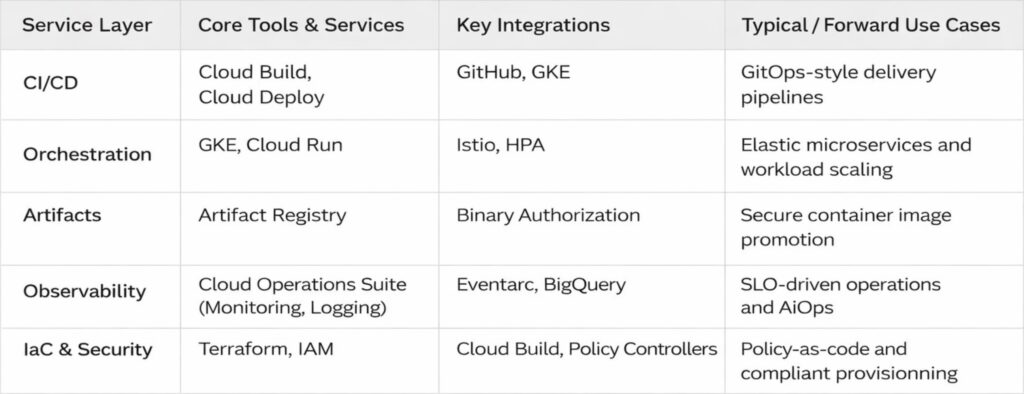
There it is, in all its tabular glory. Five rows that represent roughly fifteen thousand hours of human effort, and at least three separate incidents involving accidentally deleted production namespaces. The arrows are neat and tidy, which is more than can be said for any actual implementation.

I keep a laminated copy taped to my monitor, not because I consult it; I have the contents memorised, along with the scars that accompany each service, but because it serves as a reminder that even the most chaotic systems can be reduced to something that looks orderly on PowerPoint. The real magic lives in the gaps between those tidy boxes, where service accounts mysteriously expire, where network policies behave like quantum particles, and where the monthly bill arrives with numbers that seem generated by a random number generator with a grudge.

A modest proposal for surviving GCP

That table represents the map. What follows is the territory, with all its muddy bootprints and unexpected cliffs.

After three years, I have learned that the best DevOps engineers are not the ones with the most certificates. They are the ones who have learned to read the runes, who know which logs matter and which can be ignored, who have developed an intuitive sense for when a deployment is about to fail and can smell a misconfigured IAM binding at fifty paces. They are part sysadmin, part detective, part wizard.

The platform makes many things possible, but it does not make them easy. It is infrastructure for grown-ups, which is to say it trusts you to make expensive mistakes and learn from them. My advice is to start small, automate everything, and keep a sense of humour. You will need it the first time you accidentally delete a production bucket and discover that the undo button is marked “open a support ticket and wait.”

Store your manifests in Git and let Cloud Deploy handle the applying. Define SLOs and let the machines judge you. Tag resources for cost allocation and prepare to be horrified by the results. Replicate artifacts across regions because the internet is not as reliable as we pretend. And above all, remember that the cloud is not magic. It is simply other people’s computers running other people’s code, orchestrated by APIs that are occasionally documented and frequently misunderstood.

We build on these foundations because they let us move faster, scale further, and sleep slightly better at night, knowing that somewhere in a data centre in Belgium, a robot is watching our servers and will wake us only if things get truly interesting.

That is the theory, anyway. In practice, I still keep my phone on loud, just in case.
Your Terraform S3 backend is confused not broken

You’ve done everything right. You wrote your Terraform config with the care of someone assembling IKEA furniture while mildly sleep-deprived. You double-checked your indentation (because yes, it matters). You even remembered to enable encryption, something your future self will thank you for while sipping margaritas on a beach far from production outages.

And then, just as you run terraform init, Terraform stares back at you like a cat that’s just been asked to fetch the newspaper.

Error: Failed to load state: NoSuchBucket: The specified bucket does not exist

But… you know the bucket exists. You saw it in the AWS console five minutes ago. You named it something sensible like company-terraform-states-prod. Or maybe you didn’t. Maybe you named it tf-bucket-please-dont-delete in a moment of vulnerability. Either way, it’s there.

So why is Terraform acting like you asked it to store your state in Narnia?

The truth is, Terraform’s S3 backend isn’t broken. It’s just spectacularly bad at telling you what’s wrong. It doesn’t throw tantrums, it just fails silently, or with error messages so vague they could double as fortune cookie advice.

Let’s decode its passive-aggressive signals together.

The backend block that pretends to listen

At the heart of remote state management lies the backend “s3” block. It looks innocent enough:

terraform {
  backend "s3" {
    bucket         = "my-team-terraform-state"
    key            = "networking/main.tfstate"
    region         = "us-west-2"
    dynamodb_table = "tf-lock-table"
    encrypt        = true
  }
}

Simple, right? But this block is like a toddler with a walkie-talkie: it only hears what it wants to hear. If one tiny detail is off, region, permissions, bucket name, it won’t say “Hey, your bucket is in Ohio but you told me it’s in Oregon.” It’ll just shrug and fail.

And because Terraform backends are loaded before variable interpolation, you can’t use variables inside this block. Yes, really. You’re stuck with hardcoded strings. It’s like being forced to write your grocery list in permanent marker.

The four ways Terraform quietly sabotages you

Over the years, I’ve learned that S3 backend errors almost always fall into one of four buckets (pun very much intended).

1. The credentials that vanished into thin air

Terraform needs AWS credentials. Not “kind of.” Not “maybe.” It needs them like a coffee machine needs beans. But it won’t tell you they’re missing, it’ll just say the bucket doesn’t exist, even if you’re looking at it in the console.

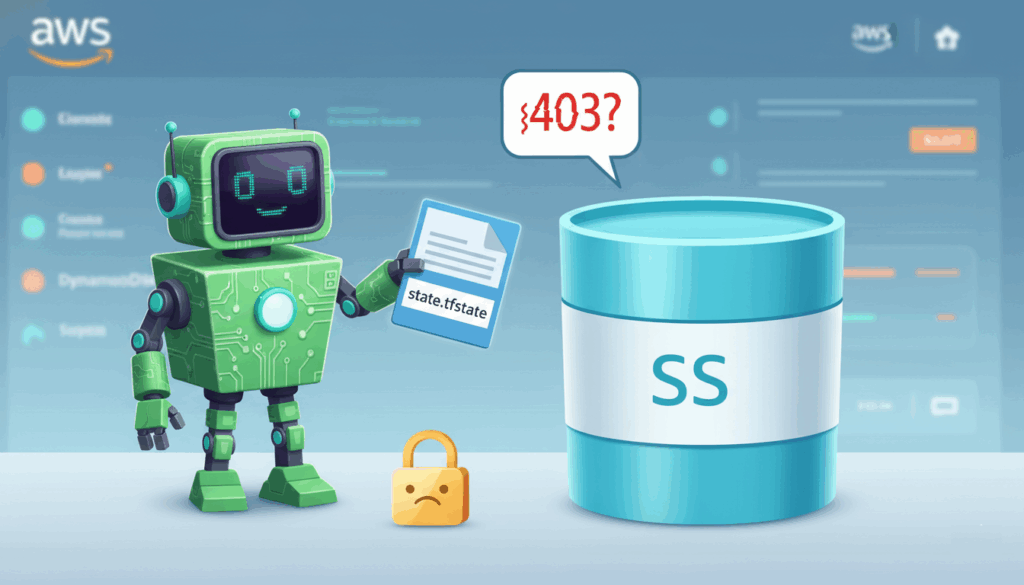
Why? Because without valid credentials, AWS returns a 403 Forbidden, and Terraform interprets that as “bucket not found” to avoid leaking information. Helpful for security. Infuriating for debugging.

Fix it: Make sure your credentials are loaded via environment variables, AWS CLI profile, or IAM roles if you’re on an EC2 instance. And no, copying your colleague’s .aws/credentials file while they’re on vacation doesn’t count as “secure.”

2. The region that lied to everyone

You created your bucket in eu-central-1. Your backend says us-east-1. Terraform tries to talk to the bucket in Virginia. The bucket, being in Frankfurt, doesn’t answer.

Result? Another “bucket not found” error. Because of course.

S3 buckets are region-locked, but the error message won’t mention regions. It assumes you already know. (Spoiler: you don’t.)

Fix it: Run this to check your bucket’s real region:

aws s3api get-bucket-location --bucket my-team-terraform-state

Then update your backend block accordingly. And maybe add a sticky note to your monitor: “Regions matter. Always.”

3. The lock table that forgot to show up

State locking with DynamoDB is one of Terraform’s best features; it stops two engineers from simultaneously destroying the same VPC like overeager toddlers with a piñata.

But if you declare a dynamodb_table in your backend and that table doesn’t exist? Terraform won’t create it for you. It’ll just fail with a cryptic message about “unable to acquire state lock.”

Fix it: Create the table manually (or with separate Terraform code). It only needs one attribute: LockID (string). And make sure your IAM user has dynamodb:GetItem, PutItem, and DeleteItem permissions on it.

Think of DynamoDB as the bouncer at a club: if it’s not there, anyone can stumble in and start redecorating.

4. The missing safety nets

Versioning and encryption aren’t strictly required, but skipping them is like driving without seatbelts because “nothing bad has happened yet.”

Without versioning, a bad terraform apply can overwrite your state forever. No undo. No recovery. Just you, your terminal, and the slow realization that you’ve deleted production.

Enable versioning:

aws s3api put-bucket-versioning \
  --bucket my-team-terraform-state \
  --versioning-configuration Status=Enabled

And always set encrypt = true. Your state file contains secrets, IDs, and the blueprint of your infrastructure. Treat it like your diary, not your shopping list.

Debugging without losing your mind

When things go sideways, don’t guess. Ask Terraform nicely for more details:

TF_LOG=DEBUG terraform init

Yes, it spits out a firehose of logs. But buried in there is the actual AWS API call, and the real error code. Look for lines containing AWS request or ErrorResponse. That’s where the truth hides.

Also, never run terraform init once and assume it’s locked in. If you change your backend config, you must run:

terraform init -reconfigure

Otherwise, Terraform will keep using the old settings cached in .terraform/. It’s stubborn like that.

A few quiet rules for peaceful coexistence

After enough late-night debugging sessions, I’ve adopted a few personal commandments:

  • One project, one bucket. Don’t mix dev and prod states in the same bucket. It’s like keeping your tax documents and grocery receipts in the same shoebox, technically possible, spiritually exhausting.
  • Name your state files clearly. Use paths like prod/web.tfstate instead of final-final-v3.tfstate.
  • Never commit backend configs with real bucket names to public repos. (Yes, people still do this. No, it’s not cute.)
  • Test your backend setup in a sandbox first. A $0.02 bucket and a tiny DynamoDB table can save you a $10,000 mistake.

It’s not you, it’s the docs

Terraform’s S3 backend works beautifully, once everything aligns. The problem isn’t the tool. It’s that the error messages assume you’re psychic, and the documentation reads like it was written by someone who’s never made a mistake in their life.

But now you know its tells. The fake “bucket not found.” The silent region betrayal. The locking table that ghosts you.

Next time it acts up, don’t panic. Pour a coffee, check your region, verify your credentials, and whisper gently: “I know you’re trying your best.”

Because honestly? It is.

The mutability mirage in Cloud

We’ve all been there. A DevOps engineer squints at a script, muttering, “But I changed it, it has to be mutable.” Meanwhile, the cloud infrastructure blinks back, unimpressed, as if to say, “Sure, you swapped the sign. That doesn’t make the building mutable.”

This isn’t just a coding quirk. It’s a full-blown identity crisis in the world of cloud architecture and DevOps, where confusing reassignment with mutability can lead to anything from baffling bugs to midnight firefighting sessions. Let’s dissect why your variables are lying to you, and why it matters more than you think.

The myth of the mutable variable

Picture this: You’re editing a configuration file for a cloud service. You tweak a value, redeploy, and poof, it works. Naturally, you assume the system is mutable. But what if it isn’t? What if the platform quietly discarded your old configuration and spun up a new one, like a magician swapping a rabbit for a hat?

This is the heart of the confusion. In programming, mutability isn’t about whether something changes; it’s about how it changes. A mutable object alters its state in place, like a chameleon shifting colors. An immutable one? It’s a one-hit wonder: once created, it’s set in stone. Any “change” is just a new object in disguise.

What mutability really means

Let’s cut through the jargon. A mutable object, say, a Python list, lets you tweak its contents without breaking a sweat. Add an item, remove another, and it’s still the same list. Check its memory address with id(), and it stays consistent.

Now take a string. Try to “modify” it:

greeting = "Hello"  
greeting += " world"

Looks like a mutation, right? Wrong. The original greeting is gone, replaced by a new string. The memory address? Different. The variable name greeting is just a placeholder, now pointing to a new object, like a GPS rerouting you to a different street.

This isn’t pedantry. It’s the difference between adjusting the engine of a moving car and replacing the entire car because you wanted a different color.

The great swap

Why does this illusion persist? Because programming languages love to hide the smoke and mirrors. In functional programming, for instance, operations like map() or filter() return new collections, never altering the original. Yet the syntax, data = transform(data), feels like mutation.

Even cloud infrastructure plays this game. Consider immutable server deployments: you don’t “update” an AWS EC2 instance. You bake a new AMI and replace the old one. The outcome is change, but the mechanism is substitution. Confusing the two leads to chaos, like assuming you can repaint a house without leaving the living room.

The illusion of change

Here’s where things get sneaky. When you write:

counter = 5  
counter += 1  

You’re not mutating the number 5. You’re discarding it for a shiny new 6. The variable counter is merely a label, not the object itself. It’s like renaming a book after you’ve already read it, The Great Gatsby didn’t change; you just called it The Even Greater Gatsby and handed it to someone else.

This trickery is baked into language design. Python’s tuples are immutable, but you can reassign the variable holding them. Java’s String class is famously unyielding, yet developers swear they “changed” it daily. The culprit? Syntax that masks object creation as modification.

Why cloud and DevOps care

In cloud architecture, this distinction is a big deal. Mutable infrastructure, like manually updating a server, invites inconsistency and “works on my machine” disasters. Immutable infrastructure, by contrast, treats servers as disposable artifacts. Changes mean new deployments, not tweaks.

This isn’t just trendy. It’s survival. Imagine two teams modifying a shared configuration. If the object is mutable, chaos ensues, race conditions, broken dependencies, the works. If it’s immutable, each change spawns a new, predictable version. No guessing. No debugging at 3 a.m.

Performance matters too. Creating new objects has overhead, yes, but in distributed systems, the trade-off for reliability is often worth it. As the old adage goes: “You can optimize for speed or sanity. Pick one.”

How not to fall for the trick

So how do you avoid this trap?

  1. Check the documentation. Is the type labeled mutable? If it’s a string, tuple, or frozenset, assume it’s playing hard to get.
  2. Test identity. In Python, use id(). In Java, compare references. If the address changes, you’ve been duped.
  3. Prefer immutability for shared data. Your future self will thank you when the system doesn’t collapse under concurrent edits.

And if all else fails, ask: “Did I alter the object, or did I just point to a new one?” If the answer isn’t obvious, grab a coffee. You’ll need it.

The cloud doesn’t change, it blinks

Let’s be brutally honest: in the cloud, assuming something is mutable because it changes is like assuming your toaster is self-repairing because the bread pops up different shades of brown. You tweak a Kubernetes config, redeploy, and poof, it’s “updated.” But did you mutate the cluster or merely summon a new one from the void? In the world of DevOps, this confusion isn’t just a coding quirk; it’s the difference between a smooth midnight rollout and a 3 a.m. incident war room where your coffee tastes like regret.

Cloud infrastructure doesn’t change; it reincarnates. When you “modify” an AWS Lambda function, you’re not editing a living organism. You’re cremating the old version and baptizing a new one in S3. The same goes for Terraform state files or Docker images: what looks like a tweak is a full-scale resurrection. Mutable configurations? They’re the digital equivalent of duct-taping a rocket mid-flight. Immutable ones? They’re the reason your team isn’t debugging why the production database now speaks in hieroglyphics.

And let’s talk about the real villain: configuration drift. It’s the gremlin that creeps into mutable systems when no one’s looking. One engineer tweaks a server, another “fixes” a firewall rule, and suddenly your cloud environment has the personality of a broken vending machine. Immutable infrastructure laughs at this. It’s the no-nonsense librarian who will replace the entire catalog if you so much as sneeze near the Dewey Decimal System.

So the next time a colleague insists, “But I changed it!” with the fervor of a street magician, lean in and whisper: “Ah, yes. Just like how I ‘changed’ my car by replacing it with a new one. Did you mutate the object, or did you just sacrifice it to the cloud gods?” Then watch their face, the same bewildered blink as your AWS console when you accidentally set min_instances = 0 on a critical service.

The cloud doesn’t get frustrated. It doesn’t sigh. It blinks. Once. Slowly. And in that silent judgment, you’ll finally grasp the truth: change is inevitable. Mutability is a choice. Choose wisely, or spend eternity debugging the ghost of a server that thought it was mutable.

(And for the love of all things scalable: stop naming your variables temp.)

Fast database recovery using Aurora Backtracking

Let’s say you’re a barista crafting a perfect latte. The espresso pours smoothly, the milk steams just right, then a clumsy elbow knocks over the shot, ruining hours of prep. In databases, a single misplaced command or faulty deployment can unravel days of work just as quickly. Traditional recovery tools like Point-in-Time Recovery (PITR) in Amazon Aurora are dependable, but they’re the equivalent of tossing the ruined latte and starting fresh. What if you could simply rewind the spill itself?

Let’s introduce Aurora Backtracking, a feature that acts like a “rewind” button for your database. Instead of waiting hours for a full restore, you can reverse unwanted changes in minutes. This article tries to unpack how Backtracking works and how to use it wisely.

What is Aurora Backtracking? A time machine for your database

Think of Aurora Backtracking as a DVR for your database. Just as you’d rewind a TV show to rewatch a scene, Backtracking lets you roll back your database to a specific moment in the past. Here’s the magic:

  • Backtrack Window: This is your “recording buffer.” You decide how far back you want to keep a log of changes, say, 72 hours. The larger the window, the more storage you’ll use (and pay for).
  • In-Place Reversal: Unlike PITR, which creates a new database instance from a backup, Backtracking rewrites history in your existing database. It’s like editing a document’s revision history instead of saving a new file.

Limitations to Remember :

  • It can’t recover from instance failures (use PITR for that).
  • It won’t rescue data obliterated by a DROP TABLE command (sorry, that’s a hard delete).
  • It’s only for Aurora MySQL-Compatible Edition, not PostgreSQL.

When backtracking shines

  1. Oops, I Broke Production
    Scenario: A developer runs an UPDATE query without a WHERE clause, turning all user emails to “oops@example.com .”
    Solution: Backtrack 10 minutes and undo the mistake—no downtime, no panic.
  2. Bad Deployment? Roll It Back
    Scenario: A new schema migration crashes your app.
    Solution: Rewind to before the deployment, fix the code, and try again. Faster than debugging in production.
  3. Testing at Light Speed
    Scenario: Your QA team needs to reset a database to its original state after load testing.
    Solution: Backtrack to the pre-test state in minutes, not hours.

How to use backtracking

Step 1: Enable Backtracking

  • Prerequisites: Use Aurora MySQL 5.7 or later.
  • Setup: When creating or modifying a cluster, specify your backtrack window (e.g., 24 hours). Longer windows cost more, so balance need vs. expense.

Step 2: Rewind Time

  • AWS Console: Navigate to your cluster, click “Backtrack,” choose a timestamp, and confirm.
  • CLI Example :
aws rds backtrack-db-cluster --db-cluster-identifier my-cluster --backtrack-to "2024-01-15T14:30:00Z"  

Step 3: Monitor Progress

  • Use CloudWatch metrics like BacktrackChangeRecordsApplying to track the rewind.

Best Practices:

  • Test Backtracking in staging first.
  • Pair it with database cloning for complex rollbacks.
  • Never rely on it as your only recovery tool.

Backtracking vs. PITR vs. Snapshots: Which to choose?

MethodSpeedBest ForLimitations
Backtracking🚀 FastestReverting recent human errorIn-place only, limited window
PITR🐢 SlowerDisaster recovery, instance failureCreates a new instance
Snapshots🐌 SlowestFull restores, complianceManual, time-consuming

Decision Tree :

  • Need to undo a mistake made today? Backtrack.
  • Recovering from a server crash? PITR.
  • Restoring a deleted database? Snapshot.

Rewind, Reboot, Repeat

Aurora Backtracking isn’t a replacement for backups, it’s a scalpel for precision recovery. By understanding its strengths (speed, simplicity) and limits (no magic for disasters), you can slash downtime and keep your team agile. Next time chaos strikes, sometimes the best way forward is to hit “rewind.”

Clarifying The Trio of AWS Config, CloudTrail, and CloudWatch

The “Management and Governance Services” area in AWS offers a suite of tools designed to assist system administrators, solution architects, and DevOps in efficiently managing their cloud resources, ensuring compliance with policies, and optimizing costs. These services facilitate the automation, monitoring, and control of the AWS environment, allowing businesses to maintain their cloud infrastructure secure, well-managed, and aligned with their business objectives.

Breakdown of the Services Area

  • Automation and Infrastructure Management: Services in this category enable users to automate configuration and management tasks, reducing human errors and enhancing operational efficiency.
  • Monitoring and Logging: They provide detailed tracking and logging capabilities for the activity and performance of AWS resources, enabling a swift response to incidents and better data-driven decision-making.
  • Compliance and Security: These services help ensure that AWS resources adhere to internal policies and industry standards, crucial for maintaining data integrity and security.

Importance in Solution Architecture

In AWS solution architecture, the “Management and Governance Services” area plays a vital role in creating efficient, secure, and compliant cloud environments. By providing tools for automation, monitoring, and security, AWS empowers companies to manage their cloud resources more effectively and align their IT operations with their overall strategic goals.

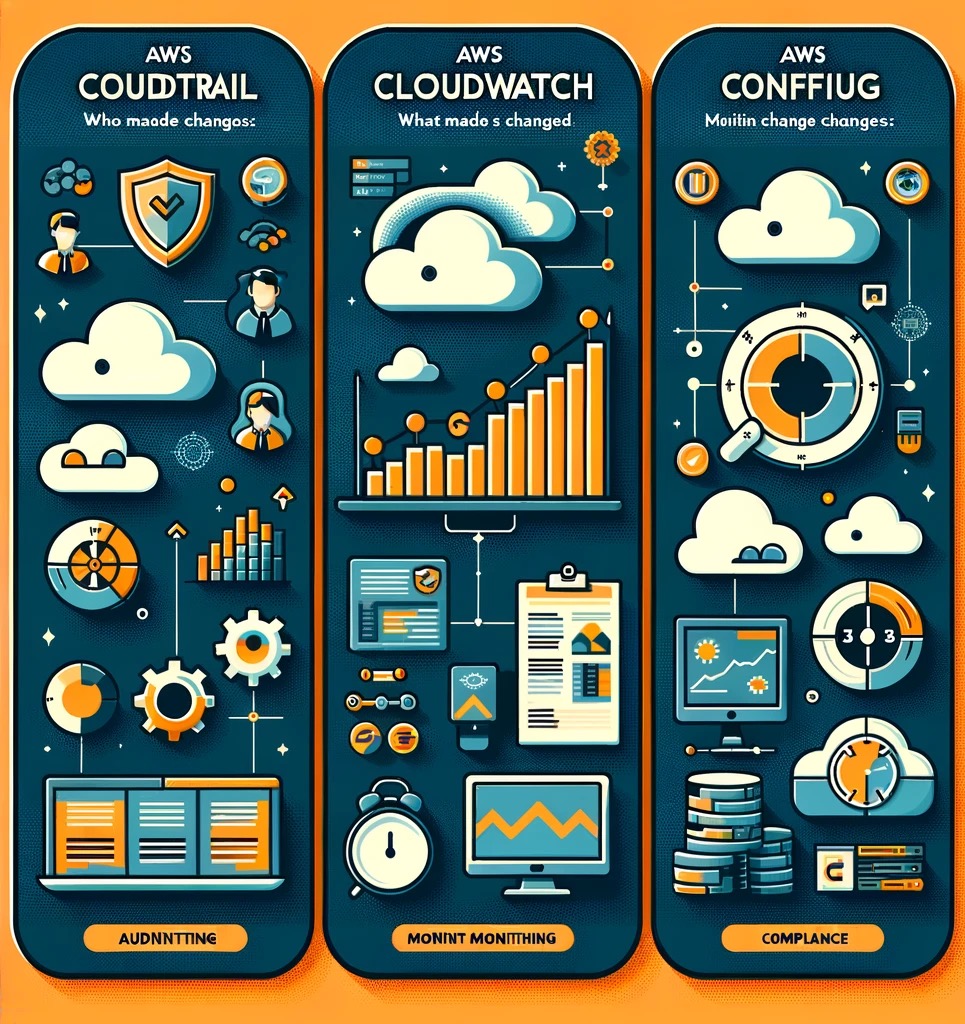
In the world of AWS, three services stand as pillars for ensuring that your cloud environment is not just operational but also optimized, secure, and compliant with the necessary standards and regulations. These services are AWS CloudTrail, AWS CloudWatch, and AWS Config. At first glance, their functionalities might seem to overlap, causing a bit of confusion among many folks navigating through AWS’s offerings. However, each service has its unique role and importance in the AWS ecosystem, catering to specific needs around auditing, monitoring, and compliance.

Picture yourself setting off on an adventure into wide, unknown spaces. Now picture AWS CloudTrail, CloudWatch, and Config as your go-to gadgets or pals, each boasting their own unique tricks to help you make sense of, get around, and keep a handle on this vast area. CloudTrail steps up as your trusty record keeper, logging every detail about who’s doing what, and when and where it’s happening in your AWS setup. Then there’s CloudWatch, your alert lookout, always on watch, gathering important info and sounding the alarm if anything looks off. And don’t forget AWS Config, kind of like your sage guide, making sure everything in your domain stays in line and up to code, keeping an eye on how things are set up and any tweaks made to your AWS tools.

Before we really get into the nitty-gritty of each service and how they stand out yet work together, it’s key to get what they’re all about. They’re here to make sure your AWS world is secure, runs like a dream, and ticks all the compliance boxes. This first look is all about clearing up any confusion around these services, shining a light on what makes each one special. Getting a handle on the specific roles of AWS CloudTrail, CloudWatch, and Config means we’ll be in a much better spot to use what they offer and really up our AWS game.

Unlocking the Power of CloudTrail

Initiating the exploration of AWS CloudTrail can appear to be a formidable endeavor. It’s crucial to acknowledge the inherent complexity of navigating AWS due to its extensive features and capabilities. Drawing upon thorough research and analysis of AWS, An overview has been carefully compiled to highlight the functionalities of CloudTrail, aiming to provide a foundational understanding of its role in governance, compliance, operational auditing, and risk auditing within your AWS account. We shall proceed to delineate its features and utilities in a series of key points, aimed at simplifying its understanding and effective implementation.

  • Principal Use:
    • AWS CloudTrail is your go-to service for governance, compliance, operational auditing, and risk auditing of your AWS account. It provides a detailed history of API calls made to your AWS account by users, services, and devices.
  • Key Features:
    • Activity Logging: Captures every API call to AWS services in your account, including who made the call, from what resource, and when.
    • Continuous Monitoring: Enables real-time monitoring of account activity, enhancing security and compliance measures.
    • Event History: Simplifies security analysis, resource change tracking, and troubleshooting by providing an accessible history of your AWS resource operations.
    • Integrations: Seamlessly integrates with other AWS services like Amazon CloudWatch and AWS Lambda for further analysis and automated reactions to events.
    • Security Insights: Offers insights into user and resource activity by recording API calls, making it easier to detect unusual activity and potential security risks.
    • Compliance Aids: Supports compliance reporting by providing a history of AWS interactions that can be reviewed and audited.

Remember, CloudTrail is not just about logging; it’s about making those logs work for us, enhancing security, ensuring compliance, and streamlining operations within our AWS environment. Adopt it as a critical tool in our AWS toolkit to pave the way for a more secure and efficient cloud infrastructure.

Watching Over Our Cloud with AWS CloudWatch

Looking into what AWS CloudWatch can do is key to keeping our cloud environment running smoothly. Together, we’re going to uncover the main uses and standout features of CloudWatch. The goal? To give us a crystal-clear, thorough rundown. Here’s a neat breakdown in bullet points, making things easier to grasp:

  • Principal Use:
    • AWS CloudWatch serves as our vigilant observer, ensuring that our cloud infrastructure operates smoothly and efficiently. It’s our central tool for monitoring our applications and services running on AWS, providing real-time data and insights that help us make informed decisions.
  • Key Features:
    • Comprehensive Monitoring: CloudWatch collects monitoring and operational data in the form of logs, metrics, and events, giving us a unified view of AWS resources, applications, and services that run on AWS and on-premises servers.
    • Alarms and Alerts: We can set up alarms to notify us of any unusual activity or thresholds that have been crossed, allowing for proactive management and resolution of potential issues.
    • Dashboard Visualizations: Customizable dashboards provide us with real-time visibility into resource utilization, application performance, and operational health, helping us understand system-wide performance at a glance.
    • Log Management and Analysis: CloudWatch Logs enable us to centralize the logs from our systems, applications, and AWS services, offering a comprehensive view for easy retrieval, viewing, and analysis.
    • Event-Driven Automation: With CloudWatch Events (now part of Amazon EventBridge), we can respond to state changes in our AWS resources automatically, triggering workflows and notifications based on specific criteria.
    • Performance Optimization: By monitoring application performance and resource utilization, CloudWatch helps us optimize the performance of our applications, ensuring they run at peak efficiency.

With AWS CloudWatch, we cultivate a culture of vigilance and continuous improvement, ensuring our cloud environment remains resilient, secure, and aligned with our operational objectives. Let’s continue to leverage CloudWatch to its full potential, fostering a more secure and efficient cloud infrastructure for us all.

Crafting Compliance with AWS Config

Exploring the capabilities of AWS Config is crucial for ensuring our cloud infrastructure aligns with both security standards and compliance requirements. By delving into its core functionalities, we aim to foster a mutual understanding of how AWS Config can bolster our cloud environment. Here’s a detailed breakdown, presented through bullet points for ease of understanding:

  • Principal Use:
    • AWS Config is our tool for tracking and managing the configurations of our AWS resources. It acts as a detailed record-keeper, documenting the setup and changes across our cloud landscape, which is vital for maintaining security and compliance.
  • Key Features:
    • Configuration Recording: Automatically records configurations of AWS resources, enabling us to understand their current and historical states.
    • Compliance Evaluation: Assesses configurations against desired guidelines, helping us stay compliant with internal policies and external regulations.
    • Change Notifications: Alerts us whenever there is a change in the configuration of resources, ensuring we are always aware of our environment’s current state.
    • Continuous Monitoring: Keeps an eye on our resources to detect deviations from established baselines, allowing for prompt corrective actions.
    • Integration and Automation: Works seamlessly with other AWS services, enabling automated responses for addressing configuration and compliance issues.

By cultivating AWS Config, we equip ourselves with a comprehensive tool that not only improves our security posture but also streamlines compliance efforts. Why don’t commit to utilizing AWS Config to its fullest potential, ensuring our cloud setup meets all necessary standards and best practices.

Clarifying and Understanding AWS CloudTrail, CloudWatch, and Config

AWS CloudTrail is our audit trail, meticulously documenting every action within the cloud, who initiated it, and where it took place. It’s indispensable for security audits and compliance tracking, offering a detailed history of interactions within our AWS environment.

CloudWatch acts as the heartbeat monitor of our cloud operations, collecting metrics and logs to provide real-time visibility into system performance and operational health. It enables us to set alarms and react proactively to any issues that may arise, ensuring smooth and continuous operations.

Lastly, AWS Config is the compliance watchdog, continuously assessing and recording the configurations of our resources to ensure they meet our established compliance and governance standards. It helps us understand and manage changes in our environment, maintaining the integrity and compliance of our cloud resources.

Together, CloudTrail, CloudWatch, and Config form the backbone of effective cloud management in AWS, enabling us to maintain a secure, efficient, and compliant infrastructure. Understanding their roles and leveraging their capabilities is essential for any cloud strategy, simplifying the complexities of cloud governance and ensuring a robust cloud environment.

AWS ServicePrincipal FunctionDescription
AWS CloudTrailAuditingActs as a vigilant auditor, recording who made changes, what those changes were, and where they occurred within our AWS ecosystem.
Ensures transparency and aids in security and compliance investigations.
AWS CloudWatchMonitoringServes as our observant guardian, diligently collecting and tracking metrics and logs from our AWS resources.
It’s instrumental in monitoring our cloud’s operational health, offering alarms and notifications.
AWS ConfigComplianceIs our steadfast champion of compliance, continually assessing our resources for adherence to desired configurations.
It questions, “Is the resource still compliant after changes?” and maintains a detailed change log.

A Comparative Look at Cloud Engineers and DevOps Engineers

The roles of Cloud Engineers and DevOps Engineers have emerged as pivotal to the success of technology-driven businesses. While the titles might sound similar and are sometimes used interchangeably, each role carries distinct responsibilities, objectives, and skill sets. However, there’s also a significant overlap, creating a synergy that drives efficiency and innovation.

Understanding the Roles

Cloud Engineer: A Cloud Engineer’s primary focus is on the creation and management of cloud infrastructure. This role ensures that the applications developed by a company can seamlessly run on cloud platforms. Cloud Engineers are akin to architects and builders in the digital realm. They must be knowledgeable about various cloud services and understand how to configure them to meet the company’s business needs and requirements. For instance, if a company requires a global presence, a Cloud Engineer will configure the cloud services to ensure efficient and secure distribution across different geographic regions.

DevOps Engineer: The term “DevOps” blends development and operations, aiming to harmonize software development (Dev) with IT operations (Ops). The primary goal of a DevOps Engineer is to shorten the development lifecycle, fostering a culture and environment where building, testing, and releasing software can happen rapidly, frequently, and more reliably. They focus on automating and streamlining the software release process to ensure fast, efficient, and bug-free deployments.

Differences and Overlaps

While the core objectives differ, Cloud Engineers focus on infrastructure, and DevOps Engineers on the software release process, their paths intertwine in the realm of automation and efficiency. Both roles aim to simplify complexities, albeit in different layers of the IT ecosystem.

Overlap: Both roles share a common ground when it comes to automating tasks to enhance performance and reliability. For instance, both Cloud and DevOps Engineers might utilize Infrastructure as Code (IaC) to automate the setup and management of the infrastructure. This synergy is pivotal in environments where rapid deployment and management of infrastructure are crucial for the business’s success.

Distinctive Responsibilities: Despite the overlaps, each role has its distinct responsibilities. Cloud Engineers are more focused on the cloud infrastructure’s nuts and bolts (ensuring that the setup is secure, reliable, and optimally configured). On the other hand, DevOps Engineers are more aligned with the development side, ensuring that the software release pipeline is as efficient as possible.

Toolkits and Discussion Points: DevOps Engineers vs. Cloud Architects

Both, DevOps Engineers and Cloud Architects arm themselves with an array of tools and frameworks, each tailored to their unique responsibilities.

DevOps Engineer: The Automation Maestro

Tools and Frameworks:

  • IDEs and Code Editors: DevOps Engineers frequently use powerful IDEs like Visual Studio Code or JetBrains IntelliJ for scripting and automation. These IDEs support a multitude of languages and plugins, catering to the versatile nature of DevOps work.
  • Automation and CI/CD Tools: Jenkins, Travis CI, GitLab CI, and CircleCI are staples for automating the software build, test, and deployment processes, ensuring a smooth and continuous integration/continuous deployment (CI/CD) pipeline.
  • Infrastructure as Code (IaC) Tools: Tools like Terraform and AWS CloudFormation allow DevOps Engineers to manage infrastructure using code, making the process more efficient, consistent, and error-free.
  • Configuration Management Tools: Ansible, Puppet, and Chef help in automating the configuration of servers, ensuring that the systems are in a desired, predictable state.
  • Containerization and Orchestration Tools: Docker and Kubernetes dominate the container ecosystem, allowing for efficient creation, deployment, and scaling of applications across various environments.

Meeting Discussions: In team meetings, DevOps Engineers often discuss topics such as optimizing the CI/CD pipeline, ensuring high availability and scalability of services, automating repetitive tasks, and maintaining security throughout the software development lifecycle. The focus is on streamlining processes, enhancing the quality of releases, and minimizing downtime.

Cloud Architect: The Digital Strategist

Tools and Frameworks:

  • Cloud Service Providers’ Consoles and CLI Tools: AWS Management Console, Azure Portal, and Google Cloud Console, along with their respective CLI tools, are indispensable for managing and interacting with cloud resources.
  • Diagram and Design Tools: Tools like Lucidchart and Draw.io are frequently used for designing and visualizing the architecture of cloud solutions, helping in clear communication and planning.
  • Monitoring and Management Tools: Cloud Architects rely on tools like AWS CloudWatch, Google Operations (formerly Stackdriver), and Azure Monitor to keep a vigilant eye on the performance and health of cloud infrastructure.
  • Security and Compliance Tools: Ensuring that the architecture adheres to security standards and compliance requirements is crucial, making tools like AWS Config, Azure Security Center, and Google Security Command Center key components of a Cloud Architect’s toolkit.

Meeting Discussions: Cloud Architects’ meetings revolve around designing robust, scalable, and secure cloud solutions. Discussions often involve evaluating different architectural approaches, ensuring alignment with business goals, complying with security and regulatory standards, and planning for scalability and disaster recovery.

Harmonizing Tools and Talents

While the tools and discussion points highlight the distinctions between DevOps Engineers and Cloud Architects, it’s the harmonious interaction between these roles that empowers organizations to thrive in the digital era. DevOps Engineers’ focus on automation and process optimization complements Cloud Architects’ strategic approach to cloud infrastructure, together driving innovation, efficiency, and resilience.

The Big Picture

The roles of Cloud Engineers and DevOps Engineers are not isolated but rather parts of a larger ecosystem aimed at delivering value through technology. While a Cloud Engineer ensures that the infrastructure is robust and poised for scalability and security, a DevOps Engineer ensures that the software lifecycle—from coding to deployment—is streamlined and efficient.

In an ideal world, these roles should not be siloed but should work in tandem. A robust cloud infrastructure is of little use if the software deployment process is sluggish, and vice versa. Hence, understanding the nuances, differences, and overlaps of these roles is not just academic but pivotal for businesses aiming to leverage technology for growth and innovation.

As technology continues to evolve, the lines between different IT roles might blur, but the essence will remain the same—delivering value through efficient, secure, and innovative technological solutions. Whether you are a Cloud Engineer ensuring the reliability and security of the cloud infrastructure or a DevOps Engineer automating the pipeline for a smoother release process, your role is crucial in the grand tapestry of modern IT operations.